Weshoot.com

The Official We Shoot Blog

  • Home
  • About
  • To Comment

Archive for the ‘Tips’ Category

Can your blog get hacked . . . ?

Thursday, June 7th, 2012

The blog you are reading is a WordPress blog.  If you read the last post on our blog in the recent past, you would not have realized that it had been hacked, because it was invisible.  Don’t worry, it caused you no damage.  It only caused us damage.

First, some background:  I had installed an earlier version of WordPress back in 2010 on our photography website as it is good for SEO to have a blog inside the domain, and for informative purposes to our readers.  Then, a banner came up from WordPress that an updated version was available and that I should update.  Anyone with experience in computers knows that updating can go seriously awry and you could lose all your posts or information, and it is best to back them up.  Of course, this is time spent, and no one wants to do all this preventative work, but I grudgingly did that with the help of my hosting company, and did the upgrade to version 3.1.3 or something like that .  I clicked on “update” and held my breath, and it worked.

About 6 months after that, I got another notice that a newer version of WordPress was now available with more security (I forget which number).  I thought, “Oh, boy, here we go again,” and went through the motions again.  This time, it didn’t work.  The update notified me that the server our website was on did not have a high enough PHP protocol, and that the update could not take place.  So, I left it where it was at.  I called my host and they said that the server I was on did indeed not have a higher PHP and that I would have to move to another server, and there was a procedure to do that, and I would have to put it in writing that I wanted to move to another server.  I didn’t want to hassle it, reasoning that I would see if anyone hacked the blog, as it would obviously show up in the blog reading . . . or would it?  I have been getting warnings from my Google webmaster tools account that I needed to update my WordPress for security reasons.  I just shrugged it off.  It was too much work.

I went to my Google webmaster tools site last week, and updated the XML sitemap to our website, and while there, I thought I would check the optimization for keywords.  I was very upset when I found words of popular drugs for ED in my keywords, along with a pet supply store.  I didn’t put them there!

How could anyone put them there?  I have a reasonably strong password, and I don’t give it out.  So I went to check out where they were in the blog.  Lo and behold, when the blog posts were in edit mode in HTML, there they were, plain as day.  But they were invisible to anyone reading the blog on the web.  Someone or something had inserted HTML links interspersed with my text, some even intersecting words, but not showing up in the blog.  I called tech support at my hosting company.  The person I talked to could see the intrusion, and told me it was due to a low PHP protocol and low security in the earlier version of WordPress.  I asked him why anyone would do that, seeing as how there was nothing to click on or any change in the visible information in the blog.  His opinion was that the links were inserted for backlinks to other websites for their SEO.  One of them was a pet supply house.  So, somebody had hired someone to do their SEO or web work and they hack WordPress blogs to increase the SEO of their clients.  Pretty underhanded!  It can have the result of lowering the weshoot.com page rankings.

So, my path was clear.  I formally asked in writing that all my domains be moved to a more secure server with as high a PHP as possible.  It took a couple of days for the move to solidify.  I backed up my domains in a full backup.  I updated to the newest version of WordPress.  Once everything was complete, I spent a whole day removing all the inserted HTML code from each old post (sometimes they had more text in their links than I had written in our posts), and will be very vigilant from now on.

If you have a WordPress blog, take a look at old posts in HTML from time to time.  You may get a surprise.  Update to the newest version of WordPress ASAP.  Weshoot.com is lucky.  We have a cooperative hosting company and they had a more secure place for our website with a higher version of PHP.  Make sure that your hosting company does, too.

-Gary Silverstein

Tags: backlink, blog, hack, html, link, photography, weshoot.com, WordPress
Posted in Tips | Comments Off on Can your blog get hacked . . . ?

A Website: What is most important?

Thursday, May 17th, 2012

I received a call from a web designer the other day.  He had looked at our website at http://weshoot.com and decided it was too “plain” and that it needed his touch to make it work.  I responded that I am quite happy with our website, and that it does already work.  It is easy to navigate, with no delays in loading.  It doesn’t have much flash, so much of it is viewable on almost all mobile devices.  Yeah, maybe it’s not as fancy as some other photographers’ websites, but you can view all of our sample images at your leisure without waiting for the slideshow to bring around the image you want to see.  And above all, it is visible and we get calls and emails from all over the country inquiring about our photography services.  Visibility matters.  The best website ever made will not get many visitors if it is on page 65 of a Google search.

What makes it visible?  It is called SEO or search engine optimization.  You have all heard it before.  If you have a business website on the web, you have undoubtedly received a multitude of emails and phone calls, all touting services that can get you to the top of the first page of Google and other search engines.  It doesn’t matter to these people if you are already there.  What it basically comes out to is that most people type in a three-word phrase to find what they are looking for.  Something like “seattle product photography.”  As you would see, we come up somewhere on page one.

It takes a lot of work to get there.  I have a professional help make this a reality.  I help with my knowledge of some website development and making sure to post to social sites to help boost our SEO.  My SEO pro and I communicate often when changes to the website are needed and when they have been completed.  Even having a blog helps SEO.

So, the bottom line is:  If you need to budget for your website, go with a little less fanciness and spend instead on real SEO.  Make sure you get a pro to do your SEO.  If someone guarantees you that you will be at the top of page one, you’d better be in a business with no competition, because no great SEO pro will make that claim.

If you need a great SEO professional, drop me a line via our contact page on our website at http://weshoot.com.

– Gary Silverstein

Tags: commercial photography, http://weshoot.com, photography, professional photography, search engine optimization, SEO, website, weshoot.com
Posted in Marketing, Tips | Comments Off on A Website: What is most important?

Video And Animation . . .

Sunday, March 18th, 2012

I think that video and animation is something that stills photographers have to become more aware of in order to be competitive.  One of the areas is simple animation of still photographs.  Fortunately, Photoshop CS5 has an application within it to take your still photo and make a short animated video that can keep on running on your web page to attract attention.  Older versions may have this capability also, but since I no longer have any of them available, I can only speak to what I have.  (See the image below to get an idea of what can be done.)  I have used the header image from our We Shoot Facebook page at http://on.fb.me/kH0Ozp to make a flashing “Eat at Joe’s” type of billboard for this purpose.  There are three transitions: First, just as a collage; second, “Call Now” is added; and, third, our phone number is flashed over our name.

I won’t go into how to make such an animation except to say that you go into the menu at the top of Photoshop and pick Window>Animation.  You can look up how to use this in the help menu, or go to Vimeo or Youtube to get step-by-step instructions on how to carry this out.  If you already have a knowledge of timelines in slideshows or video editing programs, you are already on your way.

BTW, the file size can be made relatively small, and take almost no time to load.  The animation will not work on some web pages, such as on Flickr, but will work elsewhere, and unless you have it blocked on your own website, it will probably work there.  As you can see, it works on this blog.

Have fun.

-Gary Silverstein

We Shoot

Tags: animation, fun, http://weshoot.com, photography, Seattle commercial and advertising photography, stills, video
Posted in How To, Marketing, Tips | Comments Off on Video And Animation . . .

Megapixel madness . . .

Tuesday, March 6th, 2012

First, let me say that I have nothing against technology.  I, as a professional photographer, use it every day.  The problem with the newest and greatest technology is determining what you really need, and secure that for your business.

New cameras have come out with incredible capabilities.  These include the Nikon D800 (in two forms) and the Canon 5D Mk III.  The former has 36.6 megapixels, and the latter has around 22.3.  Both shoot HD video.

Let’s look at what is needed.  I have been a photographer for a long time.  I currently shoot for various companies on assignments that include food, products, services, architecture, and lifestyle images.  I cut my teeth on event and consumer photography.  One thing I can tell you is that it is folly to show up with only one camera to a professional shoot, especially if reshooting it is difficult or downright impossible.  Let’s take a wedding photographer, for example.  Let’s say he has $3K-$3.5K to spend on a camera or cameras.  Should he buy one new Nikon D800 or Canon 5D Mk III to shoot weddings, or should he buy two Nikon D300s or Canon 7Ds?

I would say he should buy 2 of either of the latter 2 cameras.  First we usually buy the brand that will accept our older lenses.  That usually dictates the brand.  For weddings these days, how many people will be buying or making anything larger than an 8X10?

You don’t need over 12 megapixels for anything under 30X40 (and you might even be able to push it to 40X60).  Most images are printed smaller, and even wind up on the web, where a sub- one-megabyte image has sufficient size.  The only photographers who need such a large megapixel camera are those who produce images in excess of 30X40, or severely crop an image from the original size.  An 8X10 from a D800 won’t necessarily be better-looking than one from a D300!

Let’s also look at logistics.  A 12.2-megapixel D300 Nikon produces a tiff file around 35-megabytes (8-bit).  A D800 is said to produce a tiff image at around 76-megabytes (8-bit).  In Photoshop, professional photographers regularly make layers to enhance their images.  Each layer adds multiples to the size of that file, and unless you have a pretty robust 64-bit computer system, it may create delays in workflow, or even give you dreaded “out of memory” messages.

The second argument for buying two of the same camera is that you have a backup for the first camera.  The lenses are interchangeable.  A wedding couple and their families don’t want to hear that your camera failed during their wedding and you didn’t get the pictures.  When we did weddings during the days of film, we used to show up with no less that 3 medium-format camera bodies, 3 lenses, and multiple film inserts or backs.  We also had two shooters, and this allowed broader coverage.  If you are hired to shoot, and you do not deliver, you may be in breach of contract, will possibly get sued, and will definitely generate bad will.  This is very bad in this modern age, what with Facebook and Yelp.

My advice is if you are considering going pro, buy affordable cameras in pairs, or even use an older camera to back up your newer one.  Never turn up for a pro shoot with just one camera.  It can be a recipe for disaster.

– Gary Silverstein

We Shoot

Tags: Canon 5D Mk III, commercial photography, enlargement, megapixel, Nikon D300, Nikon D800, weshoot.com
Posted in Tips | Comments Off on Megapixel madness . . .

Putting Lipstick on a Pig . . .

Thursday, February 16th, 2012

Some years ago, I was emailed by a man who wanted me to photograph a business property. He was a commercial real estate broker with a property to sell. He sent an image he had taken of a rundown business property in our area and wanted to know if we could photograph it. I called him, and we exchanged information.  I said I had viewed the image he sent and was curious why he would spend money on getting an image of such a property, to which he replied, “I need a pro to take the image, and then put some lipstick on this pig.” I asked him what he meant. He said he wanted the property to look great and that our photographic ability plus considerable Photoshop editing skills could make winning images. He would be showing the images to a buyer out of state, and he might be able to make a sale on the strength of my images. He wanted me to be complicit in fraud! Once I heard this, there was no way I was having anything to do with such activities, but out of curiosity, I asked him what his budget was for this, and he said he had very limited funds and could only pay about one-fourth of my then day rate. Not only did he have the chutzpa to ask me to commit fraud, even though I wouldn’t have shot and altered the image for profit, he still had the gall to think I would be thrilled to do it at no profit! I hope everyone he called was willing to say no.

Now, I have been asked to enhance properties before, like the time the water truck broke down that was used to wet down a parking lot and I had to make a parking lot look wet for an image. I was also asked before to put two adjacent aerial images together of an airport my partner had taken, and make one photo out of them, and then extend the airport background to look like the drop-off behind the airport had been filled in, and a retaining wall added. This was sort of a photographer’s rendering of what the airport could look like if the airport hired my client to remodel the airport. Another time, a company hired me to take an older aerial image of a building they had built and update it to close to what the building looked like now with landscaping as they couldn’t get another aerial shot. I, of course, went to the building and did extensive work to make a realistic image of the building that I imagined from the air. This image was made into a large print, framed, and hung in the boardroom of the construction company.

In these images in the above paragraph, there was no attempt to defraud anyone. If anyone asks you to do something like this, make sure of what their intentions are. Ask questions. And if someone asks you to “Put lipstick on this pig,” run the other way as fast as you can.

– Gary Silverstein
We Shoot

Tags: architectural, architecture, Seattle commercial and advertising photography, weshoot.com
Posted in Learning, Tips | Comments Off on Putting Lipstick on a Pig . . .

Video from still photography . . .

Sunday, December 11th, 2011

Slide shows have been around for a long time. How can someone use a still photograph in a video and see it move? One method in digital slide shows is to “pan” a still image – that is, pan across an enlarged still image by starting at one side of a room, for example, and move your “camera” to the other side of the room as though you were scanning the room with your eyes from one side to another. Another way is to see an element in a photo and to “back away” so as to see the whole image. There are many slide show programs out there which will do this. One thing lacking in these images is depth. If I took a still image of a staircase and “panned” it, it would lack depth. If I took a video camera and panned the same staircase, it would look more real because there would be a perceived foreground (the balusters or stair sticks) and background (back wall), actually appearing to have movement between the foreground and background due to “camera” movement.

A still photograph can’t have that movement – or can it? See the video above, and pay attention to the hamburger plate in relation to the background. This image was a still photo taken during a food shoot for a local restaurant chain, and reworked in both Photoshop CS5.1 Extended and Adobe After Effects CS5.5. As you can see, the meal gets bigger while the background stays the same size, blurs, and appears to move slightly to the right. The plate looks like it is coming toward you and away from the background. This gives the illusion of depth and movement. I have seen this technique in some old sepia photos from bygone eras on TV where a famous Wild West character comes out of an old photo toward you and the “camera” “moves” to the right. This adds a dynamic to a still photo making the subject three-dimensional, and gives the photo a video presence.

-Gary Silverstein
We Shoot

Tags: cheeseburger, commercial and advertising food photography, depth, food, food photography, food video, hamburger, movement, photography, realism, still image
Posted in How To, Tips | Comments Off on Video from still photography . . .

Expanding your capabilities . . .

Saturday, September 17th, 2011

Here’s one of our promo videos!


All professional photographers should strive to increase their capabilities.  One of the ways is to embrace video.  A lot of wedding photographers have done this as this gives them more ways of generating capital.  Being versatile is very important.  But there are costs for doing this.  Let’s talk about video and where it figures in. 

In the film days, a professional photographer could buy 2¼” medium-format cameras to do weddings and portraits, or a 4″X5″ (or bigger) large format camera to photograph architecture and products.  This was a huge barrier to entry to amateurs, with the huge cost and learning how to work with what were mostly manual systems.  Unless an amateur or student was particularly well-heeled, he couldn’t purchase this equipment.  He would have to work with the less expensive smaller format 35mm cameras, that were also more expensive when moving up to the high end.  A budding pro would have to work his way up, sometimes working as an assistant for an established pro.

In the past, architectural clients wouldn’t hire someone who couldn’t give them large-format transparencies or negatives.  It shut out a good many photographers.  It was a barrier to entry.

Then digital still photography became the norm and the cameras evolved into something very capable of producing a very large and sharp print.  And the price started dropping.  The barrier to entry was being lowered.  And digital had another perk.  Editing software came into its own.  The one with the highest regard is Adobe Photoshop.  It is not cheap for the current version.  But there are some lower-cost alternatives that don’t do as much.  A barrier just fell again.  More amateurs call themselves pros.  Now, the competition is very heavy.  It is hard for the clients to tell who can do the work or not.  The Internet is awash with images.  Some may steal an image and say it is theirs.  Others shoot all the standard stuff photographers take as a hobby.  Flowers, landscapes, people, boats, cars, etc.

A commercial photographer does more with the images he creates.  You wouldn’t hire someone to shoot your company’s expensive product to show it in its best light, if the photographer only showed you a portfolio of beautiful sunsets, would you?

You would want to know that the photographer could get great detail and sharp, clear, well-lit images of products as seen in his/her portfolio.

Since we already have extensive experience at commercial photography, we add video to the mix to increase our versatility and do more for our clients.

Video is a whole different animal than still photography.  You have all the things that a still photographer has to think about, plus movement and sound to deal with.  And editing videos is more complicated than it has ever been as there are more tools to work with. While a lot of video cameras will do a great job of recording what is in front of them with just the press of a button, editing them is way more than trimming a clip and placing it on the end of another clip.  And, everyone watches TV.  If you want to see what is possible, look at the intro to CSI Miami.  It is a mixture of stills, video clips, and moving graphics. It probably took months to put together and it is over in less than a minute.  HD video files are huge.  A one-minute HD video in QuickTime format is around a gigabyte in size.  You need a computer with some real horsepower to harness the expensive software that it takes to get something really professional.  Rendering time can run many hours.  Adobe Premiere Pro, After Effects, Photoshop Extended, and a legion of other programs come into play.  And the learning curve is steep.  High costs, a lot to learn . . .  Now, there is a barrier to entry. 

If you haven’t already, take a look at our video at the top of this post.  As you can see, it adds a dynamic dimension to our professional commercial portfolio. It is a great way to show off our portfolio and for a client company  to promote itself, as well.

– Gary Silverstein

Tags: barrier to entry, commercial, http://weshoot.com, photograph, photographer, professional, promo, promotional, still photography, value added, versatile, versatility, video, video editing, videographer
Posted in Learning, Marketing, Tips | Comments Off on Expanding your capabilities . . .

Food Photographers and Food Photography . . . Are you hungry?

Friday, August 19th, 2011

Food photography has been with us . . . well, since there was photography.  But then, there is FOOD PHOTOGRAPHY.  That “It looks so good, I can taste it!” photography.  That “It’s making me hungry photography!”  You know what I am talking about.  Prime examples are the Red Lobster video ads with butter dripping off seafood.  Don’t they make you hungry, even after you just ate?  Now, look at your food images.  Are they the victim of flat lighting  Do they lack color?  Do they make anyone hungry?

Almost everyone has a digital camera.  Some have better digital cameras than others.  Many have a small strobe built into the camera, while others may use a flash unit that fits in a shoe on the camera.  For a commercial pro, that would be the lighting of last resort just to document something.  This is the worst lighting one could use, especially for food.  Any small thing or element that is white or very light gets blown out and loses detail, like sour cream or whipped cream.  If the food image is mostly white or light colored, like vanilla ice cream, the strobe and camera may automatically adjust to make it gray, or a darker color, instead.  Did you ever wonder why the image you tried to take that reflected the flash back displayed as dark or a sickly shade of brown?  That is because the auto-exposure feature of the flash read only the brightest spot in the frame and shut down the strobe before it was able to light the darker areas.  Silverware, other bright metal, and glass have a habit of reflecting very bright hot spots with flat lighting.

Great food photography all has one thing in common: great lighting, which includes positioning the lighting to better enhance the food.  It is critical.  It all starts there.  See Example 1.

stir-fry

Example 1 - Click on image to enlarge.

See how the glistening highlights make this look juicy and delicious?  To make better-looking food images, the main lighting comes from the back, sides, or above to reflect on the food (in this case with a soft box).  Overall ceiling room lights don’t serve this purpose, nor does a flash mounted directly on a camera.  To see examples of what I see as overall room lighting or direct flash lighting for a similar food dish as Example 1, click here .  Of course, the services of a great food styl ist and a lot of post-production work is done in Photoshop to get the color and look found in Example 1.

It is said that a picture is worth a whole lot of words (1000, 10000, or the amount to be determined by the viewer) .  I say that a great food image is worth that many more sales.  If you are selling food, it pays to do a lot more work creating your food images, or you could hire We Shoot.  You can find us at weshoot.com.

– Gary Silverstein

Tags: food, food photographer, food photography, food stylist, http://weshoot.com, photographer, photography, we shoot
Posted in Learning, Tips | Comments Off on Food Photographers and Food Photography . . . Are you hungry?

How to take more professional images . . .

Tuesday, August 9th, 2011

We just finished a product shoot where the client first tried to take the pictures himself.  That did not give him the results he wanted for his business promotion.   He called a friend with “A really good camera,” and the results were, shall we say, less than stellar.   He called us and showed us the images his friend had taken.   While he indeed may have had a really good camera, his friend lacked the skills and equipment necessary to show the products in the absolute best light (pun intended).   For most product photography, it is all about the lighting and knowing how to use it.   It is not about the camera, lens, or resolution (sufficiency in each is all that is needed).   Quality of lighting – diffused or harsh, color of lighting, and its relationship to white balance are all factors.   Lighting shape is a factor – square, round, or some other shape.   How will the light reflect off the subject?    Using an umbrella to spread out the light when shooting a mirrored surface will show the ribbing in the umbrella in reflection.   Is a spotlight required?   How is that accomplished?   When should one use continuous lighting (such as hot lights), or should one use strobes?   What are the advantages of each?

When we were done and presented the final images to our client, he said that he felt bad that he wasn’t using his friend’s images.   But then he said this was about making money from his business and increasing same, and although he didn’t want to make his friend unhappy, he wanted to use these images to make money.   And that is the bottom line.   I am including some images as samples.   They have nothing to do with the above-mentioned product shoot, but are being used for illustrative purposes only.

Sample 1 is an image I took to illustrate really poor photography.   I used the flash built into a pro-sumer DSLR and the image is badly out of focus (on purpose).   It is underexposed.   It is taken against a dark busy background, and there is no editing whatsoever of the image.   I have seen shots like this on eBay, and even company websites when someone is trying to promote their products – anything from a widget to a building.   Except for the fact that the image cost nothing to create (once the camera has been purchased), there is nothing good to say about it.   In fact, bad photography could be hiding flaws in the product, as far as the viewer knows.   If the photography is bad, whatever the company is selling is suspect – if corners are cut with the photos, what corners were cut with the product?   For a better chance at selling an item with a photograph, a bit of work will be involved.

poor amateur product image

Sample 1 - Click to Enlarge

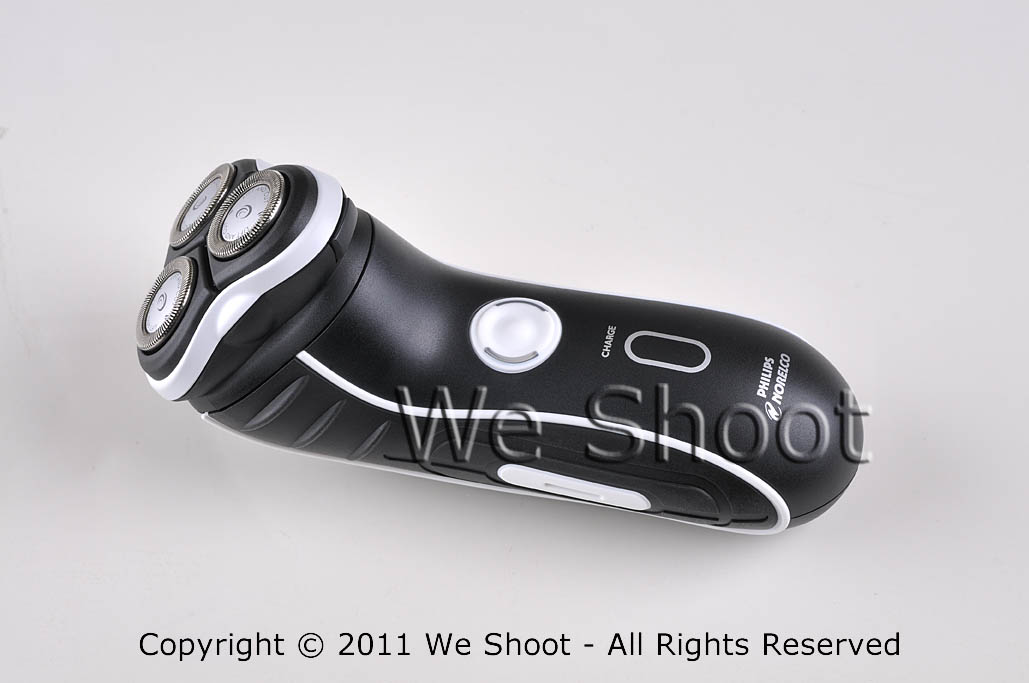
Sample 2 is against a white fomecore background and had two AC-powered studio strobes with soft boxes opposite each other at each end of the shaver to show texture in the shaver, and to highlight  stainless steel cutting heads.   The soft boxes spread light out with very diffused lighting and bring out a lot of detail with no harsh shadows.   There is some minor enhancement with Photoshop in this sample.

Basic well-lighted product image

Sample 2 - Click to Enlarge


In sample 3, I have made a “clipping path” to trace out the shaver from the original background, rotated the image vertically, and made a background layer with Photoshop in which I made a gradient of black and red.   Some more enhancement was done with Photoshop, including making the glowing yellow-green lights on either side of the on-off switch to simulate the look when the shaver is switched on.   Now you may ask why I didn’t take it with the shaver “on,” instead of simulating the look.   First, the shaver probably wouldn’t stay in position with the vibration of the shaver running, and also because I had more control of how it looks in the output this way.

weshoot.com product image

Sample 3 - Click to Enlarge

Now, which sample image would you choose to promote your product?

I will help you get close to sample 2 results, but you have to have some other props and accessories and do extra work to get there.  First get something white (for a dark subject) as a background , like a piece of fomecore.   It also helps reflect white light onto a dark object.   If shooting a light-colored or white object, you might want to go with gray or black as a background to contrast.   Next, go to a store like Lowe’s or Home Depot and buy several clamp light housings (see http://bit.ly/o3p5cP ) and a commensurate number of daylight compact fluorescent bulbs.   This won’t work as well as strobes with soft-boxes, but it will beat using a camera-mounted strobe.   Try different lighting positions until you get the lighting, shadows, and highlights you desire.   You will also need a tripod and a camera capable of taking a time exposure and allowing the flash to be deactivated.   You may also need to set the white balance (check your camera or editing program documentation to see how to do that ).   Make sure to get sharp focus.   Getting too close to the subject reduces depth-of-field, and some part of the subject will go out of focus.   Take several shots at different exposures to get the best one.   It may take more tries to get exactly what you want.

To get to sample 3 results, you will need a photo-editing program, and know enough on how to work with images for given results.   That is not within the scope of this article.  Really good product image editing takes knowledge, experience, and patience.   It can be time consuming and a lot of hard work.   It also helps to know a few enhancement secrets and have a lot of Photoshop experience.  That’s why I still get work, even if my client has a “really good camera.”

– Gary Silverstein

Tags: commercial product photography, product photographer, We Shoot Photography, weshoot.com
Posted in How To, Learning, Tips | Comments Off on How to take more professional images . . .

Take much better pictures with your camera: Move and soften that flash!

Thursday, July 28th, 2011

For a doctor, the first rule is, “Do No Harm.”  The first rule for better photography should be, “Take the flash unit off your camera (if possible)!” Why? Well, it is an unflattering lighting source, for one.  It is a bright direct light source like the sun.  It produces harsh shadows and high-contrast conditions for your subject.  You won’t see any of that in well-done professional commercial images, unless that is the specific intent .  Just look at beautiful models on magazine covers, or products in a name brand ad.  Remember when someone was telling ghost stories and held a flashlight under their face?  It threw the harsh shadows upward and gave the story-teller a scary look.  Normally, on-camera flashes throw harsh shadows downward on a horizontal image, and to the left or right on a vertical image. A lot of good wedding and portrait photographers use accessory flash units very similar to the one you might use on your camera, but they mount them off the camera.  A lot of these photographers are able to hand-hold their units by mounting the flash to a bracket which moves the flash way above and centered over the lens axis to allow the shadows to drop down behind the subject so they are not noticeable in the images.  When they want to take a vertical shot, the bracket allows the strobe to still stay positioned at center and over the lens axis so the shadows drop down behind the subject. This approach also reduces the chance for “red-eye,” (the glowing red marbles) as well. Another trick is bouncing the light off a diffuser card (attached to a number of modern flash units), or through specific attachments, or putting tissue paper or some other white translucent material over the strobe to mitigate the harsh shadows.

If you don’t want or can’t afford a flash bracket, some DSLR cameras allow wifi remote control of a dedicated flash so you can hold the flash above the camera, or most of these cameras have accessory wires available so you can hold the flash sufficiently above the lens to get the same effect.

A lot of people use point and shoot cameras.  They can’t remove the flash unit, but they can usually turn it off.  It will require the photographer to utilize a tripod or other support for the camera and shoot with available light.  Many of these cameras have different modes or manual controls to allow slower shutter speeds so ambient light can be used instead of that bright, unflattering strobe light.

Try these things, and your images will definitely start to look better.

-Gary Silverstein

Tags: flash photography, getting better pictures with flash, more professional look to my pictures, shooting with flash, weshoot.com
Posted in How To, Learning, Tips | Comments Off on Take much better pictures with your camera: Move and soften that flash!

<< Previous Next >>

  • Categories

    • How To (21)
    • Information (548)
    • Learning (30)
    • Lighting (179)
    • Marketing (291)
    • Photographs, Images (545)
    • Tips (38)
    • Uncategorized (2)
    • video (13)
  • Archives

    • September 2025
    • June 2025
    • May 2025
    • April 2025
    • January 2025
    • December 2024
    • November 2024
    • September 2024
    • August 2024
    • July 2024
    • June 2024
    • May 2024
    • April 2024
    • March 2024
    • February 2024
    • December 2023
    • November 2023
    • October 2023
    • September 2023
    • August 2023
    • July 2023
    • May 2023
    • February 2023
    • January 2023
    • October 2022
    • September 2022
    • August 2022
    • July 2022
    • March 2022
    • February 2022
    • January 2022
    • December 2021
    • July 2021
    • June 2021
    • May 2021
    • April 2021
    • March 2021
    • February 2021
    • January 2021
    • December 2020
    • November 2020
    • October 2020
    • September 2020
    • August 2020
    • July 2020
    • June 2020
    • May 2020
    • April 2020
    • March 2020
    • February 2020
    • January 2020
    • December 2019
    • November 2019
    • October 2019
    • September 2019
    • August 2019
    • July 2019
    • June 2019
    • May 2019
    • April 2019
    • March 2019
    • February 2019
    • January 2019
    • December 2018
    • November 2018
    • October 2018
    • September 2018
    • August 2018
    • July 2018
    • June 2018
    • May 2018
    • April 2018
    • March 2018
    • February 2018
    • January 2018
    • December 2017
    • November 2017
    • October 2017
    • September 2017
    • August 2017
    • July 2017
    • June 2017
    • May 2017
    • April 2017
    • March 2017
    • February 2017
    • January 2017
    • December 2016
    • November 2016
    • October 2016
    • September 2016
    • August 2016
    • July 2016
    • June 2016
    • May 2016
    • April 2016
    • March 2016
    • February 2016
    • January 2016
    • December 2015
    • November 2015
    • October 2015
    • September 2015
    • August 2015
    • July 2015
    • June 2015
    • May 2015
    • July 2014
    • June 2014
    • May 2014
    • September 2013
    • June 2013
    • March 2013
    • February 2013
    • January 2013
    • December 2012
    • October 2012
    • July 2012
    • June 2012
    • May 2012
    • March 2012
    • February 2012
    • December 2011
    • September 2011
    • August 2011
    • July 2011
    • March 2011
    • December 2010
    • October 2010
    • September 2010
    • July 2010
    • June 2010
  • Meta

    • Log in
    • Entries RSS
    • Comments RSS
    • WordPress.org

Copyright © 2025 - weshoot.com | Entries (RSS) | Comments (RSS)

WordPress theme designed by web design