Weshoot.com

The Official We Shoot Blog

  • Home
  • About
  • To Comment

Posts Tagged ‘commercial photographer’

Everybody’s a food photographer . . . NOT!

Thursday, July 10th, 2014

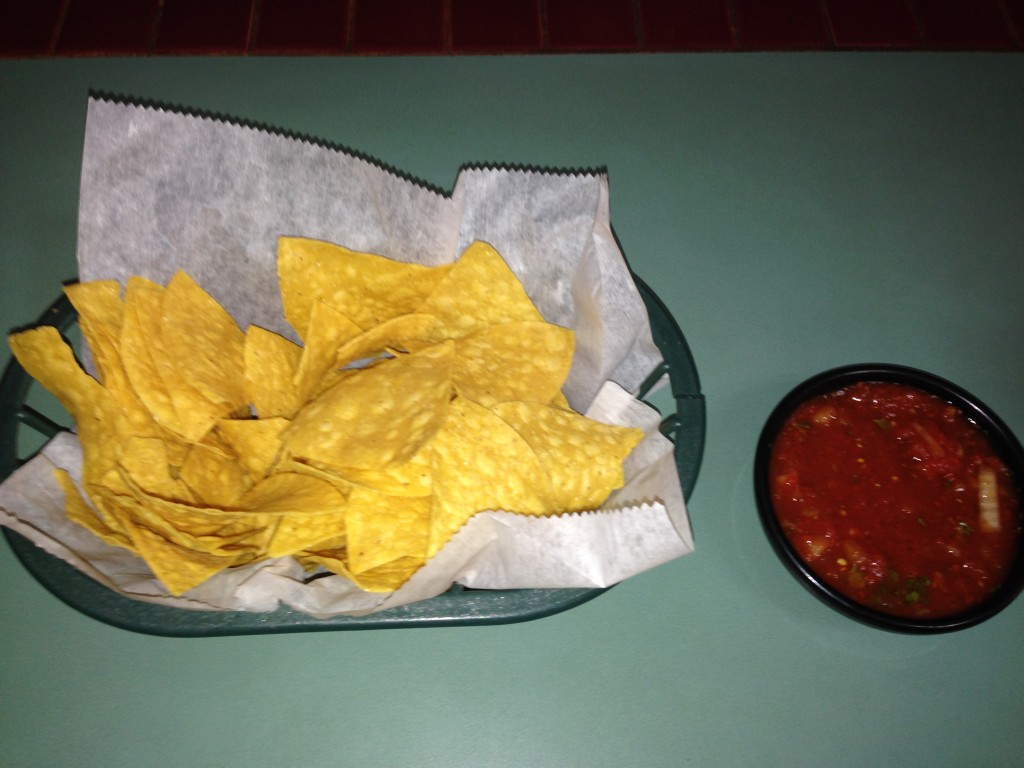
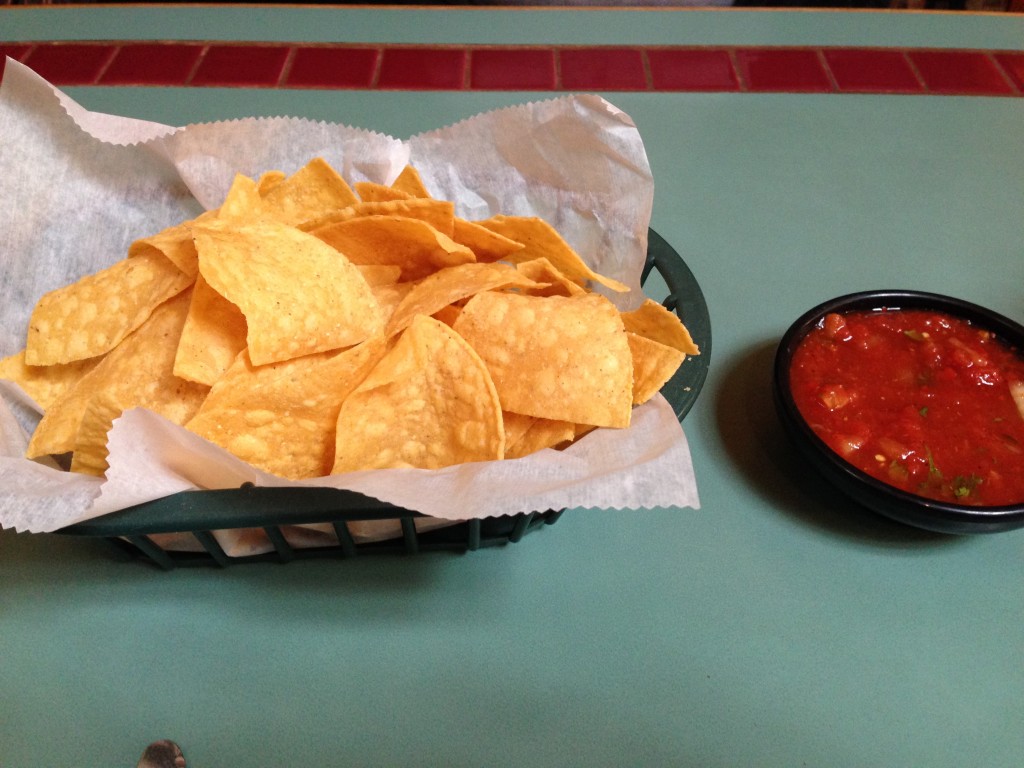
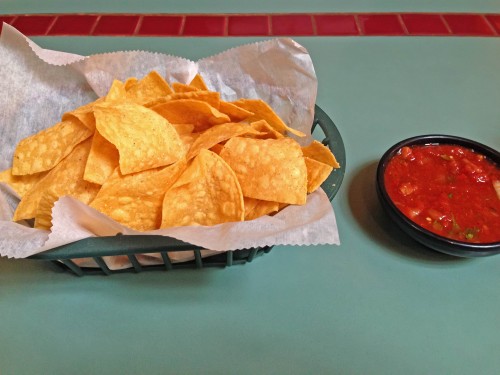
Like a lot of other people, I go to Facebook, Flickr, Twitter, and other social sites, and I see lots of images of food.  Contacts and colleagues, as well as anonymous strangers, have decided to show what they are about to eat, or have partially eaten.  The explosion of cell phone cameras and other low-cost digital cameras has allowed many people to think of themselves as “Food Photographers.” Anyone today with a heartbeat can take a picture.  I look at some of the food photography online, and there are comments from others on this, like:  “That looks so yummy, I wish I could have some!”  Or, “That looks delicious!”  I look at the images and it is all I can do to keep my last meal down.  What I usually see is not well composed, never styled, improperly lit, and the colors are sickly.  This is akin to those blurry, out of focus  images some people take of their kids and post on Facebook, to the delight of their friends and grandparents who say “Great shot!” The one thing they all have in common was that all the images were created for free, once you factor out the cost of the phone or camera, memory cards, readers, computers, and editing software. As I create food photography professionally, I have decided to see if I could take decent images of food with my cell phone and run it through Photoshop to get decent looking food shots. Now, real commercial food photography takes planning, a good food stylist, lots of lighting and equipment, and photographic experience.  It also takes a tremendous amount of patience.  I have dealt with clients, corporate chefs, tight spaces, and less than ideal shooting conditions.  Sometimes the food looks great but is actually inedible because things are done to it for the purpose of great photography. I went out to a favorite Mexican restaurant for dinner the other night and, as usual, I brought along my iPhone, which actually has a decent camera built-in (for what it is).  It takes 8 megapixel images in .jpg form.  It performs reasonably well in relatively low lighting conditions.  It has a strobe.  But, first, it doesn’t shoot in RAW format. This is important for making better final images.  More megapixels means more information and higher enlargement quality.  Not all megapixels are equal.  There are many cell phones that have larger pixel counts than the iPhone, but the picture quality isn’t as high, as evidenced by the fact that several stock agencies will accept still images and video from iPhones, but not other cell phones.  Image noise becomes a factor when jamming high pixel counts on small sensors. For this reason, a cell phone isn’t what a pro would use.  If you are going to shoot food, in my opinion, a 24mm X 16mm sensor in a DSLR at 10 megapixels that shoots in RAW format would be the minimum to use. So, despite my opinion, I decided to experiment as a pro since I have indeed been paid to photograph food by people in the food biz.  I decided to work with the chips and salsa. The first obstacle is lighting.  In this example, we are away from the outside windows and close to an inside wall. I am shooting hand-held.  So it has to be either the ambient room lighting or the camera flash.  Trying the flash, I get the following image: IMG_0388 Although it looks sharp as a small image, there is unacceptable camera movement evident in the full-sized version.  Harsh shadow at the top of the paper.  Loss of light away from the center, and all the color is off.  No styling is evident.  This was just the way the food was delivered.  Yet I see images on FB worse than this with someone saying “yummy” in the comments. I then try the somewhat same shot using room lighting, without the strobe.  See the sample image below: IMG_0384   While in-focus and more appealing color is evident and lighting is more even, the shadows are still way too heavy, caused by non-diffused room lighting.  The position of the camera is dictated by my seating.  I can’t get far enough back to get the chips and salsa in the frame.  The tip of my silverware can be seen at the bottom of the image.  Remember that I am shooting as most people do who post images online, not as a pro.  There will be no styling. Next, I take the image and put it through a little Photoshop massage.  It comes out looking like this: IMG_0384 ret With shadows lightened, color enhanced, top of the image straightened, and the silverware tip removed, it looks better – but still nowhere near professional quality.  Maybe worthy of FB, but not for marketing. I will show you a styled, professional image we did a while back of two taco salads, chips, and the rest of the fixings: taco salads As you can see, the color is quite appealing, the image is light and colorful, and the food is crisp and fresh-looking. Shadows are attractive and unobtrusive. The image has been styled by a professional stylist, and a lot of diffused strobe light has been used.  Lighting is off-camera to give highlights where needed and provide depth.  This is professional food photography – the kind supplied by We Shoot.
– Gary Silverstein

Tags: commercial, commercial photographer, commercial photography, food, food photography, Photoshop, retouch, shoot, shooting, weshoot.com
Posted in How To, Information, Learning, Tips | Comments Off on Everybody’s a food photographer . . . NOT!

The Difference A Background Can Make . . .

Monday, October 1st, 2012

In the days of film, a professional commercial photographer had to be very careful of the backgrounds that would be used in his/her images.  Retouching was expensive.  Shooting an item for use against another background from the one it was taken with could be a labor-intensive multi-step process.  A spot on a high-key (pure white) background  could be touched out on the negative, and a nightmare undertaking on a transparency.   Today, of course, images are taken digitally and manipulated by editing programs, like Photoshop.  One of our most recent shoots involved large, heavy industrial products.   In film-days past, we would have probably used a seamless white background to shoot the product and spent a lot of time with product placement.  The items to be photographed were round, between two and three feet in diameter, and each weighed 500 or more pounds.  Five views were to be taken of each.  That means that either the item would have to be moved on the background, or very carefully lifted by a hoist onto the background.  We would have to be careful of marks left by the items where they rested on the paper, and some method of keeping such round items from rolling off the surface would have to be employed and kept out of sight.

So, pre-planning for the shoot is still important, even in this digital world.  We opted to not use any type of manufactured background per se, but to only use white reflectors in strategic places to reflect light or add a highlight where we desired.  Not using a background simplified the lighting somewhat in that a roll of paper or fabric didn’t block out the light from behind each item.  We were going to photograph the items in the factory environment with the idea that we would isolate the image in Photoshop, and put it on another, more desirable background.

Lighting was done with our powerful studio strobes, and the modeling lights on the strobes gave us an idea of how the lighting would look in the finished image.  We shot with soft-boxes to give a square look to our lighting in the highlights, as umbrellas just wouldn’t cut it here as these products were light-reflective.  We planned to keep the camera stationary, move the lights as necessary, and rotate the product for the five different angles the customer required.  Since the objects were circular,  and we wanted to keep all the images the same size, we had to plan how to keep that proportionality.  Think of a coin stood on edge.  The widest the image would have to be is a little more than the diameter when one of the faces of the coin is toward you.  When the edge of the coin is nearer to you, the size of the image could change, but we wanted to make them all the same size for the client’s ease of putting together several views of their product.  Also, we had to be far enough away to assure depth of field when we were shooting the views that showed part of the object furthest away.  Editing programs have great sharpening utilities, but a severely out-of-focus image cannot be brought back.  You can easily blur parts of a sharp image and make it look good if needed for the effect, but the reverse isn’t the case.  So all this had to be figured out in advance.

Now, let’s go on to the backgrounds for the images.  Since the area or table on which the items were shot was in a fixed location, the background for each image (as produced by the camera) would have been a toolbox and other parts of the assembly plant.  So we made it so that we and our client could “lift” the item off the background and put it on any other background or even a video.  This is done by means of a “clipping path.”  This is a very labor-intensive process.  It means that I use a Photoshop tool to painstakingly trace out every edge of the product at anywhere from a 100% to a 300% enlargement.  Once I have outlined every hole, edge, and cranny, I “select” the item alone and make a layer of it to put on other backgrounds.  I include this clipping path with the image, so the client is able to do the same.  Now, you may ask why I do so much work, as some of the editing programs have become pretty sophisticated and make an easier selection with other, faster tools.  Well, the answer is this:  I have used these editing tools, and sometimes there are errors in the program choosing what is part of the item and what is not.  It may not be noticeable on a small jpeg on a website, but it will stick out like a sore thumb on a 30X40 enlargement at a trade show.  That is what separates a pro from an amateur.  Below are an original view of one of the products, and a few different backgrounds that I feel work well.  Each background below was created in Photoshop, but other backgrounds could be used, as well.  Remember that whichever one a client chooses, I include the clipping path so they can put it against another background if that is their need.
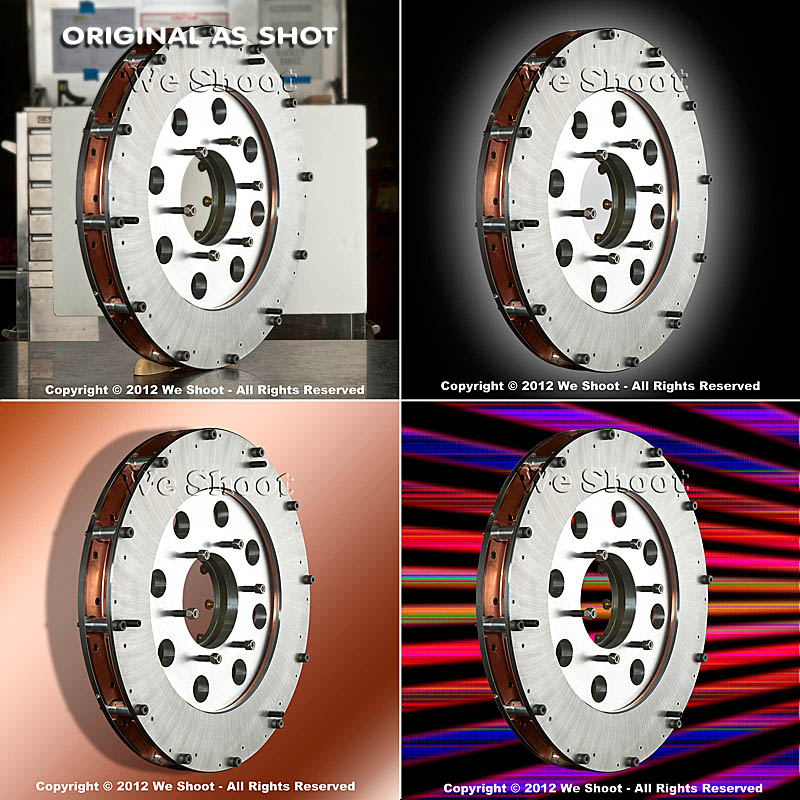
As you can see, the product image looks at home with any of the backgrounds.  Keep this in mind as you plan your next shoot.

– Gary Silverstein

Tags: camera, commercial photographer, commercial photography, http://weshoot.com, Marketing, photographer, photography, Photoshop, professional, reflections, video
Posted in How To, Learning, Tips | Comments Off on The Difference A Background Can Make . . .

Speak to Your Public . . . first in a series on Public Speaking

Friday, June 22nd, 2012

The silence was deafening.  You could hear a pin drop.  The crowd was still, each face looking up to me in anticipation of what I would say next.  Through the roaring din in my head, I heard a woman stutter with every word that escaped from her mouth.  Oh, my God, it was me!

That, my friends, is the scenario I have always envisioned if I ever got up to speak to a group of people.  With clichés included.

I pointed swiftly with my finger to the wall behind them, wanting to avert their gaze from my trembling, shuddering personae.

Oh good, that was smart.  Now I can collect myself.  Wait!  They’re looking back at me again.  What will I do?  I know.  I’ll drop my notes off the podium.  Then someone will have to pick them up and I’ll establish a relationship with someone in the audience so I can have a friend.  A friend, a friend, my kingdom for a friend!!!

Yup, my army of public speaking resisters, you guessed it.  None of that occurred during my first foray into public speaking, albeit only 2 minutes, 37 seconds.  Prior to being introduced to the audience on that fateful day, I had already spent days memorizing my speech.  And I had spent years writing marketing material for my company.  I knew what I was talking about.  I had no reason to lack confidence in this presentation.  But, no, like so many of you, I had multitudinous reasons to never, ever speak to a crowd of people.  But it all boiled down to one time-honored tradition in the ranks of probably 99% of the human nation:  I was “scared to death.”  And then I looked out – or down because I was on a stage – at a good 300 pairs of eyes staring up at me, and with little exception, these were friendly eyes, many with smiles, beckoning me to smile back and start my speech.  So I did.

Sure, there was a little stuttering.  There was a wee bit of hesitation.  But as I looked out on the masses, starting my speech by making light of the accolades said of my prowess as a commercial photographer by the Master of Ceremonies, I lost a good 50% of my fear.  These people were actually laughing at my self-deprecating humor.  And, with that, I realized one thing.  They wanted me to feel at ease with the crowd.  They wanted me to succeed in my presentation.  And I did.

So what do I want you to get from my experience?  I want you to cancel your monthly subscription to Guest Speaker Revulsion.  Put down your new book, “In Praise of Public-Speaking Resistance.”  And, yes, as you sit there gasping for air at such a thought, there is one last thing I want you to discontinue.  That’s right.  Your next weekly Aversion Therapy Anonymous meeting.  Yep, the ATA.  It has to be put into your past.  It’s time to move on, my comrades in business, because it’s now time to take the next step on your own.  Time for you, too, to step up on the dais and cry your eyes out.  Oh, wait, I regress.  It’s time to sing your heart out, to speak loud and strong.  It’s time to bring focus to yourself.  The confidence to do so may not come before it’s done, but the second time around just got easier.


[Look for my upcoming further blogs on the subject of Public Speaking for your business.]


– Dione Benson

Tags: commercial photographer, public speaking, speak, speaker, speech, talk
Posted in Learning | Comments Off on Speak to Your Public . . . first in a series on Public Speaking

“Photography is so easy . . . Why does a pro charge so much?”

Tuesday, December 14th, 2010

Note:  This article explains why pros like us charge what we charge and why we get it.


First, the long answer.

Photographers in the “ business” of photography don’t view their business as a hobby. The motivating factor is income. The average hobbyist – a nonprofessional – sees photography as an enjoyable pastime, and receiving money for their photography, although a nice addendum, is not the reason they engage in the activity. A hobbyist can be at several levels, from a novice to an accomplished photographer, but a pro has to always be at the top of his or her game to compete. After all, no professional photographer’s client wants to pay for sub-par images.

An amateur may show his shadow or reflection in the final picture, while a pro would never think of submitting such an image to the client. A nonprofessional photographer – an amateur – takes snapshots. “Click!” A pro may take a quick shot, but he or she quickly calculates variables to get the best possible shot, from the sun’s angle, to shadows, to exposure. To avoiding including as little as possible of his or her shadow so as to be less difficult to remove post-shoot. Getting closer to the ground or framing the subject through another object may not only get a more enticing image, it may as well eliminate the photographer’s shadow. Every little detail of an image is considered while shooting. Visualizing the image as a finished product, in two dimensions on a computer screen or in a print, is an essential part of the professional’s job.

Let me provide you with an example of work we do for a particular client to help illustrate the mark of – and the necessity for – a pro. This client, an out-of-state advertising agency, commissions our work for their client (a bank), sending us to many locations a year to shoot specific subjects (and other subjects we deem suitable) in the community around their branches. From our submission, our client chooses a number of images to be displayed in each branch for which we shoot. Requirements for these shoots include high-resolution images in a vertical, black and white, gray-scale format. If our images are submitted by FTP, they can be high-res jpegs; if delivered on DVD, they will be tiffs. No horizontal or color images (not even as sample images) will be accepted, so every sample image we send has been first converted to black and white. We have done a large number of jobs for this client because we deliver what they want, what they need. They expect artistry in taking the images and artistry in executing the post-shoot processing of each of our images.

Let me lead you through the workflow on the assignments we do for this agency. With the assignment comes a list of specific things in the community to shoot. We travel to the community, some as near to our studio as one hour, some as far as a day’s drive. We arrive in the community with maps we have printed up from our research of subject matter our client has shown primary interest in, and then we drive around to locate other targets we see as appropriate for this client. Leaving before sun break may be necessary for some objects of interest, knowing that a low-sun angle may cause our shadow to appear in the image, and conversely, if we are facing the sun, flares may occur (especially with a wide-angle lens), resulting in noisy silhouettes or blown-out skies. We are sometimes asked to shoot on a deadline in the rainy season, meaning diminished shooting days and hours. While shooting in the rain with its accompanied white or gray sky (cutting contrast, for just one example) can be dealt with, mist on the lens will ruin an image and must be carefully monitored. We also don’t typically shoot higher than 400 ISO, as this usually introduces an unacceptable amount of video noise to the discerning professional eye, especially in the shadow areas, but sometimes it must be done.

A discerning professional eye also abhors low-light conditions, so a portable flash mounted on a flash bracket is a necessary part of the equipment bag. One never knows when having a little more light could come in real handy.

You may ask what’s the big deal about shooting black and white. Simply set your camera to black and white, right? Well, after some experimentation, I found that our Nikon cameras’ black and white mode still shoots the raw images in color, and the camera is merely adding a black and white filter to the image. If I take the image in b&w mode, I can remove the b&w filter in Nikon’s raw editor, Capture NX2, or if I run it through Camera Raw in Photoshop CS5, it doesn’t see the filter that was put in by my camera, at all. So, I don’t even bother shooting it in b&w in the camera. I add it later as a layer in Photoshop CS5, which gives me more options in the look of the image.

So, let’s say that I take a close-to-perfect image. What happens then? The amateur can take the memory card to a camera-store kiosk to output to disk or print – enhanced to the kiosk program’s ability. Or, the amateur can elect to work on it himself, let’s say with Photoshop Elements, a relatively inexpensive program that produces good results. Great for the amateur photographer but a program which pales in comparison to the immeasurably more professional Photoshop CS5 and the raw editing of the aforementioned Nikon Capture NX2 – both incredible programs costing – and worth – much more.

Using the raw editor, I weed out the images that are not up to the caliber I wish to present to my client. Yes, even pros have camera movement, out-of-focus and under- or overexposed images. These are discarded. During the shoot, we take several images of the same thing, one of many differences between a pro and an amateur. This backup is further enhanced by using two different cameras and, when possible, two different shooters. One camera has the long zoom (18-200mm), and the other has an ultra-wide angle zoom (10-20mm) lens. If for some reason the subject isn’t captured successfully by one photographer, it is captured by the other. Consequently, we have several versions of the same subject from which to choose the very best for the client to select from.

All images that pass muster are then further evaluated with the raw editing program. Adjustment of density (lightness and darkness). Selection of the most accurate and impressive color. Saturation. And mild sharpening. The images are then converted to tif images, labeled with our copyright and other information from the image metadata.

Another place a professional such as myself is different than an amateur is hard-drive space. Hard-drive space is a commodity to me. I buy new one-terabyte drives to replace those that fill up. None of our professional images are erased to make room for new images. All work is stored on multiple drives. There’s never enough backup. Images are lost by the client – disks are misplaced – more times than I wish to count. It’d be death for my business if all I saved an image to was one drive and I got that fateful call from a client, and had a drive failure. In the long run in terms of both time and money, it is cheaper to save an image to the hard drive in perpetuity than it is to burn it to removable media (CDs and DVDs). This, of course, adds expense to the business. But it makes me more efficient. And takes up less room in my studio.

I now take the color tif images I made in Capture NX2 and bring them up in Bridge, the sorting program that comes with Photoshop CS5. Next, I open a number of them in Photoshop, magnifying each image to 100%. Having a powerful computer system with lots of processor horsepower and ram to run these programs is of immeasurable value, increasingly necessary to the professional with a large workload. I am currently running an i7-950 processor, and 12-gigs of ram with eSata internal drives and USB 3.0 external drives, a time saver for the loading and processing of the high-res images delivered by my cameras. Again, a necessary business expense. When efficiency and high quality are needed, sparing no expense is first on a professional’s business agenda.

At 100% magnification, I scrutinize each image for imperfections. A dust mote on the sensor can have the appearance of a fuzzy “ball” in the sky, and it needs to be touched out. If a distracting shadow or reflection was also captured in an image, that will need retouching work, as well. If a building’s sides aren’t straight (a distortion caused by the lenses and the angle taken), I will bend the image to make them so, if it enhances the look. Even if our client doesn’t demand it, cigarette butts and other things that distract from a good-looking image are removed to make it a better image. Providing a client with the best – from the image samples to the finished product – is a mark of a professional.

At this point, it is time to turn the image into a psd, or Photoshop, file. I then use a “black and white adjustment layer” in Photoshop to take away the color. Oftentimes, the b&w image will look “flat,” lacking contrast. There are several software filters available in Photoshop. Years ago, when using b&w film, a photographer might use a colored filter to enhance an image. A red filter, for example, will produce a dark or black sky with white clouds. Infrared film will produce white foliage. Photoshop has filters that mimic these traits in a b&w digital image, and can be modified as well. Or I may choose to add contrast or a light or dark sky, or make a “soft-light” layer and darken or lighten some section of the image only. The image is then saved as the layered psd file in case additional changes have to be made. At this point the image is still in color with adjustment layers. Once I am happy with the image, I “flatten” all the layers to one and save it as a gray-scale tif in another folder. When all of this is accomplished (my last job with this client totaled 107 and took several days), I prepare the images for my client. I use an “action” in Photoshop to automatically save a reduced-size version of each image in another folder as a low-resolution jpeg, and then I prepare another folder for additional backup. I then bring up every image in that folder in Photoshop, and use a brush “stamp” to put our “We Shoot” watermark on every one. But I am still not done. I then make a single “zip file” of all of these images to transfer to the client by FTP or into their drop box. I advise them, usually by email, that they’re ready to see, and they unzip the file with their unzip program to see all the images. I then await their notification of the image numbers they want in final high-resolution, sending them the images on disk, via FTP, or to their drop-box.

Why does a pro charge so much? When photography is so easy? Besides the photographic and post-production time and expense involved in making a successful image, it’s more than just love of the art. It’s knowing our work will make our client successful, increase their return-on-investment, and keep them coming back for more.

And the short answer is, being a professional – being able to provide high-quality photography to a client – costs money. We fulfill a need for a client who needs high-quality images, and we need to make enough to continue to provide high-quality business to our client. It makes our client money, and it makes us money. A successful image goes a long way in helping to sustain a successful business – a professional business – for our client and this pro. A win-win for all concerned.

-Gary Silverstein

raw image representation

Jpeg made from unedited raw image

color after editing

Jpeg of raw image after editing

black and white final image

Jpeg of final black and white image


Tags: black and white, color, commercial photographer, photographer, photography, professional, professional photographer
Posted in Learning | Comments Off on “Photography is so easy . . . Why does a pro charge so much?”

  • Categories

    • How To (21)
    • Information (548)
    • Learning (30)
    • Lighting (179)
    • Marketing (291)
    • Photographs, Images (545)
    • Tips (38)
    • Uncategorized (2)
    • video (13)
  • Archives

    • September 2025
    • June 2025
    • May 2025
    • April 2025
    • January 2025
    • December 2024
    • November 2024
    • September 2024
    • August 2024
    • July 2024
    • June 2024
    • May 2024
    • April 2024
    • March 2024
    • February 2024
    • December 2023
    • November 2023
    • October 2023
    • September 2023
    • August 2023
    • July 2023
    • May 2023
    • February 2023
    • January 2023
    • October 2022
    • September 2022
    • August 2022
    • July 2022
    • March 2022
    • February 2022
    • January 2022
    • December 2021
    • July 2021
    • June 2021
    • May 2021
    • April 2021
    • March 2021
    • February 2021
    • January 2021
    • December 2020
    • November 2020
    • October 2020
    • September 2020
    • August 2020
    • July 2020
    • June 2020
    • May 2020
    • April 2020
    • March 2020
    • February 2020
    • January 2020
    • December 2019
    • November 2019
    • October 2019
    • September 2019
    • August 2019
    • July 2019
    • June 2019
    • May 2019
    • April 2019
    • March 2019
    • February 2019
    • January 2019
    • December 2018
    • November 2018
    • October 2018
    • September 2018
    • August 2018
    • July 2018
    • June 2018
    • May 2018
    • April 2018
    • March 2018
    • February 2018
    • January 2018
    • December 2017
    • November 2017
    • October 2017
    • September 2017
    • August 2017
    • July 2017
    • June 2017
    • May 2017
    • April 2017
    • March 2017
    • February 2017
    • January 2017
    • December 2016
    • November 2016
    • October 2016
    • September 2016
    • August 2016
    • July 2016
    • June 2016
    • May 2016
    • April 2016
    • March 2016
    • February 2016
    • January 2016
    • December 2015
    • November 2015
    • October 2015
    • September 2015
    • August 2015
    • July 2015
    • June 2015
    • May 2015
    • July 2014
    • June 2014
    • May 2014
    • September 2013
    • June 2013
    • March 2013
    • February 2013
    • January 2013
    • December 2012
    • October 2012
    • July 2012
    • June 2012
    • May 2012
    • March 2012
    • February 2012
    • December 2011
    • September 2011
    • August 2011
    • July 2011
    • March 2011
    • December 2010
    • October 2010
    • September 2010
    • July 2010
    • June 2010
  • Meta

    • Log in
    • Entries RSS
    • Comments RSS
    • WordPress.org

Copyright © 2025 - weshoot.com | Entries (RSS) | Comments (RSS)

WordPress theme designed by web design