Weshoot.com

The Official We Shoot Blog

  • Home
  • About
  • To Comment

Posts Tagged ‘video’

We Shoot Photography Of The Day For 8/4/2015

Tuesday, August 4th, 2015

Videos are about movement and interest.  Editing video is not just clipping and pasting

various clips together with (or without) transitions to tell your story.

An interesting video background can help you tell your video story!  Just watch some of

the news programs on TV and see how they use motion graphics to enhance their articles.

Check out the video background at full screen by clicking the box in the lower right hand

corner of the video!  Click the ESC key to come back to the blog.

Click here to find out how you can get this one for your video!

http://weshoot.com/wordpress/wp-content/uploads/2015/08/Map-and-Graphics-1.mp4

Tags: background, map, meter, motion graphics, news, revolving, rotation, spinning, video
Posted in Information, Marketing, video | Comments Off on We Shoot Photography Of The Day For 8/4/2015

Your Business Video

Tuesday, June 2nd, 2015

If your website is 50% more likely to appear on the first page of search engine results if it includes video, would you say, “let’s buy a video camera?” or “let’s call a professional videographer?”  Since utilizing video for your website appears to be a sound business investment, either answer is good.  But, which one is better?

That depends upon your day-to-day priorities.  If you choose the former – buying a video camera (or using one you already have) – can you open up time in your day to create the layout, storyboard the shoot, set up lighting and camera equipment, do the shoot, conduct the interviews, edit the video (including researching music, creating graphics, transitions), and place the video on your website, YouTube, and other online sites?  If so, doing it yourself is the way to go.

So, before you do all of the above – and you definitely have the time – be sure you are confident the video will be just what you want from this personal endeavor.  Study the process fully, create the exact story you want to tell, and pick up that camera and shoot!  Or should I say, “experiment.”

Otherwise, consider the latter – calling a professional videographer.  Placing the process into the hands of a professional may well be the very best use of your time – and your budget.  Personal experimentation may be just that, an experiment.

###

Dione Benson

6.1.2015
Tags: advice, amateur, camcorder, edit, editing, editor, equipment, experiment, lighting, professional, storyboard, video, video camera, video production, videographer
Posted in Information, Tips | Comments Off on Your Business Video

The Memory Card Reader From Hell!

Thursday, May 29th, 2014

Professional photographers and amateurs alike have many things in common in this digital age:  our cameras put the images we take on digital media, such as Compact Flash cards, SD cards, or similar devices.  Some of the different methods for extracting the information from these cards are to run a cable (usually USB) to the camera from the computer and we instruct the computer to copy, transfer, or import the images to the computer’s hard drive(s), or we take the digital media card out of the camera and place it in a reader that serves the same function.  Some of us have built-in slots in our desktop computers that will accommodate various kinds of cards.  My last two computers have had the slots built in.

I’m a professional photographer and videographer.  For many shoots, I go on location and have several Compact Flash cards that fit in my still cameras, and the images I shoot are stored on the CF cards awaiting transfer to my computer’s multiple hard drives.  Since I usually can’t reshoot the images, and there is much more security in the redundancy of having the files on different drives, I store my images on several external drives simultaneously.  Hard drives do fail.  There is no excuse for losing a client’s images.

The critical point, however, is that much can happen to the information on the cards during the transfer process.  Pulling a card out of a camera that is turned on can corrupt the card, as can pulling a card out of a reader during a copy phase.  So, I breathe easier once the images have been copied or imported to my first hard drive without a hitch.  Until I have the images on more than one hard drive, however, I keep the images on the card, as well, for backup in case something bad happens.

I recently got a wakeup call, and it was just by chance.  I had been using the CF card slot in my PC to copy files from the card to the computer.  I didn’t have a job for a little while and I had left the images from the last shoot on the card in the camera after first copying them to several drives on my computer.  I put the card back in my camera after copying it.  I usually copy to my main drive first, add keywords, my copyright, etc. to the meta data, and then copy all that to a couple more external drives for security.

About a week after I had copied the images on the card I had put back into the camera, I went to reset the camera’s settings for the most likely settings for my next shoot.  It showed I still had images on the card, so I hit the view button to see which images were on the card before deleting them, AND, HORRORS,  THEY LOOKED BADLY PIXELATED!  I looked at several of the images in the camera and most had this problem.  I hit the magnify button, and they looked sharp again, but when going back to the “fit on screen” image they again looked pixelated.  All I had done was to copy them to the hard drive on my computer.  The images that had been copied to the hard drive were in no way affected, but the card seemed to be corrupted.  That never happened before.

Luckily, I had already uploaded the finished job to the client the day before, so I knew that the images in the computer were not corrupted.

As a pro, I can’t leave anything to chance, so I had to find out whether the card was bad, the camera had a problem, or what had screwed up the images while the card was in the computer.

My first test was to shoot test images to see what was happening.  Once shot, I looked at each at the back of the camera.  They looked normal.  I turned off the camera, popped the card, and put it in the built-in PC reader.  I copied the files to a folder on my desktop, and made sure it was finished copying.  I removed the card from the PC.  I made a second folder on my desktop.  I then used Photoshop to view the images in the first folder on my desktop.  They looked OK.  I put the card back in the camera and turned the viewer on, and they were corrupted!  I took the card out of the camera again, and put it back in the PC and copied the same files to the second folder on my desktop.  I clicked on the first image in Photoshop and a dialog box popped up saying that Photoshop could not read the image format.  The card was corrupted.  Period.

I had an old external USB 2.0 card reader I used to use before having built-in slots, so I dusted it off and plugged it into an open USB slot on my computer.  I put the card in the camera again and formatted the card.  Again I took some test images.  I took the card out of the camera and put it in the external reader.  It took longer than the built-in reader, but there weren’t that many images.  They copied perfectly.  I took the card from the reader and put it back in the camera.  I turned on the viewer, and the pictures looked normal, not corrupted.  I shut off the camera and again removed the card.  I again copied the files to another folder on my desktop – they could be opened in Photoshop and looked normal.

I determined that the built-in reader in the PC was corrupting the images while copying.  I don’t know why: was it software, or hardware?  I determined that the best way around the problem was to not use the built-in slots again on this computer, but to bypass them.  I had lost faith in them.  However, the USB 2.0 external reader is incredibly slow.  I also use my readers for HD video on SDHC cards, and it takes forever to import video files.  So, I decided to buy a new USB 3.0 external reader.  I found one on B&H’s website for $14.95 (with no shipping) at http://bhpho.to/SVr845 .  I ordered it and tried it out with all my different media from different cameras.  It seems to work well, and it is blazing fast compared with USB 2.0.

The moral of the story is:  Don’t be complacent about your digital photography equipment.  Don’t assume all is well without checking it out occasionally.  I could have gotten a bad surprise if I hadn’t looked at my camera, and taken action.  Being a pro, you’ve got to be on your toes!

– Gary Silverstein

Tags: 2.0, 3.0, camera, card, CF, CF card, commercial photography, Compact Flash, corrupt, corrupting, corruption, drive, file, files, hard drive, image, memory card, PC, pixel, pixelated, professional, reader, SD, SDHC, still, stills, USB, video
Posted in Information, Tips | Comments Off on The Memory Card Reader From Hell!

The Difference A Background Can Make . . .

Monday, October 1st, 2012

In the days of film, a professional commercial photographer had to be very careful of the backgrounds that would be used in his/her images.  Retouching was expensive.  Shooting an item for use against another background from the one it was taken with could be a labor-intensive multi-step process.  A spot on a high-key (pure white) background  could be touched out on the negative, and a nightmare undertaking on a transparency.   Today, of course, images are taken digitally and manipulated by editing programs, like Photoshop.  One of our most recent shoots involved large, heavy industrial products.   In film-days past, we would have probably used a seamless white background to shoot the product and spent a lot of time with product placement.  The items to be photographed were round, between two and three feet in diameter, and each weighed 500 or more pounds.  Five views were to be taken of each.  That means that either the item would have to be moved on the background, or very carefully lifted by a hoist onto the background.  We would have to be careful of marks left by the items where they rested on the paper, and some method of keeping such round items from rolling off the surface would have to be employed and kept out of sight.

So, pre-planning for the shoot is still important, even in this digital world.  We opted to not use any type of manufactured background per se, but to only use white reflectors in strategic places to reflect light or add a highlight where we desired.  Not using a background simplified the lighting somewhat in that a roll of paper or fabric didn’t block out the light from behind each item.  We were going to photograph the items in the factory environment with the idea that we would isolate the image in Photoshop, and put it on another, more desirable background.

Lighting was done with our powerful studio strobes, and the modeling lights on the strobes gave us an idea of how the lighting would look in the finished image.  We shot with soft-boxes to give a square look to our lighting in the highlights, as umbrellas just wouldn’t cut it here as these products were light-reflective.  We planned to keep the camera stationary, move the lights as necessary, and rotate the product for the five different angles the customer required.  Since the objects were circular,  and we wanted to keep all the images the same size, we had to plan how to keep that proportionality.  Think of a coin stood on edge.  The widest the image would have to be is a little more than the diameter when one of the faces of the coin is toward you.  When the edge of the coin is nearer to you, the size of the image could change, but we wanted to make them all the same size for the client’s ease of putting together several views of their product.  Also, we had to be far enough away to assure depth of field when we were shooting the views that showed part of the object furthest away.  Editing programs have great sharpening utilities, but a severely out-of-focus image cannot be brought back.  You can easily blur parts of a sharp image and make it look good if needed for the effect, but the reverse isn’t the case.  So all this had to be figured out in advance.

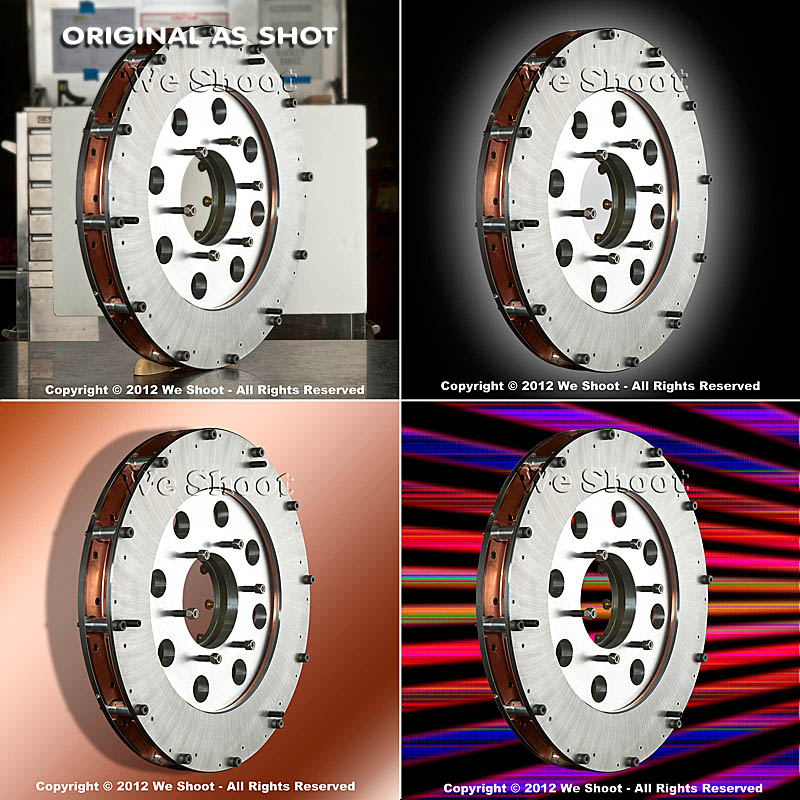
Now, let’s go on to the backgrounds for the images.  Since the area or table on which the items were shot was in a fixed location, the background for each image (as produced by the camera) would have been a toolbox and other parts of the assembly plant.  So we made it so that we and our client could “lift” the item off the background and put it on any other background or even a video.  This is done by means of a “clipping path.”  This is a very labor-intensive process.  It means that I use a Photoshop tool to painstakingly trace out every edge of the product at anywhere from a 100% to a 300% enlargement.  Once I have outlined every hole, edge, and cranny, I “select” the item alone and make a layer of it to put on other backgrounds.  I include this clipping path with the image, so the client is able to do the same.  Now, you may ask why I do so much work, as some of the editing programs have become pretty sophisticated and make an easier selection with other, faster tools.  Well, the answer is this:  I have used these editing tools, and sometimes there are errors in the program choosing what is part of the item and what is not.  It may not be noticeable on a small jpeg on a website, but it will stick out like a sore thumb on a 30X40 enlargement at a trade show.  That is what separates a pro from an amateur.  Below are an original view of one of the products, and a few different backgrounds that I feel work well.  Each background below was created in Photoshop, but other backgrounds could be used, as well.  Remember that whichever one a client chooses, I include the clipping path so they can put it against another background if that is their need.

As you can see, the product image looks at home with any of the backgrounds.  Keep this in mind as you plan your next shoot.

– Gary Silverstein

Tags: camera, commercial photographer, commercial photography, http://weshoot.com, Marketing, photographer, photography, Photoshop, professional, reflections, video
Posted in How To, Learning, Tips | Comments Off on The Difference A Background Can Make . . .

Video: Why a clapperboard should be part of your kit bag . . .

Tuesday, July 17th, 2012

Clapperboard


Did you ever watch an old Hollywood movie about making a movie?  At the beginning of each scene and take, someone holds up a slate with something like, “Scene 6, Take 164,” on it and audibly says the same thing that is on the slate.  At the top of the slate is the “Clapper,” and usually after the director yells “Action,” the person holding the slate claps it to denote the start of the scene.  Actually, the cameras are already rolling so they can record the slate, and the clap.  In the early days of movies, the slate was used to denote the scenes and takes so, when editing the film, the editor was able to piece together the scenes to make the story flow.  Scene 6 and Scene 3 may have been in one city, and other scenes in another.  As sound came in, the clapper was added to allow synchronization of sound to film.  Since the cameras were noisy beasts, the sound was recorded on a separate device, and the clapping sound was synchronized to the visual of the clapper sticks hitting one another.  They were then paired up, and the clapperboard visuals and sound were edited out in the final version.

Today you may ask why you would want to purchase and use this contraption since the audio and video are synchronized by the camera and in lockstep, unless intentionally unlinked in the video editing software.  The answer is that the slate is still needed for real video editing, and the clapper is very handy for synching multiple cameras and the sound with different angles of the same scene.  Almost everybody is bothered when the mouth movement doesn’t synch with the sound.

The truth is that anyone today can shoot a video!  All you need is $100 or more and a heartbeat.  Simple, cheap video cameras (or camcorders) are readily available.  But, professional video cameras can cost well above $60,000.  Why would anyone spend a lot of money for a camera when the images on our TVs looks pretty good from low-priced cameras?  A couple of  reasons are that the image degrades from the cheaper cameras when less than ideal lighting is encountered.  Video noise becomes a factor.  Also, sound input and output is better the more you spend on the camera.

Should you shoot your own video for your business?  Unless you are a budding amateur Spielberg, probably not!  While pushing the record button is easy, buying quality software like Adobe Premiere Pro and After Effects is expensive and learning how to use it can be daunting.

Using lighting can add quality to your video, and there is a whole science to it.

Do you have lights?  Do you have pro software to edit your video?  Are you proficient in video editing?  Do you have a camcorder of sufficient quality to overcome video and audio noise?  These are questions you should ask yourself before trying to promote your business in a video.

In making a video, my partner and I meet with our client to map out the story before even going near a camera.  Videos take planning.  Several days of shooting stills and video can go into a short promotional video.  Way more time is spent editing it.

Now, back to the clapperboard.  The clapperboard we employ (see image above) allows for a tremendous time savings when we’re editing video.

Below, take a look at one of the latest videos we did for a music composer.  You will notice that even though we recorded him from two different angles with two cameras, his mouth is in synch in the side view and the front view.  The guitar-playing scene was also shot with two cameras.  This two-camera setup is included at no extra charge.  It adds a dynamic not found in most amateur endeavors, and this professional look much more successfully illustrates the professionalism of your business.  Don’t put out a substandard video.  It could do more harm than good.

-Gary Silverstein

Tags: audio, clapper, clapperboard, http://weshoot.com, sound, two-camera, video, video production, videography, visual, we shoot, weshoot.com
Posted in How To, Learning, Tips | Comments Off on Video: Why a clapperboard should be part of your kit bag . . .

Video And Animation . . .

Sunday, March 18th, 2012

I think that video and animation is something that stills photographers have to become more aware of in order to be competitive.  One of the areas is simple animation of still photographs.  Fortunately, Photoshop CS5 has an application within it to take your still photo and make a short animated video that can keep on running on your web page to attract attention.  Older versions may have this capability also, but since I no longer have any of them available, I can only speak to what I have.  (See the image below to get an idea of what can be done.)  I have used the header image from our We Shoot Facebook page at http://on.fb.me/kH0Ozp to make a flashing “Eat at Joe’s” type of billboard for this purpose.  There are three transitions: First, just as a collage; second, “Call Now” is added; and, third, our phone number is flashed over our name.

I won’t go into how to make such an animation except to say that you go into the menu at the top of Photoshop and pick Window>Animation.  You can look up how to use this in the help menu, or go to Vimeo or Youtube to get step-by-step instructions on how to carry this out.  If you already have a knowledge of timelines in slideshows or video editing programs, you are already on your way.

BTW, the file size can be made relatively small, and take almost no time to load.  The animation will not work on some web pages, such as on Flickr, but will work elsewhere, and unless you have it blocked on your own website, it will probably work there.  As you can see, it works on this blog.

Have fun.

-Gary Silverstein

We Shoot

Tags: animation, fun, http://weshoot.com, photography, Seattle commercial and advertising photography, stills, video
Posted in How To, Marketing, Tips | Comments Off on Video And Animation . . .

Expanding your capabilities . . .

Saturday, September 17th, 2011

Here’s one of our promo videos!


All professional photographers should strive to increase their capabilities.  One of the ways is to embrace video.  A lot of wedding photographers have done this as this gives them more ways of generating capital.  Being versatile is very important.  But there are costs for doing this.  Let’s talk about video and where it figures in. 

In the film days, a professional photographer could buy 2¼” medium-format cameras to do weddings and portraits, or a 4″X5″ (or bigger) large format camera to photograph architecture and products.  This was a huge barrier to entry to amateurs, with the huge cost and learning how to work with what were mostly manual systems.  Unless an amateur or student was particularly well-heeled, he couldn’t purchase this equipment.  He would have to work with the less expensive smaller format 35mm cameras, that were also more expensive when moving up to the high end.  A budding pro would have to work his way up, sometimes working as an assistant for an established pro.

In the past, architectural clients wouldn’t hire someone who couldn’t give them large-format transparencies or negatives.  It shut out a good many photographers.  It was a barrier to entry.

Then digital still photography became the norm and the cameras evolved into something very capable of producing a very large and sharp print.  And the price started dropping.  The barrier to entry was being lowered.  And digital had another perk.  Editing software came into its own.  The one with the highest regard is Adobe Photoshop.  It is not cheap for the current version.  But there are some lower-cost alternatives that don’t do as much.  A barrier just fell again.  More amateurs call themselves pros.  Now, the competition is very heavy.  It is hard for the clients to tell who can do the work or not.  The Internet is awash with images.  Some may steal an image and say it is theirs.  Others shoot all the standard stuff photographers take as a hobby.  Flowers, landscapes, people, boats, cars, etc.

A commercial photographer does more with the images he creates.  You wouldn’t hire someone to shoot your company’s expensive product to show it in its best light, if the photographer only showed you a portfolio of beautiful sunsets, would you?

You would want to know that the photographer could get great detail and sharp, clear, well-lit images of products as seen in his/her portfolio.

Since we already have extensive experience at commercial photography, we add video to the mix to increase our versatility and do more for our clients.

Video is a whole different animal than still photography.  You have all the things that a still photographer has to think about, plus movement and sound to deal with.  And editing videos is more complicated than it has ever been as there are more tools to work with. While a lot of video cameras will do a great job of recording what is in front of them with just the press of a button, editing them is way more than trimming a clip and placing it on the end of another clip.  And, everyone watches TV.  If you want to see what is possible, look at the intro to CSI Miami.  It is a mixture of stills, video clips, and moving graphics. It probably took months to put together and it is over in less than a minute.  HD video files are huge.  A one-minute HD video in QuickTime format is around a gigabyte in size.  You need a computer with some real horsepower to harness the expensive software that it takes to get something really professional.  Rendering time can run many hours.  Adobe Premiere Pro, After Effects, Photoshop Extended, and a legion of other programs come into play.  And the learning curve is steep.  High costs, a lot to learn . . .  Now, there is a barrier to entry. 

If you haven’t already, take a look at our video at the top of this post.  As you can see, it adds a dynamic dimension to our professional commercial portfolio. It is a great way to show off our portfolio and for a client company  to promote itself, as well.

– Gary Silverstein

Tags: barrier to entry, commercial, http://weshoot.com, photograph, photographer, professional, promo, promotional, still photography, value added, versatile, versatility, video, video editing, videographer
Posted in Learning, Marketing, Tips | Comments Off on Expanding your capabilities . . .

Next >>

  • Categories

    • How To (21)
    • Information (548)
    • Learning (30)
    • Lighting (179)
    • Marketing (291)
    • Photographs, Images (545)
    • Tips (38)
    • Uncategorized (2)
    • video (13)
  • Archives

    • September 2025
    • June 2025
    • May 2025
    • April 2025
    • January 2025
    • December 2024
    • November 2024
    • September 2024
    • August 2024
    • July 2024
    • June 2024
    • May 2024
    • April 2024
    • March 2024
    • February 2024
    • December 2023
    • November 2023
    • October 2023
    • September 2023
    • August 2023
    • July 2023
    • May 2023
    • February 2023
    • January 2023
    • October 2022
    • September 2022
    • August 2022
    • July 2022
    • March 2022
    • February 2022
    • January 2022
    • December 2021
    • July 2021
    • June 2021
    • May 2021
    • April 2021
    • March 2021
    • February 2021
    • January 2021
    • December 2020
    • November 2020
    • October 2020
    • September 2020
    • August 2020
    • July 2020
    • June 2020
    • May 2020
    • April 2020
    • March 2020
    • February 2020
    • January 2020
    • December 2019
    • November 2019
    • October 2019
    • September 2019
    • August 2019
    • July 2019
    • June 2019
    • May 2019
    • April 2019
    • March 2019
    • February 2019
    • January 2019
    • December 2018
    • November 2018
    • October 2018
    • September 2018
    • August 2018
    • July 2018
    • June 2018
    • May 2018
    • April 2018
    • March 2018
    • February 2018
    • January 2018
    • December 2017
    • November 2017
    • October 2017
    • September 2017
    • August 2017
    • July 2017
    • June 2017
    • May 2017
    • April 2017
    • March 2017
    • February 2017
    • January 2017
    • December 2016
    • November 2016
    • October 2016
    • September 2016
    • August 2016
    • July 2016
    • June 2016
    • May 2016
    • April 2016
    • March 2016
    • February 2016
    • January 2016
    • December 2015
    • November 2015
    • October 2015
    • September 2015
    • August 2015
    • July 2015
    • June 2015
    • May 2015
    • July 2014
    • June 2014
    • May 2014
    • September 2013
    • June 2013
    • March 2013
    • February 2013
    • January 2013
    • December 2012
    • October 2012
    • July 2012
    • June 2012
    • May 2012
    • March 2012
    • February 2012
    • December 2011
    • September 2011
    • August 2011
    • July 2011
    • March 2011
    • December 2010
    • October 2010
    • September 2010
    • July 2010
    • June 2010
  • Meta

    • Log in
    • Entries RSS
    • Comments RSS
    • WordPress.org

Copyright © 2025 - weshoot.com | Entries (RSS) | Comments (RSS)

WordPress theme designed by web design