Weshoot.com

The Official We Shoot Blog

  • Home
  • About
  • To Comment

Video from still photography . . .

Author: weshoot

Slide shows have been around for a long time. How can someone use a still photograph in a video and see it move? One method in digital slide shows is to “pan” a still image – that is, pan across an enlarged still image by starting at one side of a room, for example, and move your “camera” to the other side of the room as though you were scanning the room with your eyes from one side to another. Another way is to see an element in a photo and to “back away” so as to see the whole image. There are many slide show programs out there which will do this. One thing lacking in these images is depth. If I took a still image of a staircase and “panned” it, it would lack depth. If I took a video camera and panned the same staircase, it would look more real because there would be a perceived foreground (the balusters or stair sticks) and background (back wall), actually appearing to have movement between the foreground and background due to “camera” movement.

A still photograph can’t have that movement – or can it? See the video above, and pay attention to the hamburger plate in relation to the background. This image was a still photo taken during a food shoot for a local restaurant chain, and reworked in both Photoshop CS5.1 Extended and Adobe After Effects CS5.5. As you can see, the meal gets bigger while the background stays the same size, blurs, and appears to move slightly to the right. The plate looks like it is coming toward you and away from the background. This gives the illusion of depth and movement. I have seen this technique in some old sepia photos from bygone eras on TV where a famous Wild West character comes out of an old photo toward you and the “camera” “moves” to the right. This adds a dynamic to a still photo making the subject three-dimensional, and gives the photo a video presence.

-Gary Silverstein
We Shoot
Tags: cheeseburger, commercial and advertising food photography, depth, food, food photography, food video, hamburger, movement, photography, realism, still image
December 11th, 2011  |  Posted in How To, Tips  |  Comments Off on Video from still photography . . .

Expanding your capabilities . . .

Author: weshoot

Here’s one of our promo videos!


All professional photographers should strive to increase their capabilities.  One of the ways is to embrace video.  A lot of wedding photographers have done this as this gives them more ways of generating capital.  Being versatile is very important.  But there are costs for doing this.  Let’s talk about video and where it figures in. 

In the film days, a professional photographer could buy 2¼” medium-format cameras to do weddings and portraits, or a 4″X5″ (or bigger) large format camera to photograph architecture and products.  This was a huge barrier to entry to amateurs, with the huge cost and learning how to work with what were mostly manual systems.  Unless an amateur or student was particularly well-heeled, he couldn’t purchase this equipment.  He would have to work with the less expensive smaller format 35mm cameras, that were also more expensive when moving up to the high end.  A budding pro would have to work his way up, sometimes working as an assistant for an established pro.

In the past, architectural clients wouldn’t hire someone who couldn’t give them large-format transparencies or negatives.  It shut out a good many photographers.  It was a barrier to entry.

Then digital still photography became the norm and the cameras evolved into something very capable of producing a very large and sharp print.  And the price started dropping.  The barrier to entry was being lowered.  And digital had another perk.  Editing software came into its own.  The one with the highest regard is Adobe Photoshop.  It is not cheap for the current version.  But there are some lower-cost alternatives that don’t do as much.  A barrier just fell again.  More amateurs call themselves pros.  Now, the competition is very heavy.  It is hard for the clients to tell who can do the work or not.  The Internet is awash with images.  Some may steal an image and say it is theirs.  Others shoot all the standard stuff photographers take as a hobby.  Flowers, landscapes, people, boats, cars, etc.

A commercial photographer does more with the images he creates.  You wouldn’t hire someone to shoot your company’s expensive product to show it in its best light, if the photographer only showed you a portfolio of beautiful sunsets, would you?

You would want to know that the photographer could get great detail and sharp, clear, well-lit images of products as seen in his/her portfolio.

Since we already have extensive experience at commercial photography, we add video to the mix to increase our versatility and do more for our clients.

Video is a whole different animal than still photography.  You have all the things that a still photographer has to think about, plus movement and sound to deal with.  And editing videos is more complicated than it has ever been as there are more tools to work with. While a lot of video cameras will do a great job of recording what is in front of them with just the press of a button, editing them is way more than trimming a clip and placing it on the end of another clip.  And, everyone watches TV.  If you want to see what is possible, look at the intro to CSI Miami.  It is a mixture of stills, video clips, and moving graphics. It probably took months to put together and it is over in less than a minute.  HD video files are huge.  A one-minute HD video in QuickTime format is around a gigabyte in size.  You need a computer with some real horsepower to harness the expensive software that it takes to get something really professional.  Rendering time can run many hours.  Adobe Premiere Pro, After Effects, Photoshop Extended, and a legion of other programs come into play.  And the learning curve is steep.  High costs, a lot to learn . . .  Now, there is a barrier to entry. 

If you haven’t already, take a look at our video at the top of this post.  As you can see, it adds a dynamic dimension to our professional commercial portfolio. It is a great way to show off our portfolio and for a client company  to promote itself, as well.

– Gary Silverstein

Tags: barrier to entry, commercial, http://weshoot.com, photograph, photographer, professional, promo, promotional, still photography, value added, versatile, versatility, video, video editing, videographer
September 17th, 2011  |  Posted in Learning, Marketing, Tips  |  Comments Off on Expanding your capabilities . . .

Food Photographers and Food Photography . . . Are you hungry?

Author: weshoot

Food photography has been with us . . . well, since there was photography.  But then, there is FOOD PHOTOGRAPHY.  That “It looks so good, I can taste it!” photography.  That “It’s making me hungry photography!”  You know what I am talking about.  Prime examples are the Red Lobster video ads with butter dripping off seafood.  Don’t they make you hungry, even after you just ate?  Now, look at your food images.  Are they the victim of flat lighting  Do they lack color?  Do they make anyone hungry?

Almost everyone has a digital camera.  Some have better digital cameras than others.  Many have a small strobe built into the camera, while others may use a flash unit that fits in a shoe on the camera.  For a commercial pro, that would be the lighting of last resort just to document something.  This is the worst lighting one could use, especially for food.  Any small thing or element that is white or very light gets blown out and loses detail, like sour cream or whipped cream.  If the food image is mostly white or light colored, like vanilla ice cream, the strobe and camera may automatically adjust to make it gray, or a darker color, instead.  Did you ever wonder why the image you tried to take that reflected the flash back displayed as dark or a sickly shade of brown?  That is because the auto-exposure feature of the flash read only the brightest spot in the frame and shut down the strobe before it was able to light the darker areas.  Silverware, other bright metal, and glass have a habit of reflecting very bright hot spots with flat lighting.

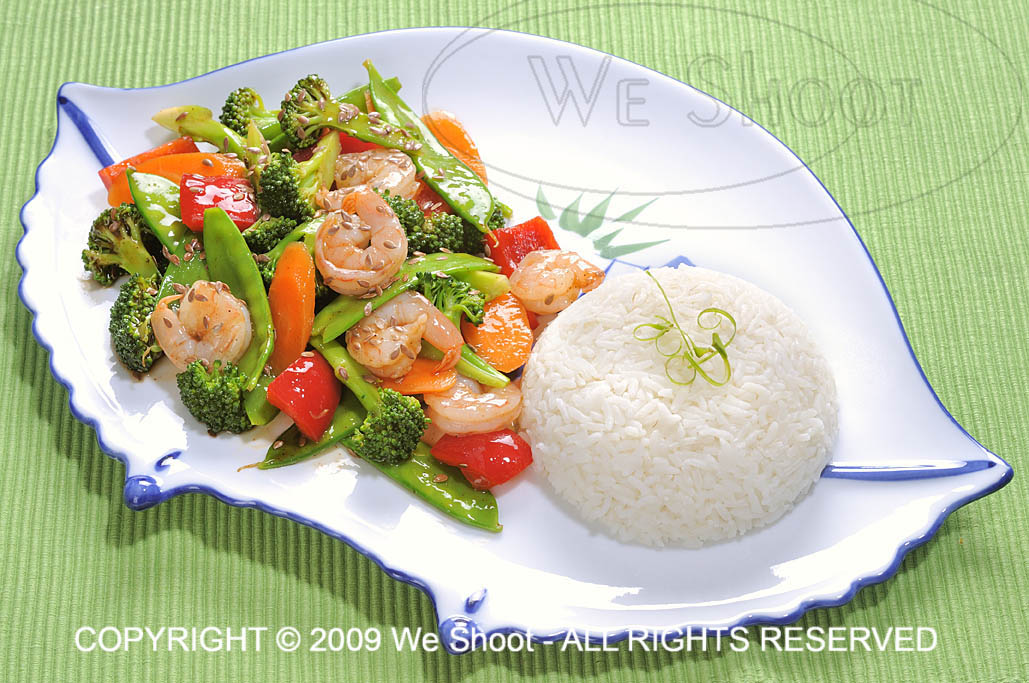
Great food photography all has one thing in common: great lighting, which includes positioning the lighting to better enhance the food.  It is critical.  It all starts there.  See Example 1.

stir-fry

Example 1 - Click on image to enlarge.

See how the glistening highlights make this look juicy and delicious?  To make better-looking food images, the main lighting comes from the back, sides, or above to reflect on the food (in this case with a soft box).  Overall ceiling room lights don’t serve this purpose, nor does a flash mounted directly on a camera.  To see examples of what I see as overall room lighting or direct flash lighting for a similar food dish as Example 1, click here .  Of course, the services of a great food styl ist and a lot of post-production work is done in Photoshop to get the color and look found in Example 1.

It is said that a picture is worth a whole lot of words (1000, 10000, or the amount to be determined by the viewer) .  I say that a great food image is worth that many more sales.  If you are selling food, it pays to do a lot more work creating your food images, or you could hire We Shoot.  You can find us at weshoot.com.

– Gary Silverstein

Tags: food, food photographer, food photography, food stylist, http://weshoot.com, photographer, photography, we shoot
August 19th, 2011  |  Posted in Learning, Tips  |  Comments Off on Food Photographers and Food Photography . . . Are you hungry?

How to take more professional images . . .

Author: weshoot

We just finished a product shoot where the client first tried to take the pictures himself.  That did not give him the results he wanted for his business promotion.   He called a friend with “A really good camera,” and the results were, shall we say, less than stellar.   He called us and showed us the images his friend had taken.   While he indeed may have had a really good camera, his friend lacked the skills and equipment necessary to show the products in the absolute best light (pun intended).   For most product photography, it is all about the lighting and knowing how to use it.   It is not about the camera, lens, or resolution (sufficiency in each is all that is needed).   Quality of lighting – diffused or harsh, color of lighting, and its relationship to white balance are all factors.   Lighting shape is a factor – square, round, or some other shape.   How will the light reflect off the subject?    Using an umbrella to spread out the light when shooting a mirrored surface will show the ribbing in the umbrella in reflection.   Is a spotlight required?   How is that accomplished?   When should one use continuous lighting (such as hot lights), or should one use strobes?   What are the advantages of each?

When we were done and presented the final images to our client, he said that he felt bad that he wasn’t using his friend’s images.   But then he said this was about making money from his business and increasing same, and although he didn’t want to make his friend unhappy, he wanted to use these images to make money.   And that is the bottom line.   I am including some images as samples.   They have nothing to do with the above-mentioned product shoot, but are being used for illustrative purposes only.

Sample 1 is an image I took to illustrate really poor photography.   I used the flash built into a pro-sumer DSLR and the image is badly out of focus (on purpose).   It is underexposed.   It is taken against a dark busy background, and there is no editing whatsoever of the image.   I have seen shots like this on eBay, and even company websites when someone is trying to promote their products – anything from a widget to a building.   Except for the fact that the image cost nothing to create (once the camera has been purchased), there is nothing good to say about it.   In fact, bad photography could be hiding flaws in the product, as far as the viewer knows.   If the photography is bad, whatever the company is selling is suspect – if corners are cut with the photos, what corners were cut with the product?   For a better chance at selling an item with a photograph, a bit of work will be involved.

poor amateur product image

Sample 1 - Click to Enlarge

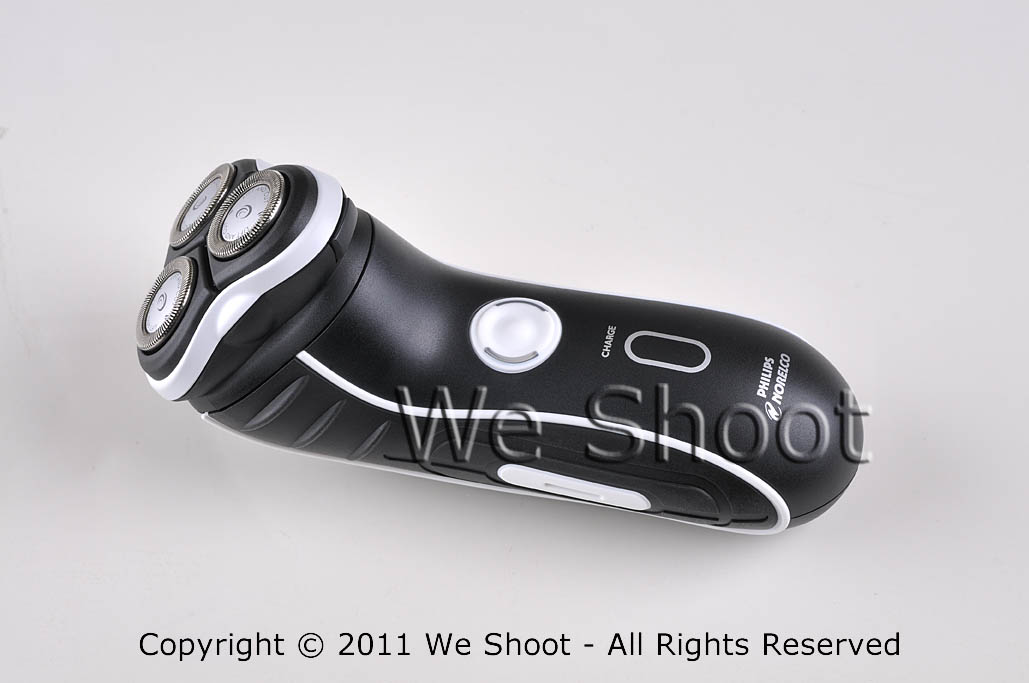
Sample 2 is against a white fomecore background and had two AC-powered studio strobes with soft boxes opposite each other at each end of the shaver to show texture in the shaver, and to highlight  stainless steel cutting heads.   The soft boxes spread light out with very diffused lighting and bring out a lot of detail with no harsh shadows.   There is some minor enhancement with Photoshop in this sample.

Basic well-lighted product image

Sample 2 - Click to Enlarge


In sample 3, I have made a “clipping path” to trace out the shaver from the original background, rotated the image vertically, and made a background layer with Photoshop in which I made a gradient of black and red.   Some more enhancement was done with Photoshop, including making the glowing yellow-green lights on either side of the on-off switch to simulate the look when the shaver is switched on.   Now you may ask why I didn’t take it with the shaver “on,” instead of simulating the look.   First, the shaver probably wouldn’t stay in position with the vibration of the shaver running, and also because I had more control of how it looks in the output this way.

weshoot.com product image

Sample 3 - Click to Enlarge

Now, which sample image would you choose to promote your product?

I will help you get close to sample 2 results, but you have to have some other props and accessories and do extra work to get there.  First get something white (for a dark subject) as a background , like a piece of fomecore.   It also helps reflect white light onto a dark object.   If shooting a light-colored or white object, you might want to go with gray or black as a background to contrast.   Next, go to a store like Lowe’s or Home Depot and buy several clamp light housings (see http://bit.ly/o3p5cP ) and a commensurate number of daylight compact fluorescent bulbs.   This won’t work as well as strobes with soft-boxes, but it will beat using a camera-mounted strobe.   Try different lighting positions until you get the lighting, shadows, and highlights you desire.   You will also need a tripod and a camera capable of taking a time exposure and allowing the flash to be deactivated.   You may also need to set the white balance (check your camera or editing program documentation to see how to do that ).   Make sure to get sharp focus.   Getting too close to the subject reduces depth-of-field, and some part of the subject will go out of focus.   Take several shots at different exposures to get the best one.   It may take more tries to get exactly what you want.

To get to sample 3 results, you will need a photo-editing program, and know enough on how to work with images for given results.   That is not within the scope of this article.  Really good product image editing takes knowledge, experience, and patience.   It can be time consuming and a lot of hard work.   It also helps to know a few enhancement secrets and have a lot of Photoshop experience.  That’s why I still get work, even if my client has a “really good camera.”

– Gary Silverstein

Tags: commercial product photography, product photographer, We Shoot Photography, weshoot.com
August 9th, 2011  |  Posted in How To, Learning, Tips  |  Comments Off on How to take more professional images . . .

Take much better pictures with your camera: Move and soften that flash!

Author: weshoot

For a doctor, the first rule is, “Do No Harm.”  The first rule for better photography should be, “Take the flash unit off your camera (if possible)!” Why? Well, it is an unflattering lighting source, for one.  It is a bright direct light source like the sun.  It produces harsh shadows and high-contrast conditions for your subject.  You won’t see any of that in well-done professional commercial images, unless that is the specific intent .  Just look at beautiful models on magazine covers, or products in a name brand ad.  Remember when someone was telling ghost stories and held a flashlight under their face?  It threw the harsh shadows upward and gave the story-teller a scary look.  Normally, on-camera flashes throw harsh shadows downward on a horizontal image, and to the left or right on a vertical image. A lot of good wedding and portrait photographers use accessory flash units very similar to the one you might use on your camera, but they mount them off the camera.  A lot of these photographers are able to hand-hold their units by mounting the flash to a bracket which moves the flash way above and centered over the lens axis to allow the shadows to drop down behind the subject so they are not noticeable in the images.  When they want to take a vertical shot, the bracket allows the strobe to still stay positioned at center and over the lens axis so the shadows drop down behind the subject. This approach also reduces the chance for “red-eye,” (the glowing red marbles) as well. Another trick is bouncing the light off a diffuser card (attached to a number of modern flash units), or through specific attachments, or putting tissue paper or some other white translucent material over the strobe to mitigate the harsh shadows.

If you don’t want or can’t afford a flash bracket, some DSLR cameras allow wifi remote control of a dedicated flash so you can hold the flash above the camera, or most of these cameras have accessory wires available so you can hold the flash sufficiently above the lens to get the same effect.

A lot of people use point and shoot cameras.  They can’t remove the flash unit, but they can usually turn it off.  It will require the photographer to utilize a tripod or other support for the camera and shoot with available light.  Many of these cameras have different modes or manual controls to allow slower shutter speeds so ambient light can be used instead of that bright, unflattering strobe light.

Try these things, and your images will definitely start to look better.

-Gary Silverstein

Tags: flash photography, getting better pictures with flash, more professional look to my pictures, shooting with flash, weshoot.com
July 28th, 2011  |  Posted in How To, Learning, Tips  |  Comments Off on Take much better pictures with your camera: Move and soften that flash!

There’s an app for that: QR codes

Author: weshoot

* * * * * * * * * * * * * * *

A little while back I noticed that there were these little mottled squares popping up all over the place, and didn’t know what they were. Some digging on the ‘net turned up that most of them are called “QR” codes (for Quick Response). I found out that Smart Phones can download an app (application) that allows the phone to read different bar codes, including QR codes. But what is in a QR code, and why would anyone want to read it? I found that you can put information into a QR code, like an instant link to a website, where the smart phone owner can point the phone’s camera at the code, and get the website up on their phone. Other info can be put into a code, like a phone number, and when read by the phone, will ask if that phone number should be put in the contact list. But I also found that the more info you put into the code, the more complex and sometimes bigger the code becomes. Since I believe that smaller mobile devices will be the communications of choice with our clientele, I have instituted QR codes on our website. If captured from a PC, it will allow those on the go to put our site on their smart phones and they can browse our site while standing in line somewhere during their busy day. I also have a code with our phone number on it, should they decide to reach us that way. I plan to institute these codes on our business cards so that no one with a smart phone has to manually input any of our info. Just another rather efficient way to connect.

I found a free application to make QR codes at http://mobilecodes.nokia.com/scan.htm

– Gary Silverstein

Tags: code, communication, efficiency, efficient, qr, qr code, quick response, there's an app for that
March 29th, 2011  |  Posted in How To, Marketing, Tips  |  Comments Off on There’s an app for that: QR codes

“If It Bleeds, It Leads”

Author: weshoot

As Benjamin Franklin purportedly said, “believe none of what you hear and half of what you see,” and as my father added: “and 10% of what you read.” A bit cynical, perhaps, but, then again, is it? These wise men’s quotes remind me of a Spencer Tracy/Katharine Hepburn movie, where Tracy, as a newspaper editor, says, and I’m loosely paraphrasing here, “Bring me a tear jerker of a story, something to grab our readers.” This exemplification of the media staple, “if it bleeds, it leads,” leads me to a topic I believe shouldn’t go unaddressed. The news of the day leans too much on the old media axiom, “Sensationalism Sells.” What can we really believe?

But enough quotes. Let me give you some of my ideas – quote me if you like! Because so much of the media stories in respect to the economy are an attack on our psyche, we sometime s react as we would to any stab to the heart and go where it is trying to lead us. Down. Closely evaluating what we hear and read for its accuracy (and, more importantly, for the whole story) is crucial. If we are so easily influenced by all that we hear and read, shouldn’t we more thoroughly think it through before we react to it? As with all we see and hear about the economy, another couple quotes come to mind. “Take it with a grain of salt,” and “there are no absolutes.” We need to be positive about our work in respect to this economy. Through all we read and hear, good things can happen and will happen.

Lately we hear a lot about how the economy is turning around, but at a slow pace, and since my tendency in hearing this is to be optimistic, especially since I’ve always reacted cynically to the negativity, I go around spouting the “think positive” mantra. Just uttering the words, “if you think positively, positive results follow,” makes us all feel better, right? But I believe it’s more than just a cliché. Words intended to make us feel good can actually make us feel good, so why not lead with that attitude in all we do? As my mother-in-law would say, “it can’t hurt!”

Sure, many of us have been out there in the business world trying to drum up business, to no avail. We’ve expressed our interest in working with someone in a positive way. We’ve put on a smile and a suit and a snap to our walk. And the result? “We’ve got nothing now, but don’t dismay. When the economy turns around, we’ll be in touch.” Well, the economy is turning around. There’s reason for optimism. We will succeed.

And we will. The next time you hear something negative about the economy, remember it’s never the whole story. And the biggest part of the story is you. How you make it happen. How you turn things around. The steps you take. But then again, what do I know? This sounds an awful lot like something I read.

– Dione Benson
3.17.11

Tags: economy, information, media, misinformation, overreacting, quotes, reportage, the whole story
March 17th, 2011  |  Posted in Tips  |  Comments Off on “If It Bleeds, It Leads”

“Photography is so easy . . . Why does a pro charge so much?”

Author: weshoot

Note:  This article explains why pros like us charge what we charge and why we get it.


First, the long answer.

Photographers in the “ business” of photography don’t view their business as a hobby. The motivating factor is income. The average hobbyist – a nonprofessional – sees photography as an enjoyable pastime, and receiving money for their photography, although a nice addendum, is not the reason they engage in the activity. A hobbyist can be at several levels, from a novice to an accomplished photographer, but a pro has to always be at the top of his or her game to compete. After all, no professional photographer’s client wants to pay for sub-par images.

An amateur may show his shadow or reflection in the final picture, while a pro would never think of submitting such an image to the client. A nonprofessional photographer – an amateur – takes snapshots. “Click!” A pro may take a quick shot, but he or she quickly calculates variables to get the best possible shot, from the sun’s angle, to shadows, to exposure. To avoiding including as little as possible of his or her shadow so as to be less difficult to remove post-shoot. Getting closer to the ground or framing the subject through another object may not only get a more enticing image, it may as well eliminate the photographer’s shadow. Every little detail of an image is considered while shooting. Visualizing the image as a finished product, in two dimensions on a computer screen or in a print, is an essential part of the professional’s job.

Let me provide you with an example of work we do for a particular client to help illustrate the mark of – and the necessity for – a pro. This client, an out-of-state advertising agency, commissions our work for their client (a bank), sending us to many locations a year to shoot specific subjects (and other subjects we deem suitable) in the community around their branches. From our submission, our client chooses a number of images to be displayed in each branch for which we shoot. Requirements for these shoots include high-resolution images in a vertical, black and white, gray-scale format. If our images are submitted by FTP, they can be high-res jpegs; if delivered on DVD, they will be tiffs. No horizontal or color images (not even as sample images) will be accepted, so every sample image we send has been first converted to black and white. We have done a large number of jobs for this client because we deliver what they want, what they need. They expect artistry in taking the images and artistry in executing the post-shoot processing of each of our images.

Let me lead you through the workflow on the assignments we do for this agency. With the assignment comes a list of specific things in the community to shoot. We travel to the community, some as near to our studio as one hour, some as far as a day’s drive. We arrive in the community with maps we have printed up from our research of subject matter our client has shown primary interest in, and then we drive around to locate other targets we see as appropriate for this client. Leaving before sun break may be necessary for some objects of interest, knowing that a low-sun angle may cause our shadow to appear in the image, and conversely, if we are facing the sun, flares may occur (especially with a wide-angle lens), resulting in noisy silhouettes or blown-out skies. We are sometimes asked to shoot on a deadline in the rainy season, meaning diminished shooting days and hours. While shooting in the rain with its accompanied white or gray sky (cutting contrast, for just one example) can be dealt with, mist on the lens will ruin an image and must be carefully monitored. We also don’t typically shoot higher than 400 ISO, as this usually introduces an unacceptable amount of video noise to the discerning professional eye, especially in the shadow areas, but sometimes it must be done.

A discerning professional eye also abhors low-light conditions, so a portable flash mounted on a flash bracket is a necessary part of the equipment bag. One never knows when having a little more light could come in real handy.

You may ask what’s the big deal about shooting black and white. Simply set your camera to black and white, right? Well, after some experimentation, I found that our Nikon cameras’ black and white mode still shoots the raw images in color, and the camera is merely adding a black and white filter to the image. If I take the image in b&w mode, I can remove the b&w filter in Nikon’s raw editor, Capture NX2, or if I run it through Camera Raw in Photoshop CS5, it doesn’t see the filter that was put in by my camera, at all. So, I don’t even bother shooting it in b&w in the camera. I add it later as a layer in Photoshop CS5, which gives me more options in the look of the image.

So, let’s say that I take a close-to-perfect image. What happens then? The amateur can take the memory card to a camera-store kiosk to output to disk or print – enhanced to the kiosk program’s ability. Or, the amateur can elect to work on it himself, let’s say with Photoshop Elements, a relatively inexpensive program that produces good results. Great for the amateur photographer but a program which pales in comparison to the immeasurably more professional Photoshop CS5 and the raw editing of the aforementioned Nikon Capture NX2 – both incredible programs costing – and worth – much more.

Using the raw editor, I weed out the images that are not up to the caliber I wish to present to my client. Yes, even pros have camera movement, out-of-focus and under- or overexposed images. These are discarded. During the shoot, we take several images of the same thing, one of many differences between a pro and an amateur. This backup is further enhanced by using two different cameras and, when possible, two different shooters. One camera has the long zoom (18-200mm), and the other has an ultra-wide angle zoom (10-20mm) lens. If for some reason the subject isn’t captured successfully by one photographer, it is captured by the other. Consequently, we have several versions of the same subject from which to choose the very best for the client to select from.

All images that pass muster are then further evaluated with the raw editing program. Adjustment of density (lightness and darkness). Selection of the most accurate and impressive color. Saturation. And mild sharpening. The images are then converted to tif images, labeled with our copyright and other information from the image metadata.

Another place a professional such as myself is different than an amateur is hard-drive space. Hard-drive space is a commodity to me. I buy new one-terabyte drives to replace those that fill up. None of our professional images are erased to make room for new images. All work is stored on multiple drives. There’s never enough backup. Images are lost by the client – disks are misplaced – more times than I wish to count. It’d be death for my business if all I saved an image to was one drive and I got that fateful call from a client, and had a drive failure. In the long run in terms of both time and money, it is cheaper to save an image to the hard drive in perpetuity than it is to burn it to removable media (CDs and DVDs). This, of course, adds expense to the business. But it makes me more efficient. And takes up less room in my studio.

I now take the color tif images I made in Capture NX2 and bring them up in Bridge, the sorting program that comes with Photoshop CS5. Next, I open a number of them in Photoshop, magnifying each image to 100%. Having a powerful computer system with lots of processor horsepower and ram to run these programs is of immeasurable value, increasingly necessary to the professional with a large workload. I am currently running an i7-950 processor, and 12-gigs of ram with eSata internal drives and USB 3.0 external drives, a time saver for the loading and processing of the high-res images delivered by my cameras. Again, a necessary business expense. When efficiency and high quality are needed, sparing no expense is first on a professional’s business agenda.

At 100% magnification, I scrutinize each image for imperfections. A dust mote on the sensor can have the appearance of a fuzzy “ball” in the sky, and it needs to be touched out. If a distracting shadow or reflection was also captured in an image, that will need retouching work, as well. If a building’s sides aren’t straight (a distortion caused by the lenses and the angle taken), I will bend the image to make them so, if it enhances the look. Even if our client doesn’t demand it, cigarette butts and other things that distract from a good-looking image are removed to make it a better image. Providing a client with the best – from the image samples to the finished product – is a mark of a professional.

At this point, it is time to turn the image into a psd, or Photoshop, file. I then use a “black and white adjustment layer” in Photoshop to take away the color. Oftentimes, the b&w image will look “flat,” lacking contrast. There are several software filters available in Photoshop. Years ago, when using b&w film, a photographer might use a colored filter to enhance an image. A red filter, for example, will produce a dark or black sky with white clouds. Infrared film will produce white foliage. Photoshop has filters that mimic these traits in a b&w digital image, and can be modified as well. Or I may choose to add contrast or a light or dark sky, or make a “soft-light” layer and darken or lighten some section of the image only. The image is then saved as the layered psd file in case additional changes have to be made. At this point the image is still in color with adjustment layers. Once I am happy with the image, I “flatten” all the layers to one and save it as a gray-scale tif in another folder. When all of this is accomplished (my last job with this client totaled 107 and took several days), I prepare the images for my client. I use an “action” in Photoshop to automatically save a reduced-size version of each image in another folder as a low-resolution jpeg, and then I prepare another folder for additional backup. I then bring up every image in that folder in Photoshop, and use a brush “stamp” to put our “We Shoot” watermark on every one. But I am still not done. I then make a single “zip file” of all of these images to transfer to the client by FTP or into their drop box. I advise them, usually by email, that they’re ready to see, and they unzip the file with their unzip program to see all the images. I then await their notification of the image numbers they want in final high-resolution, sending them the images on disk, via FTP, or to their drop-box.

Why does a pro charge so much? When photography is so easy? Besides the photographic and post-production time and expense involved in making a successful image, it’s more than just love of the art. It’s knowing our work will make our client successful, increase their return-on-investment, and keep them coming back for more.

And the short answer is, being a professional – being able to provide high-quality photography to a client – costs money. We fulfill a need for a client who needs high-quality images, and we need to make enough to continue to provide high-quality business to our client. It makes our client money, and it makes us money. A successful image goes a long way in helping to sustain a successful business – a professional business – for our client and this pro. A win-win for all concerned.

-Gary Silverstein

raw image representation

Jpeg made from unedited raw image

color after editing

Jpeg of raw image after editing

black and white final image

Jpeg of final black and white image


Tags: black and white, color, commercial photographer, photographer, photography, professional, professional photographer
December 14th, 2010  |  Posted in Learning  |  Comments Off on “Photography is so easy . . . Why does a pro charge so much?”

Time for a Cold One . . .

Author: weshoot

Do you ever wonder about the frozen foods you purchase?  There is a whole industry working in the background to make sure your frozen food remains frozen while being stored and shipped.  An industrial engineering client of ours,
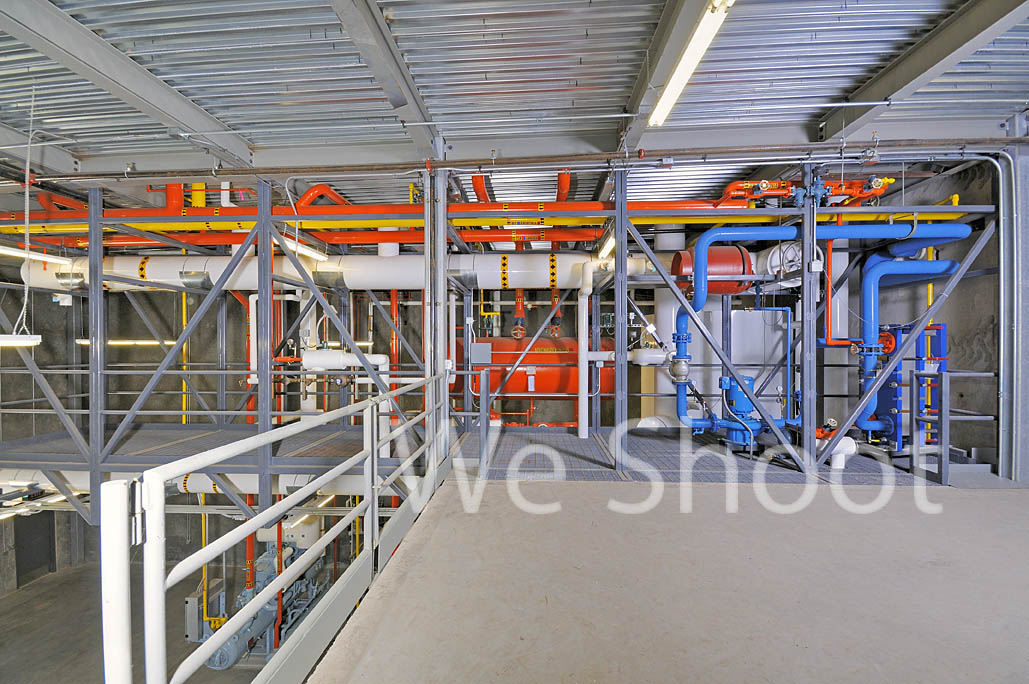
PermaCold Engineering, Inc., creates and installs machinery to keep the frozen storage industry frozen.  I’m not talking air conditioning here.  I’m not talking home freezer cold.  I’m talking keeping cold an area the size of a football field.  Serious refrigeration.  Fifteen degrees below zero Fahrenheit inside, ninety degrees above zero outside.  From hot to cold, all in the same facility.  Workers go in and out of this environment constantly.  As industrial photographers, we are tasked to brave all of these temperature variations, documenting the incredible machines and electrical and piping structures they build to make it all work.

 
If you want to shoot this kind of photography, be prepared to travel.  Since exterior shooting at one Oregon facility needed to start at 6 a.m., due to sun and building positioning (and not wanting to leave our home base at 3 a.m.), we opted to go to Oregon the day before to shoot exterior angles with sun on them late in the day while site-walking to get the “lay of the land.” 

In addition to being skilled in industrial photography, when shooting a cold-storage facility, architectural photography expertise is essential since shooting facility interiors and exteriors are a given.  In shooting architecture, unlike other forms of product photography, the product (building) and the lighting (sun) can’t be moved.  Exterior shots entail optimum positioning of the sun.  When shooting ultra-wide-angle lenses, lens flare may occur on the lens elements whether it’s a bright overcast sky or a direct sun.  Try retouching these flares in your editing program and plan on a bear of a time-consuming job. 

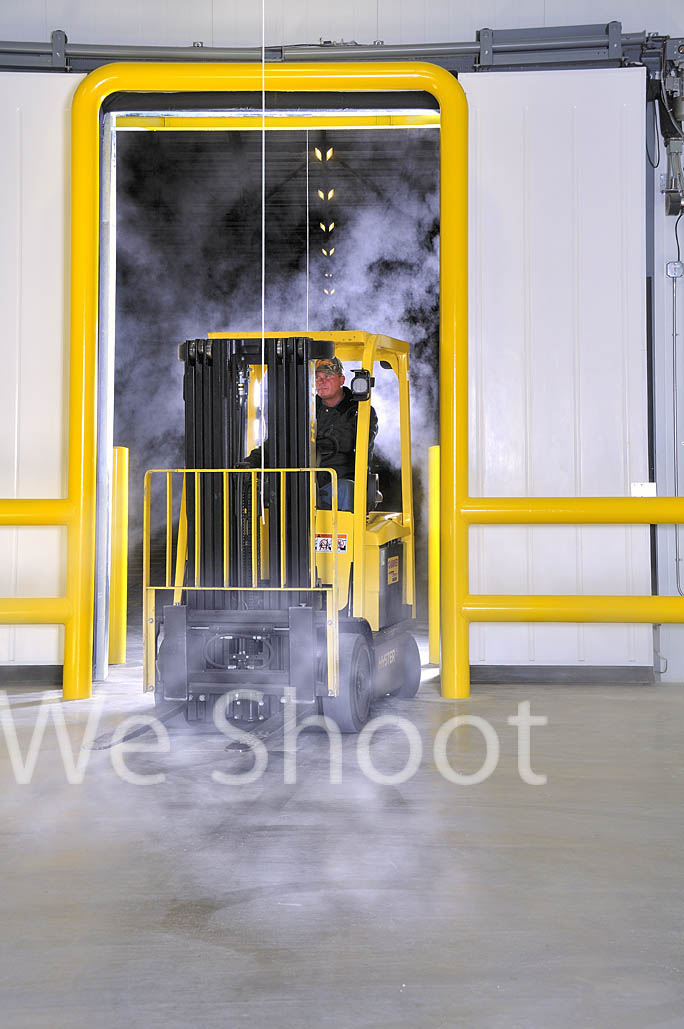
Day 2 of the Oregon facility shoot started at 6 a.m.  The shadows were still a bit long into the parking lot, but figuring we’d get our shadows out of our images with Photoshop, we began shooting one side of the building right away as there were no cars parked in front, giving us a clear shot.  After the doors were opened, we shot inside the loading dock, including the length of the dock and details such as glycol valving.  Next came the automatic sliding doors going into the main freezer and since our client wanted an image created with a forklift being driven out of the automatic doors, with condensation vapor around it, this came next.  Setting up a studio strobe in the freezer to backlight the lift and driver made for a beautiful shot.  See Image #1. 

Image #1

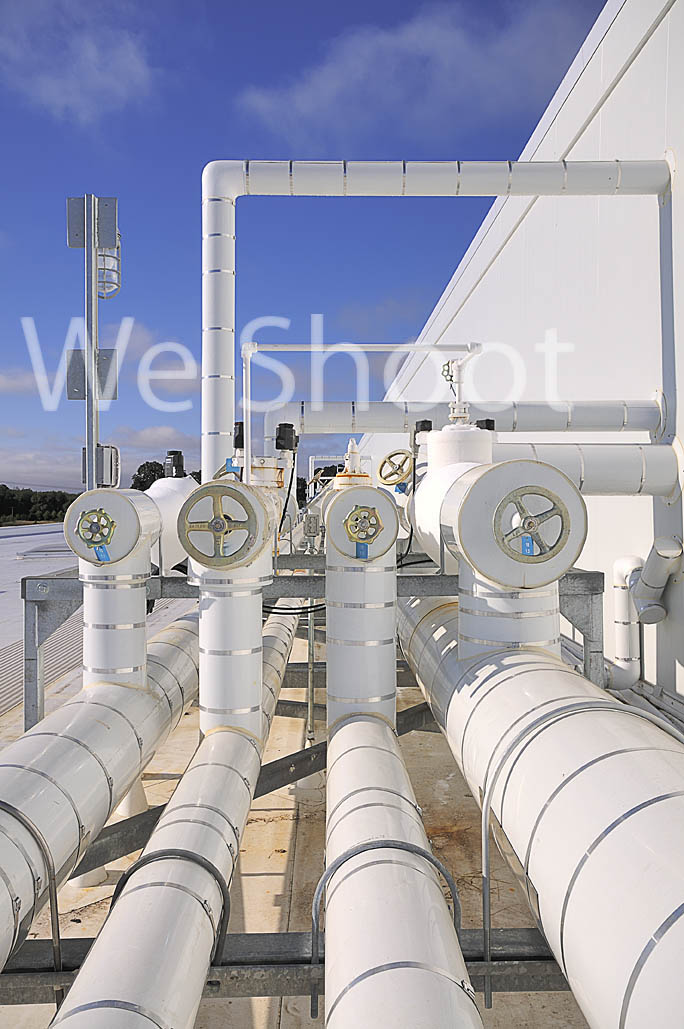
Next, on to the roof.  Up two flights of ladders.  Not ladders in the classic sense, but stairs with narrow steps where feet are placed sideways to make full contact.  Once up the stairs, a hatch in the ceiling brought us onto a roof with white rubberized coating to reduce heat from the sun, and piping of either shiny metal or a white outer pipe enclosure with insulation over the inner pipe.  See Image #2.  Due to considerable glare, the whiting out of image detail is a factor we needed to overcome.  (Think capturing detail while shooting white snow.) 

Image #2


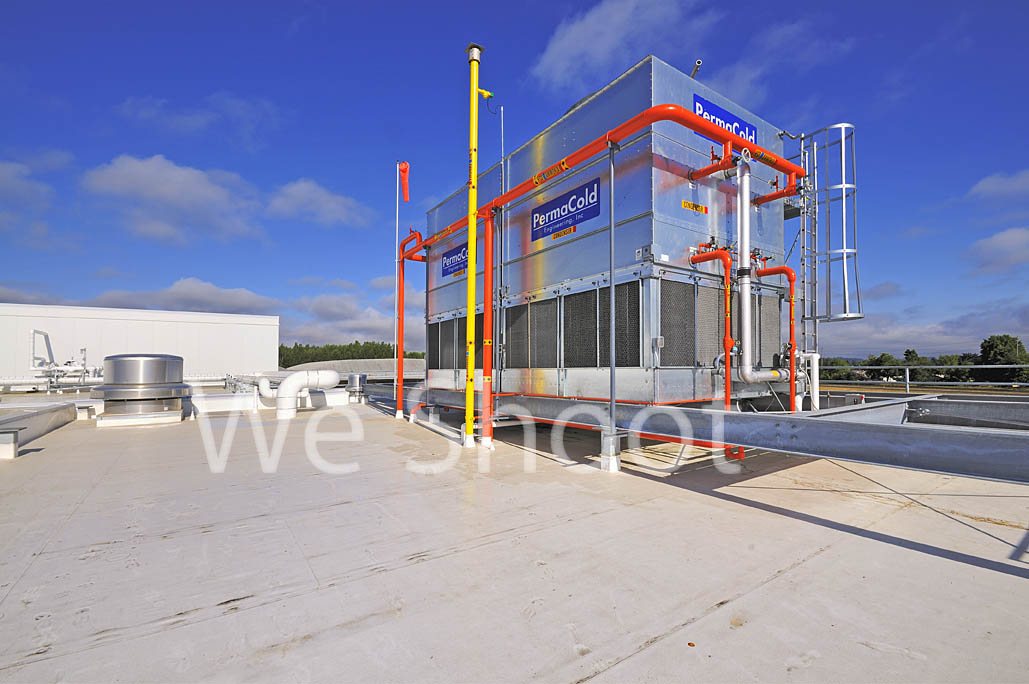
With the temperature in the 90s, in and out of the piping we maneuver, taking a lot of roof images, including a refrigeration condenser as big as a small two-story metal house.  Housing multiple person-sized fan blades, this unit can make quite a loud roar.  See Image #3. 


Image #3

Down the ladders we go to the engine room, an important area to our client because of its unique two-level design.  The upper level has a catwalk with piping and other apparatus.  Not having enough light for good images, up the narrow stairs to the catwalk we strobes, strobe batteries (20 lbs. each), light stands and umbrellas in hand.  See Image #4.

Image #4

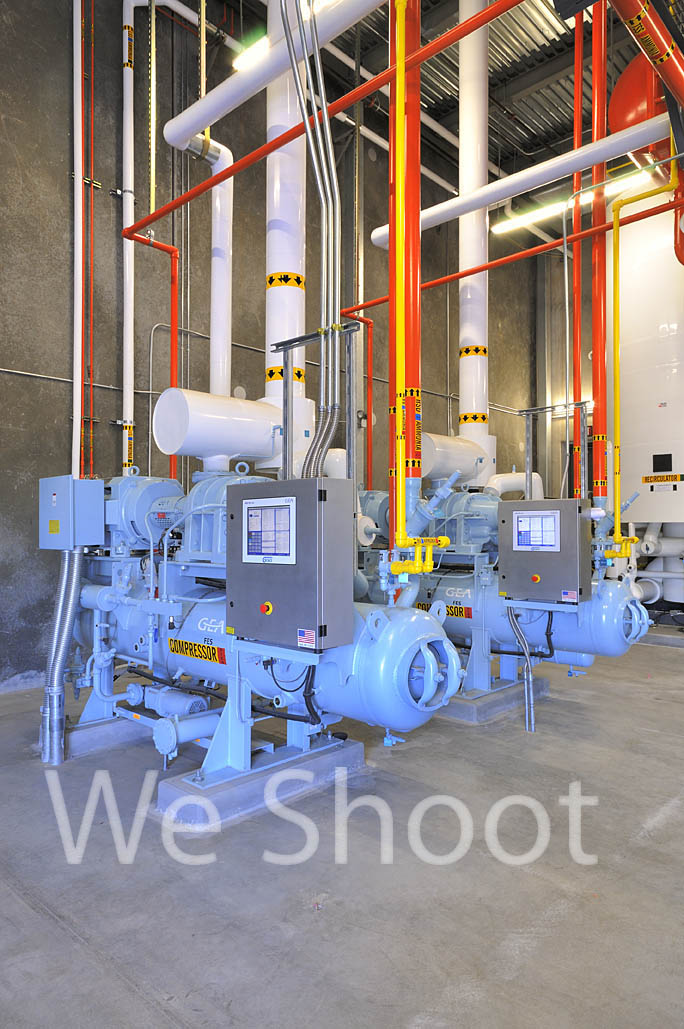
After shooting the upper level, we head down to the lower level to shoot several hours of pipes, pumps, and tanks, with the aforementioned lighting utilized for many of the images.  See Image #5. 

Image #5

After a short break with an apple and sandwich, it’s time for the freezer.  It waits for us with brutal cold.  We enter the chill with the wide-angle lens camera for the overall freezer.  The camera with a longer 18-200 mm zoom for a detail shot of an evaporator three stories above us will be retrieved later.  Each camera will last about 20 minutes before it freezes or its batteries weaken.  Figuring a face will not last much longer, on goes the ski masks.  No more frozen faces for these shooters.

We normally take nine different exposure levels of each view to get a good lighting spread, but, in this environment, time is of the essence so we limit it to five.  Using a higher ISO than we would use elsewhere to make higher shutter speeds possible, we take a number of shots from different vantage points. 

Now it is time to retire the wide-angle camera and get the longer lens camera.  The camera and lens go in a clean plastic turkey oven bag, the air is squeezed out, and the bag is sealed with a tie.  The bag and the camera are cold and dry, keeping condensation from forming on the camera and its guts.  We leave the freezer, put the camera in its bag, and take in the long-lens camera.  The tripod was left in the freezer so as not to get wet with condensation and quickly freeze when taken back in.  The tripod head has grease on its pivots and it freezes anyway so we slowly get it moving again.   It pays to remember that metal is brittle at this temperature and can shatter or crack if too much force is applied.  We take the rest of the images and prepare the long camera to leave this environment as we did the wide-angle camera.  The cameras are now useless to us for the rest of the day.  If taken out of the bags, they would get wet, the lens elements would frost over, and moisture would form between the elements, resulting in mold.  So the cameras and we are done for the day. 

An exciting day in the freezer no matter how many layers makes for numb bodies, but the wonderful memories, new friendships, and the great photography make one warm all over.   So bundled and warm down the long road we go.  The next stop is a quick rest and many days of editing great images for the eyes of our client.  And us?  We’re ready for the next cold one . . .

-Gary Silverstein 

Tags: ammonia cycle, cold, colder, coldest, commercial refrigeration, freeze, freezer, freezing, frozen, refrigeration
October 26th, 2010  |  Posted in How To  |  Comments Off on Time for a Cold One . . .

Color and Calibration . . .

Author: weshoot

As any good digital photographer knows, the color and brightness varies from monitor to monitor.  That is why it is very important for a pro photographer  to have a professional-style monitor to go along with all that other special and expensive equipment, along with a method of color calibration that is not subjective.

Some would argue most monitors are great these days.  Even inexpensive ones.  The truth is that most low-cost monitors have too bright a back light and cannot be accurately corrected.  A light pink, light yellow, or even light green color will be blown out in a print. I don’t think you would want green concrete in your final image of your new building (unless the concrete really is green).

There are different technologies at work in different types of LCD flat-screen monitors.  Some are better suited to gaming and can be low-cost.  Some are better suited to image editing, and tend to be expensive.  At We Shoot, we go for the latter type.  We want to do our best at getting accurate color and density for printing, and for online images for our clients.  We create architectural, industrial, product, food, and engineering photography for a diverse group of business entities.  Printers have told our clients that they are happy with our work because it makes their work easier.

We are currently employing a software- and hardware-based solution to color correction on a regular basis.  Our system reminds us of when our display should be corrected to keep our system at tip-top readiness.  Our display is color-matched to the sensor system and w as purchased as a matched set.

We feel that our clients are the most important people in the world, and they deserve nothing less than the best. We show it in our photographs, and our dedication to excellence.

-Gary Silverstein

Tags: calibration, calibrator, color, display, displayed, flat-screen, icc, lcd, monitor, profile, sensor
October 5th, 2010  |  Posted in Tips  |  Comments Off on Color and Calibration . . .

<< Previous Next >>

  • Categories

    • How To (21)
    • Information (548)
    • Learning (30)
    • Lighting (179)
    • Marketing (291)
    • Photographs, Images (545)
    • Tips (38)
    • Uncategorized (2)
    • video (13)
  • Archives

    • September 2025
    • June 2025
    • May 2025
    • April 2025
    • January 2025
    • December 2024
    • November 2024
    • September 2024
    • August 2024
    • July 2024
    • June 2024
    • May 2024
    • April 2024
    • March 2024
    • February 2024
    • December 2023
    • November 2023
    • October 2023
    • September 2023
    • August 2023
    • July 2023
    • May 2023
    • February 2023
    • January 2023
    • October 2022
    • September 2022
    • August 2022
    • July 2022
    • March 2022
    • February 2022
    • January 2022
    • December 2021
    • July 2021
    • June 2021
    • May 2021
    • April 2021
    • March 2021
    • February 2021
    • January 2021
    • December 2020
    • November 2020
    • October 2020
    • September 2020
    • August 2020
    • July 2020
    • June 2020
    • May 2020
    • April 2020
    • March 2020
    • February 2020
    • January 2020
    • December 2019
    • November 2019
    • October 2019
    • September 2019
    • August 2019
    • July 2019
    • June 2019
    • May 2019
    • April 2019
    • March 2019
    • February 2019
    • January 2019
    • December 2018
    • November 2018
    • October 2018
    • September 2018
    • August 2018
    • July 2018
    • June 2018
    • May 2018
    • April 2018
    • March 2018
    • February 2018
    • January 2018
    • December 2017
    • November 2017
    • October 2017
    • September 2017
    • August 2017
    • July 2017
    • June 2017
    • May 2017
    • April 2017
    • March 2017
    • February 2017
    • January 2017
    • December 2016
    • November 2016
    • October 2016
    • September 2016
    • August 2016
    • July 2016
    • June 2016
    • May 2016
    • April 2016
    • March 2016
    • February 2016
    • January 2016
    • December 2015
    • November 2015
    • October 2015
    • September 2015
    • August 2015
    • July 2015
    • June 2015
    • May 2015
    • July 2014
    • June 2014
    • May 2014
    • September 2013
    • June 2013
    • March 2013
    • February 2013
    • January 2013
    • December 2012
    • October 2012
    • July 2012
    • June 2012
    • May 2012
    • March 2012
    • February 2012
    • December 2011
    • September 2011
    • August 2011
    • July 2011
    • March 2011
    • December 2010
    • October 2010
    • September 2010
    • July 2010
    • June 2010
  • Meta

    • Log in
    • Entries RSS
    • Comments RSS
    • WordPress.org

Copyright © 2026 - weshoot.com | Entries (RSS) | Comments (RSS)

WordPress theme designed by web design