Weshoot.com

The Official We Shoot Blog

  • Home
  • About
  • To Comment

Saving and backing up images . . .

Author: weshoot

A file saved on a computer isn’t a secure file, unless it exists in at least two different places.  If it exists on two different hard drives, or a hard drive and a DVD- or CD-Rom or more drives or disks, then it has a greater chance of being secure.

Years ago, I would copy my image files from the camera’s memory card to my C: drive and work on them and save them back to the C: drive and when completed to a CD-Rom disk.  I had a CD go bad on me once, with the only copies of some files for our then main client on that CD.  I panicked.  Even though that job was “finished,” if the client called and wanted others on that disk or said they lost the original disk, I would have to say I lost the data.  I contacted many people, and no one could repair the disk.  The drive would not recognize the disk.  I finally located a company in the Bay Area who recovered the files on the disk and burnt them on another.

I made sure all media was good from that point on by checking every image on the disk and making sure all of them would open.  I would also keep copies on my hard drive as long as I could.  At some point, the CD and DVD+ RW had come out, and, although expensive, I was able to keep the data a little safer with more copies.

Hard drives started getting less expensive, and I bought an external 500-gigabyte USB 2.0 hard drive as a back-up drive.  I was still copying the files to DVD-ROMs when the job was finished, clearing the space on the main C: drive in my computer, but leaving it on the external back-up drive.  I at least had two copies of my files to make them more secure.  One day, I went to access a file on that back-up drive, and the screen went black.  The back-up drive ground to a halt.  It never restarted.  I didn’t lose any files as they were still on my main drive and on disk media.  I replaced the 500GB drive with another brand and it was 750GB.

About a year later, I decided USB 2.0 hard drives were relatively cheap, and it cost about the same as several hundred DVD-Rom blanks, so why not back up onto two external drives, and, when full, inventory them, disconnect them from the computer, and store them until images on them are needed.  Since I am mirroring the data on two external drives, and since one is full prior to the other, as long as I have an inventory, I can find any files I am searching for.  I no longer have to waste time burning DVDs and proofing every image on them as I already have done that on the hard drives.

My current setup is an ultrafast PC with two internal eSATA one terabyte drives, in non-raid configuration.  All images are first saved to only one of the internal drives.  One drive has all the programs and my document libraries on it with lots of room to add more.  The other internal drive has mostly images on it.  Once I work on an image on the internal drive, at the end of the session, I copy it to each of the external USB 2.0 drives.  This give me 3 copies of each file, guarding against loss.  The USB 2.0 drives are a bit slow for the huge amount of data that pours from the eSATA drive in the computer.  Once I start the copying, I can go and have a cup of coffee and when I return, the copying is usually done.  I just retired the 3/4 terabyte (750GB) drive as it had less than 10% free space left.  I don’t think it is a good idea to fill a drive completely, as drives need some free space to efficiently move the data around when reading and writing.  Since USB 3.0 is now available, I purchased a new one-terabyte drive, and also upgraded to a USB 3.0 host adapter card with two external ports and a bridge inside to allow upgrading to two faster eSATA  drives in the future.  I could have purchased a two- or three-terabyte drive instead, but I think one terabyte is inherently safer.  Drives run all the time and will wear out at some point, maybe before filling up.  I think one terabyte will probably be full before it will fail and will be a good storage medium since it will only be called upon to provide an image that is no longer available to the computer from other means.  And, in the end, I will still have at least two copies.  I am gambling a little more money buying separate smaller drives, but that is the way I deal with it.

One remark I will make is that the USB 3.0 is way faster than the USB 2.0 drive it replaced.  And I have cut the amount of work I have to do to back up my files.  I will have a little less expense when I replace the other USB 2.0 drive as I don’t h ave to buy a host adapter card for it.

If you have images or other important files you really care about, do yourself a favor.  Back those files up on separate media and/or hard drives.  You’ ll be glad you did.

For those of you who want a freeware inventory program that I found on the ‘net that seems to work well, go to the contact page on our website at http://weshoot.com, email me, and I will send you the link to the download page.  It can be used to inventory media and hard drives that later will be separated from the computer.

-Gary Silverstein

Tags: back-up, backup, copy, copying, data, file, hard drive, image, save, saving, USB
September 9th, 2010  |  Posted in Tips  |  Comments Off on Saving and backing up images . . .

New Technology . . .

Author: weshoot

A couple of months ago, a bit of new technology for editing images was announced.  Adobe Photoshop CS5 was available for purchase.  At the moment, I have CS4.  Previously, I used CS2.  I usually skip one iteration of the program to justify the expense and pain of buying and installing it.  However, the newest version has something called “content aware” that, if it works as advertised, will be a great time saver and make my life easier.

I am usually able to upgrade at an affordable price, as I spent what I considered a lot of money some years ago, buying the program at full price.  Adobe allows upgrades to go way back.  They still even allow you to upgrade from CS2 at the same low price at which I am able to buy it.  Some people look to get pirated versions of this program to get a lower price.  My advice is:  don’t do it.  Adobe has figured out how to make the real program inoperative without legacy key numbers and a new key number to unlock the program.  Buy from a reputable seller.  Amazon may be reputable, but every seller on Amazon may not be.

No matter how much technology costs, we all have to deal with it to get the job done.  I felt the one new feature was worth the money it cost to upgrade, as well as it having several other attributes.

One complaint by professionals on a retouching forum on the ‘net is basically, “There goes the neighborhood,” about the relative ease the new program adds to retouching, allowing amateurs to retouch with aplomb.  Don’t be too dismayed.  There still is a barrier to entry.  The cost for the full program at Adobe is close to $700.00 USD.  Even if somebody can afford to buy the program, it doesn’t make them a Photoshop expert and know how to get the most out of it.  Many who have it don’t know how to really use it.  However, these people tend to give the work away, and it affects the price true pros can charge for their work.

Frequently, I am told, “I need it yesterday.”  Clients seem to wait until the last possible minute before contacting a photographer.   I therefore want to make it so I can turn the work out faster and easier to meet that challenge.

So, if you want to call yourself a professional, you have to buy into it.  It may mean doing without something else in order to stay current.  Less lattes can mean more Photoshop or more computer memory.  I am not talking about some secret weapon that will let you get a jump on the competition, but to stay even.  It may be fun, but more often, it is a business decision needed to get the work out. 

-Gary Silverstein

Tags: competition, competitive, cs4, cs5, current, edit, forum, Photoshop, retouch
July 19th, 2010  |  Posted in Tips  |  Comments Off on New Technology . . .

Shooting a new product . . .

Author: weshoot

Shooting a new product is something commercial product photographers face all the time.  Sometimes the client has ideas about how it’s supposed to look, sometimes not.  At times, it is easier to give the client the look he or she wants, if they spell it out, as opposed to “You’re the photographer.  You come up with a great image.  You’re the pro.  That’s what you’re being paid for.”  Or something to that effect.

The following product shoot fits the latter scenario more than the first:

I had three bottles of an inexpensive nail polish to shoot.  The bottles contained glitter.  I wanted to show the bottles to be more powerful than they are.  After all, from my perspective, if one is seeing the nail polish in an ad, it should appear to be, well, more than nail polish.  The bottles themselves were less than perfect.  In a big money promo shoot, a photo stylist will sift through many bottles to find the perfect ones.  Sometimes the manufacturer supplies the products, and sometimes the stylist has to go to several retail outlets to get the most perfect props for the image.  In the case of the nail polish, it was three colors of glitter nail polish – a red, an orange, and a green.  In this case, it was a low-budget shoot, meaning no stylist.  Also, I found only one local outlet for the product, and they had a limited supply.  So, I picked out the “best” bottles.

Next, I had to prepare them for the shoot.  Cleaning dust and fingerprints off needs to be done.  It is harder to remove these blemishes with editing software than cleaning the bottles physically.  I used an anti-static cloth, and a can of Blow-Off to remove the aforesaid marks and dust.

I placed them on a translucent white square mounted over a studio strobe.  This lights them from underneath and eliminates shadows.  It also provides white light behind the clear parts of the glass.  See setup image below, example 1.

After adjusting three studio strobes and the camera for the exposures I wanted, I then captured the image you see in example 2. As you can see, the color is way off due to the lighting changes, so color correction was in order.

With numerous changes made in Photoshop, including adding more glitter than I could get from lighting alone, I created the image in example 3.  Glitter comes from adding a small light source to shine on the glitter.  I used a bare bulb on one strobe and shut off the strobe part so the modeling light would act as a small light source (hence the yellowness in example 2).  I increased the time exposure to allow that bulb to put enough light on the subject to appear bright against the instantaneous strobe light.  I also used a “mine flashlight” (the green object to the left front of the nail polish bottles in example 1) to shine on the bottles.  I additionally added small specs of glitter to the bottles with a “bling brush” in Photoshop in several colors.  I had to add the colors and rectangles and shadowing to the background.

What if I told you that given the “You’re the photographer . . .” speech above that once the image was shot, there were several tries with internet communication about colors and backgrounds before the client was happy.  Like I said, it is sometimes easier to make the client happy when they have a clear image of what they want, and they convey that idea to the photographer.  Otherwise, it is a real challenge to guess what the client will like, and it may take several tries.

In the end, it is nice to see the finished product.  But very few know how much work and dedication go into that finished product.  Now you have an idea.

-Gary Silverstein

Example 1 - Click on image to enlarge.

Example 2 - Click on image to enlarge.

Example 3 - Click on image to enlarge.

Tags: advertising, glitter, Marketing, nail polish, photograph, photographer, photography, promo, promotional
July 8th, 2010  |  Posted in Learning  |  Comments Off on Shooting a new product . . .

Losing track of why we market!

Author: weshoot

My partner and I frequently hear, “Professional photography is not in the budget.”  Or, “We have no budget for photography in our marketing.”  But the issue that keeps cropping up for me is that I think these companies lose sight of what is really important.

First, if a company is marketing itself, how many of them think that prospective clients really have time to read a lot of text about their company?  Since most marketers know that time is of the essence, photographs say a lot more than words do in a short period of time.  If the company markets itself with substandard images, e.g. underexposed, blurry, or just plain amateurish shots, what does the prospective client think?  The client subconsciously thinks that what this company does is shoddy work and it is mirrored in the substandard images!  The real problem is that the selling company sees gre at photography in the light of what it costs as an expense instead of what it costs for the bottom line.  Why do you think Target spends so much money and time on those TV ads?  Great photography translates to a fatter bottom line for Target.

The other day, I received a brochure in the mail from a local hospital.  It had a number of what I would say are stock shots:  happy, smiling people dealing with the hospital as patients or employees.  To the untrained eye, this was acceptable.  However, the only image of the hospital exterior itself was taken by someone who could best be described as a novice amateur.  While the image appeared sharp, it appeared severely underexposed under the awning in the area of the front door.  It looked for all the world like someone ran outside with their point-and-shoot camera and got an image to be used in the brochure.  It was free, a no-cost shot.  But, was it really?  The people who took this shot were either unwilling or unable to get something better.  As a pro, I would have taken several exposures of the entrance, at different exposure settings.  This would have allowed me to cut the contrast and make the entranceway almost as light as the building by combining the shots to make a good one, either by HDR or masking techniques.  The resultant image would have made the doorway a much more inviting look.  Do you want to walk into a doorway in darkness?  Hospitals are scary enough, without making the image appear foreboding.  How many patients won’t contact this hospital, just because this image puts them off psychologically?  If they lose just one, it will cost them more than hiring a good pro photographer, considering what healthcare costs these days.  And I’ll wager they’ ve lost more than one client.

So, the end result is that while the hospital saved on not hiring a pro photographer, it cost them much more out of their bottom line.  All because they forgot one thing.  Good marketing isn’t about how much you spend on it, it’s about how much you get back from its execution.

If you are going to spend money on any marketing pieces, make it count.  Go for the best paper, printing, graphics, and text.  But above all, don’t stint on the photography.  It can make or break the rest of what you are trying to do.

-Gary Silverstein

Tags: advertise, advertisement, advertising, business, Marketing, photographer, photography, professional
July 5th, 2010  |  Posted in Marketing  |  Comments Off on Losing track of why we market!

Reflecting on Reflections, Part 3

Author: weshoot

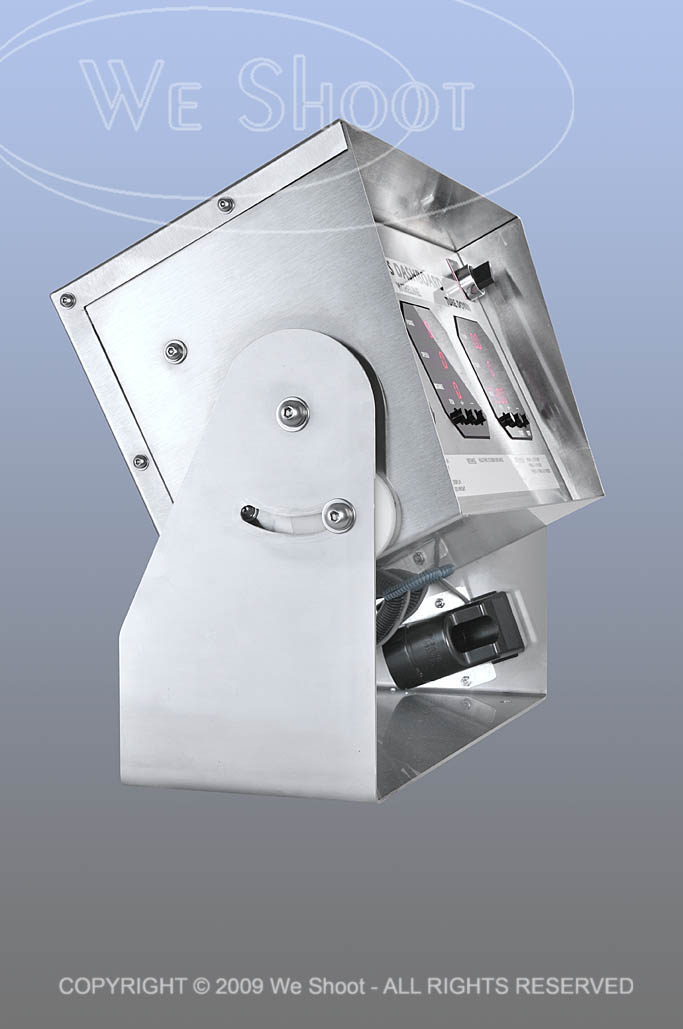
“The Shoot From Hell,” said one of my assistants, in reference to shooting the electronic control panel housed in brushed stainless steel.  Brushed stainless is no shiny brass doorknob to shoot, see previous blog post “Reflecting on Reflections, Part 2,” but it is definitely something difficult.  The unit (see images below) is a rather large, oblong-shaped, heavy electronic control panel with three red LED read-out screens which were as reflective as a mirror, housed inside of a brushed stainless steel shell, which was also quite reflective.

The brushed stainless, unlike the doorknob, won’t show my countenance, but will show all lights, colors, and dark areas surrounding it.  Any light that is not broad, whether a room light, a window, or the reflected light off our clothing, shows up as a blurry, colored reflection blob.  The size of the unit makes it difficult to isolate easily.  Many different exposures were made to control where lights sat, where reflectors were aimed, and where the assistants and I were situated.

Each setup or position of the unit was accompanied by moving lights and camera and adjusting everything many times.  My assistant who muttered the “From Hell” phrase, is himself a good photographer who eschews lighting and strobes to create images.  He mostly likes to shoot with available light.  He said it would drive him crazy trying to photograph things like this for a living.  I, on the other hand, view it as a challenge.

Finally, when I finished shooting the product, many hours were spent retouching and enhancing the images.  I then submitted the images to my client as low-res jpegs over the ‘net, and we worked together choosing the background for the images he liked.  See the images below.

While reflective objects present a challenge, make sure your attitude toward them is not defeatist.  This is difficult shooting to say the least.  Hard work and determination is the hallmark of anyone trying to get this done.

One last word on this kind of shoot.  It does not lend itself to using a point-and-shoot camera with the flash on the camera.  For the most part, it has certain minimum requirements of a good DSLR camera, and sufficient off-camera lighting and lighting equipment.  Otherwise, the results will be unsatisfactory and amateurish.

– Gary Silverstein

click on image to enlarge

click on image to enlarge

click on image to enlarge

Tags: enhance, Photoshop, reflecting, reflections, retouch, shoot, shooting
June 28th, 2010  |  Posted in Learning  |  Comments Off on Reflecting on Reflections, Part 3

One Cool Picture

Author: weshoot

As I sit here, an old friend comes to mind.  A camera repairman in Los Angeles.  Whenever I had any trouble with a camera, I’d go to Marvin.  He may have been around fixing cameras for Ansel Adams back in the day, as far as I know.  He knew everything – and I mean everything – about cameras and their operation.  I often think of how great he was at his job in his off-the-beaten-path repair shop, and how so many people weren’t aware of his business, and didn’ t know of his talent.

I knew another talented professional – an auto repairman – who got lost in the shuffle because of his far-out location.  His customers relied upon him every time they needed a repair.  On occasion, they’d mention him to a friend, but in this busy world many of us neglect to talk of such things to others and, like so many professionals, this repairman had days when no business came in, as was the case with my camera repairman.

One day, I got a call from the auto repairman requesting I take a photograph of him to accompany a newspaper ad about his business.  I suggested an image of him working over a car engine, and even though many newspaper ads don’t work, this one did.  People shuffle through their paper and flip through their magazines.  They barely take notice of their trade periodicals, oftentimes not even noticing the articles, let alone the ads.  Why did this one work?  I’d like to think it was because of this picture, and maybe it was.  New customers responding to the ad would mention it when they called for an appointment or when they came in to see him.  “What a cool picture!”  And as they got to know him, they’d say, “watching you work on my car reminds me of that newspaper photograph.”  Apparently the image seemed to say to them, “I care about what I’m doing.  I care about doing a good job.”

In the case of this wonderful automotive technician, they were right.  This mechanic cared, just like my camera mechanic cared.  Did the photo say that to the people who responded to the ad?  Apparently so.  Looking at it from that viewpoint, it’s not necessarily advertising that brings in the work, but the kind of advertising.  In this case, advertising with photography.  (An interesting anecdote:  no customer seemed to recall that the photograph was accompanied by an ad, even though it obviously was since it brought the new customer to his business, but the picture was what stood out.)

What made the image work?  Was it the sparkle in his eye – made even more luminous by our professional strobes?  Was it the highlight on his wrench – made even more powerful with my assistant’s precise positioning of the mechanic’s hand?  Whatever it was, without the picture, the ad in this case may not have even been noticed.

There are many professionals like these two mechanics.  Do you know of some?  If so, reach out to them.  Tell everyone about them.  Hey, even better.  Take his or her picture.  A good one . . . shot with care.

 – Dione Benson

Tags: ad, advertisement, advertising with photography, ansel adams, auto mechanic, auto repair, camera, photograph, picture, referrals, repair, strobes, technician
June 26th, 2010  |  Posted in Marketing  |  Comments Off on One Cool Picture

Reflecting on Reflections, Part 2

Author: weshoot

Without a doubt, the hardest single thing I ever photographed was, of all things, something so ubiquitous that we handle them every day.  I am talking about door knobs.  Plain, highly reflective, brass doorknobs.  Now, why is it so hard to photograph a doorknob?  Well, it becomes a lot more difficult when there are some rules.  Rules like one would run into with a doorknob manufacturer looking for someone to shoot images of their products for promotions.  Do you think they want a reflected image of a happy, smiling distorted photographer looking out from their new brochure at the viewer?  How about seeing that photographer’s camera and tripod, or the space the doorknob happens to be in?  Simple, inexpensive, plain, highly polished brass doorknobs become painful to contemplate as a product photographer.  They not only are spherical and reflect the entire world around them, they have a backing plate made of the same stuff, that will reflect things that exist behind the knob, from the reflection on the back of the knob.  

Several years ago, we had spoken with a potential client, the marketing department head at a large manufacturer of doorknobs, hardware, and faucets about working for her company.  She said she had several photographers she used for shooting these products, but she said she would send us a sample of their products so that we could submit a test photograph to show that we could handle this type of photography, in case she needed our services.  Parameters for shooting this product were clear.  Shoot it on a 4″X 5″ transparency, and no retouching of any kind was permitted.  She said they did any retouching needed at the graphics department at the manufacturer.  

About 5 days later, the product arrived by UPS.  There was a plain brown cardboard box inside the outer package.  I opened it up and beheld a photographic nightmare.  It was an inexpensive, highly-polished brass doorknob set, complete with keys.  

It reflected everything!  It saw me, the room, everything in the room, and to my horror, the backing plate re-reflected everything the back of the knob “saw.”  I knew this was to be a fight.  I looked at images of doorknobs in advertising.  They looked perfect.  Some were “brushed” metal – not polished, but still shiny.  Some were dull finished, and just reflected highlights.  The polished ones stood out.  No reflections of photographers, cameras, tripods, rooms, etc.  I assumed that there was some reflection of a camera lens somewhere during the taking of the image, as there was no way to avoid the reflection from the angle presented.  A different angle may have allowed one to position the lens where the reflection would be positioned over the keyhole, but you can’t shoot there for different angles.  The first problem includes camera, tripod and photographer reflections.  One way to avoid this taking up a lot of room on the doorknob is to make a blind out of white material, like foam core, and cut a hole through which the camera lens “sees” the doorknob.  

Although this cuts down on untoward reflections, it still reflects the lens and the hole, unless the hole is dark and tight around the lens.  I figured this made for a minimum of retouching at the graphics department, and would be acceptable.  A second consideration was the lighting.  Lights or hot spots show up on the product itself and a smooth highlight with no hot spots would be a better solution.  Everything I tried did not work!  As said before, putting a piece of foam core in front of the doorknob cut down reflections, but I thought that aiming lights from behind the doorknob and bouncing the light toward the white foam core blind would produce the effect without bad reflections.  I was wrong.  The strobe “soft boxes” reflected into the back side of the door knob and re-reflected off the backing plate.  I had distorted oblong light reflections staring at me from the backing plate.  

It became evident there must be a way to do this.  I tried white sheets, but the lights created hot spots, and it reflected any corners and folds.  I had seen a shooting tent at my local pro camera store, and headed down there next.  A tent like this was used to evenly light small products and I thought this was the ticket.  It cost $250.00 plus tax.  I got the tent home, and assembled it.  It was made of a translucent white fabric, meant to diffuse the light inside.  It also was rigid and had seams and a rigid frame inside the fabric which showed up in the reflections.  It had several holes for camera placement, and try as I might with stuff to cover them, they showed up, too.  Fortunately, I was able to return the tent for a refund as it really didn’t do the job.  

I even talked to man who owned a company that made plastic blister packs in Santa Barbara.  I drove out to Santa Barbara to get a prototype dome of a transparent, but clouded plastic that he was thinking of producing.  It took out most of the distracting reflections, but reflected the cloudy nature of the dome and made the doorknob appear dull and not highly reflective.  I sent it back to Santa Barbara with a thank you note and a description of the effect.  

I finally built a box enclosure of translucent white plastic, got what I thought was a good image and sent that to the marketing manager.  She said to keep the doorknob, and she would call us if she needed us.  Last I heard, she was working for another company doing something completely different.  She never called!   

Below is the image I created, after scanning it and retouching it for our portfolio.  Shiny, reflective doorknobs are tough.  Try it if you doubt me.  

– Gary Silverstein      

Doorknob with minimal reflections - click on image to enlarge

Tags: 4x5, camera, photography, Photoshop, reflecting, reflections, retouch, shoot, shooting, view, view camera
June 24th, 2010  |  Posted in Learning  |  10 Comments »

Website Photography – Shoes of the Trade

Author: weshoot

In regard to business marketing, I hear a lot lately about the importance of social networking via LinkedIn, Facebook, and Twitter.  These now accepted “Tools of the Trade” are geared to procure business and, if done right, are utilized to connect your prospective clientele to your website.  Your connections, “friends,” and fellow “tweeters” come to your website to read more about your business’s product and service.  That’s the idea, right?  So, now they’re there, and what do they see?  A great website with Flash, wonderful text, and “visuals.”  But one thing in too many cases is sorely missing.  Effective visuals.  Positively impactful, impressive, and just good old-fashioned aesthetically pleasing photographic visuals.

I hear this sad refrain from almost every website designer with whom I speak.  “My new client already has pictures, and no matter how much I say I want new photography, they say ‘these are good enough.’ “ And, yes, the vast majority of website designers I speak with say, “no, they aren’t good enough.”  “Not only,” they complain, “are they not good enough for their lack of professionalism, they are low in resolution, and, more often than not, they are a complete contrast to the professional, artistic, and beautiful website I want to create for them.”

So, what’s a professional, artistic web designer to do?  Less stellar work so as not to contrast with the horrible pictures?  More beating of their heads against the wall?  Resorting to other self-destructive activities

Tell you what, instead of contributing to the demise of artistry in web design, let’s give your web designer a break.  Just like website designers, I expect you want photographic images at your site that reflect the work you do in the most positive and attractive way possible.  After all, having a website is an essential tool of the marketplace.  It’s your online brochure.  And like your brochure, showing your product in its best light necessitates putting your best foot forward.

You know the importance of keeping your shoes polished in business, right?  A good haircut, attractive clothes, well-manicured hands?  I mean, you never know when you’ll encounter a potential client.  You never know when a potential client is looking at your website either.  Shine those shoes.  Polish those pictures.  Show your product off attractively.  Give everyone who goes to your website the impression that their opinion is valued.  Because it is.  If the impression created by your website is that your product lacks value, they won’t value your business, and since this is all about social networking, guess what impression will be emailed and tweeted to your “friends” and “connections” . . . and, directly or indirectly, to your prospective clientele? 

If through LinkedIn, Facebook, Twitter, or whatever means of social networking you employ you invite people to a website utilizing photography that is unpolished, unattractive, and unprofessional, your business, too, will be interpreted as unpolished, unattractive, and unprofessional.  Your website – just like your polished shoes – is one of the most important Tools of the Trade.  Make sure you put your best foot forward with a website with polish . . . photography that shines.

 – Dione Benson

Tags: art, facebook, linkedin, Marketing, photography, shoes, social networking, tools, twitter, website, website designers
June 21st, 2010  |  Posted in Marketing  |  Comments Off on Website Photography – Shoes of the Trade

Reflecting on Reflections, Part 1

Author: weshoot

I was once asked about the hardest thing I ever photographed.  Of course there have been several difficult things to shoot, but as a commercial photographer, some product and catalog shoots and reflective objects just jump out.  Reflecting on a number I have done, I think they have gotten a bit easier for me with time, either because of experience, or the ability to use digital retouching and enhancement techniques, or both.  To say that there are no more challenges would be a misstatement, however.

My first bout with reflective product shots came during the era of film, long before digital capture or scanning was even possible.  Digital retouching was a pipe dream for the future.  I was asked to photograph jewelry with a large-format view camera (a 4X5) on transparencies.  We opted to use our then-considered-powerful 1200 watt-second Balcar studio strobe set for lighting.

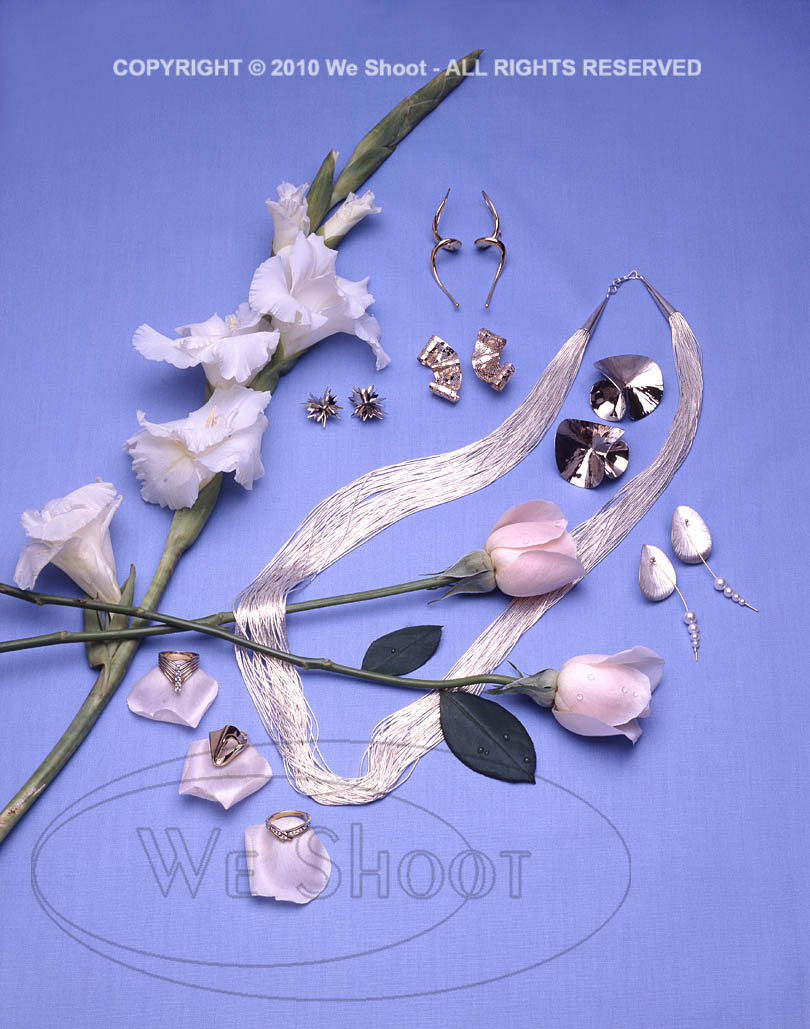
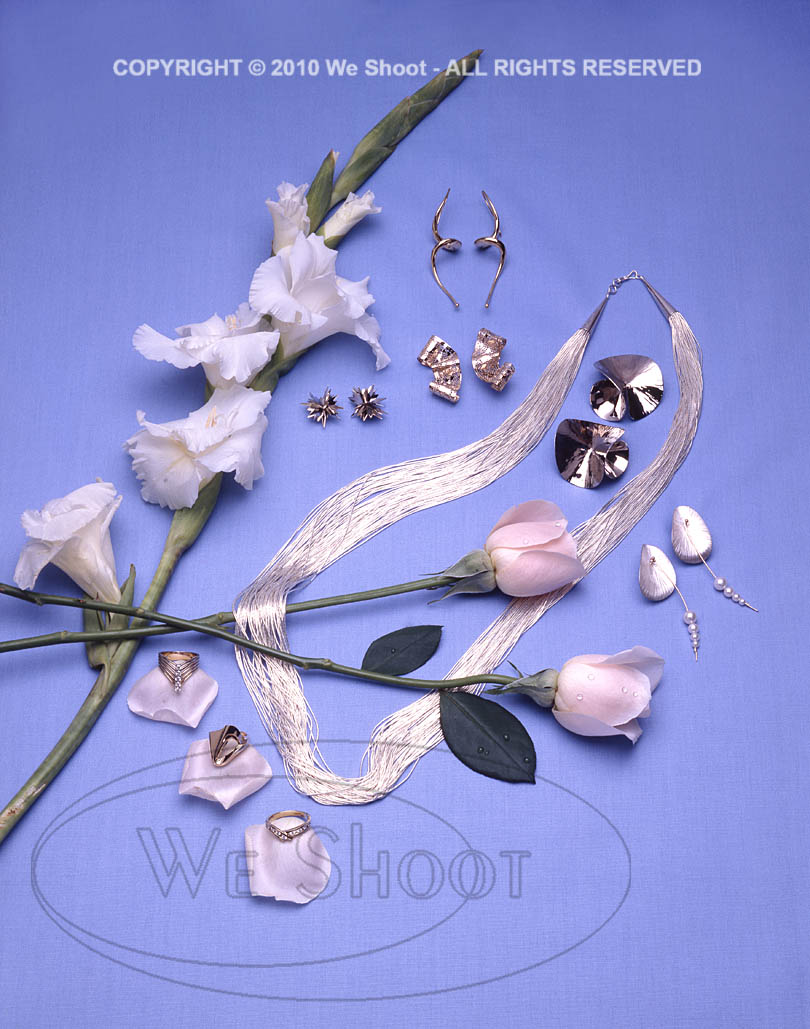
The jewelry pieces were white metal (silver, I think) and included rings, earrings, and a necklace.  All pieces were to be shot in one image, laid out on a blue fabric.  I was to capture highlights from the reflecting white umbrellas mounted on the strobes in each piece of jewelry in the layout.

In those days, we were located just south of Hollywood, California, and there were many film labs nearby, so film processing turnover was fairly fast – three hours on a non-rush basis.  We had 4X5 Polaroid self- processing black and white positives that could be shot with the 4X5 camera that we could see as proofs prior to shooting the transparencies which needed processing at a lab.

The Polaroids were over a dollar each, in those days – a big, but necessary expense.  For this shoot, we went through something like ten of them, just trying to position the irregularly-shaped jewelry, so it would show certain highlights.  Each time we shot one, we would find one piece that would go dark, with no highlight.  It would have no sparkle, it would look, well . . .  black!  We finally got what looked like a good Polaroid, put in the transparency film holders and shot four transparencies of the same shot (one for us, one for the client, and two for insurance in case we needed to lighten or darken the exposure by chemical process).  We ran it to the lab up the road, and three hours later went over there to see our new transparencies.  One of the pieces of jewelry had moved slightly and it went dark.  There went a bunch of money, and a lot of time.  It took until the next day before we got it right.  It was a good experience, and I learned a lot.  I managed to find the image in our archives.  See it below.

– Gary Silverstein

Tags: 4x5, camera, film, jewelry, large format, layout, reflect, reflecting, reflections, shoot, shooting, view camera
June 19th, 2010  |  Posted in Learning  |  Comments Off on Reflecting on Reflections, Part 1

Setting up a blog for your website

Author: weshoot

Setting up a blog for your web site, in my humble opinion, is not for the faint of heart.  I have written blogs before, and I have used the free services of “Blogger” (Google) and “Windows Live” (Microsoft).  Setting up a blog on one’s website is a whole different kettle of fish.  First, the services just mentioned are meant to be on the blog provider’s sites and not on your own.  They are really quite easy to set up.  Decide to create one, and you can be an author in a very short time, maybe minutes.  Not so with putting a blog on your own site.

I read that putting a blog on our website increases our visibility on the web with the search engines, which helps SEO, or Search Engine Optimization.  Blogs not on our website also help by making links back to our website, but I would think not as much as a home-grown weblog could.  Blogs are text-rich, and the search engine crawl bots like that.

First, I searched the web for how-to-do-it pages.  Then I decided to check with my host provider, as they seem to be up on everything, and I found that you need something to make it work, called an SQL database.  I happened to know that my provider had such a weapon in their arsenal and were willing and able for me to use it.  I wrote them and they recommended WordPress as the program of choice.   They told me how to access this in my control panel for our website.

Let me be clear about this:  Don’t attempt this at home!  Unless you are comfortable with html and web stuff, this is best left to professionals.

I have written some websites on and off for many years, and felt that if someone who did not make a living creating websites could attempt this, it would be me.

I went into the control panel and downloaded the program (and blog) to the root directory of the website.  In the documentation one usually sees after an installation, it stated that I might want to put the program and blog in a separate subfolder, as the files can look pretty messy in the root folder.  I then attempted to do that in the configuration file, saved the changes, exited the program and was now unable to reenter.  I got that feeling that one gets after accidentally deleting something very important and can’t get it back.  I called tech support with my tale of woe.  The tech said he would advise me to uninstall the program (I hadn’t written anything at that point) and reinstall it in a new folder off the bat.

I reinstalled the program and proceeded to set it up.  One of the configurations was to be able to put in “pretty” URLs for when people wanted to bookmark a post.  This would make it easier for them to identify the post without having to rename it.  More on this later.

I opted to use one of the free templates to lay out our blog.  I chose one, and set up an install.  It wouldn’t install.  I called the tech at the ISP host.  He decided to do it for me.  It took him a while, but he finally got it.  If it stumped him (and he said he was familiar with WordPress), I probably would have gone crazy.  I thanked him profusely, hung up, and advanced to the next step.

I had worked with templates before, and wanted to rid the sidebar of this blog of unneeded links put in by the authors, as it would be confusing for you, the viewer, to figure out why you needed so much documentation on WordPress instead of photography.  Try as I might, I could make changes to the template, but when I closed it, it would heal itself and come back.  It was like the Hydra – every time you removed a link, I swear it grew back with more.  I realized that I had no way to save or update the file.  I then got back on the phone with the tech guy.  I was amazed.  I made 3 calls to that point, and I got a different local guy (US) each time.  I think he was a bit confused by my blathering on, but he was patient and had to put in permissions for me to make changes to everything in the sidebar.  One at a time.  Really.  In the end, I was on my way again.

This blog was starting to shape up.  I wanted to put in blurb somewhere telling what this blog was about.  I finally found the “about” page.  I went into the config screen and typed in my text and put our logo in it.  I clicked “preview.”  A Google page came up, saying the link was broken and it couldn’t find the about page.  I spent many hours trying to figure out why it wouldn’t work.  I knew the path didn’t look right for this file, but the only part of it I could change had the word “about” in it.  Dejected, I shut down my computer and called it quits to sleep on it.  I thought I had the idea early in the morning and ran to the computer to try it out.  I didn’t see that the page had an htm ending on the file name.  I was wrong. It still didn’t work.  And then it dawned on me.  The file name was all wrong.  Remember making “pretty URLs?”  I went back to the configuration page and unchecked “pretty” and rechecked the default.  Worked like a charm.  Now, hopefully, everything will work right and We Shoot has a real on-site blog.  It took 3 days, but it was worth it.

– Gary Silverstein

Tags: blog, blogging, business, weblog, website, write, writing
June 18th, 2010  |  Posted in How To  |  Comments Off on Setting up a blog for your website

<< Previous Next >>

  • Categories

    • How To (21)
    • Information (548)
    • Learning (30)
    • Lighting (179)
    • Marketing (291)
    • Photographs, Images (545)
    • Tips (38)
    • Uncategorized (2)
    • video (13)
  • Archives

    • September 2025
    • June 2025
    • May 2025
    • April 2025
    • January 2025
    • December 2024
    • November 2024
    • September 2024
    • August 2024
    • July 2024
    • June 2024
    • May 2024
    • April 2024
    • March 2024
    • February 2024
    • December 2023
    • November 2023
    • October 2023
    • September 2023
    • August 2023
    • July 2023
    • May 2023
    • February 2023
    • January 2023
    • October 2022
    • September 2022
    • August 2022
    • July 2022
    • March 2022
    • February 2022
    • January 2022
    • December 2021
    • July 2021
    • June 2021
    • May 2021
    • April 2021
    • March 2021
    • February 2021
    • January 2021
    • December 2020
    • November 2020
    • October 2020
    • September 2020
    • August 2020
    • July 2020
    • June 2020
    • May 2020
    • April 2020
    • March 2020
    • February 2020
    • January 2020
    • December 2019
    • November 2019
    • October 2019
    • September 2019
    • August 2019
    • July 2019
    • June 2019
    • May 2019
    • April 2019
    • March 2019
    • February 2019
    • January 2019
    • December 2018
    • November 2018
    • October 2018
    • September 2018
    • August 2018
    • July 2018
    • June 2018
    • May 2018
    • April 2018
    • March 2018
    • February 2018
    • January 2018
    • December 2017
    • November 2017
    • October 2017
    • September 2017
    • August 2017
    • July 2017
    • June 2017
    • May 2017
    • April 2017
    • March 2017
    • February 2017
    • January 2017
    • December 2016
    • November 2016
    • October 2016
    • September 2016
    • August 2016
    • July 2016
    • June 2016
    • May 2016
    • April 2016
    • March 2016
    • February 2016
    • January 2016
    • December 2015
    • November 2015
    • October 2015
    • September 2015
    • August 2015
    • July 2015
    • June 2015
    • May 2015
    • July 2014
    • June 2014
    • May 2014
    • September 2013
    • June 2013
    • March 2013
    • February 2013
    • January 2013
    • December 2012
    • October 2012
    • July 2012
    • June 2012
    • May 2012
    • March 2012
    • February 2012
    • December 2011
    • September 2011
    • August 2011
    • July 2011
    • March 2011
    • December 2010
    • October 2010
    • September 2010
    • July 2010
    • June 2010
  • Meta

    • Log in
    • Entries RSS
    • Comments RSS
    • WordPress.org

Copyright © 2026 - weshoot.com | Entries (RSS) | Comments (RSS)

WordPress theme designed by web design