Weshoot.com

The Official We Shoot Blog

  • Home
  • About
  • To Comment

Bracketing With Hot Lights And Available Light . . .

Author: weshoot

In my last post, I discussed bracketing of exposures.  Today, let’s talk about bracketing with hot lights.  Hot lights are a continuous lighting source and should be regarded as available light, just sometimes very intense, and very bright.  A majority of hot lights are of incandescent color temperature, adding a warm or yellow tone to your image.  In most modern DSLRs, there is a setting for tungsten or incandescent light which compensates for the warm tint by adding a blue or cyan tint to the image.

Instead of using the incandescent mode in the camera for white balance, I prefer taking one exposure with a gray card in the image and setting the gray reading for all the images I take in that series with my editing software.  Outdoors, my cameras are very accurate, so the automatic white balance setting works just fine.  Indoors with a mix of lighting, a gray card or an Expodisk is the ticket.

Now, back to bracketing with available light and hot lights.  My cameras will do up to nine bracketed shots (different exposures of the same image) automatically.  Some cameras only allow three images for auto bracketing.  If you desire more exposures for either HDR (High Dynamic Range) images or for layering the images with these cameras, the way to facilitate that is to do it manually.  As in my last article, adjust the exposure by putting the camera in aperture-priority mode, setting one aperture and changing the shutter speed to bracket various exposures.  My choice is to use 2/3 of a stop difference for each of my brackets.  You may like 1/3 stop, 1/2 stop, 1 stop, or ? bracketing stops instead.  If doing this manually, try to get one optimum exposure, i.e. the one picked by the camera as the overall best exposure, and make the same number of exposures brighter and darker on either side of the optimum exposure.  Also, if doing it manually, you will have to put the camera on full manual for exposure, then set your aperture where you want and vary the time for the brackets.

The reason for bracketing is that the latitude for digital images is about 5 stops with detail and no digital “noise.”  When lightening darker areas in a digital image, one sometimes runs into noise, either color noise which looks likes flecks of red, green, and/or yellow in that area, or luma noise, which looks like flecks of black snow.  Noise is usually unacceptable in commercial work and for stock images.  The answer is to bracket and take images in which even shadow areas are light enough to have detail without the need to lighten them, and to blend them into the finished image, either with HDR or layering and masking in computer-editing software.  Conversely, blown-out areas of one image can be recovered from a darker bracketed image, and give detail to blown-out areas.

In summary, bracketing with available lighting or with hot lights is basically the same, and white balance should be checked and adjusted should the need arise.

-Gary Silverstein
 

Tags: bracket, bracketing, brackets, commercial photography, editing, exposure, exposures, hdr, hot lights, image, layer, layering, lights, photography, Photoshop, professional, software, We Shoot Photography, weshoot.com
January 16th, 2013  |  Posted in How To, Learning, Tips  |  Comments Off on Bracketing With Hot Lights And Available Light . . .

Bracketing Different Exposures . . .

Author: weshoot

Let’s talk about the art of bracketing.  Bracketing is taking the same image at several  different exposures so you are sure to get the detail you desire in your images during digital post-production.  You may want to use high dynamic range (HDR) features in your computer software or camera to combine the exposures into one homogenous image, preserving both shadow and highlight detail from all the different exposures.  Or, if you prefer, you can use editing program masking techniques which allow the use of layers to achieve the same goal, but with more of a standard photographic look to your work.  HDR is sometimes difficult to work with to get an image that looks like what we have come to accept as “a photographic look,” and instead seems to have the feel of an illustration.

You can bracket manually, or some cameras will allow automatic bracketing in their menus.  My work cameras will allow 3, 5, 7, or 9 images to be taken automatically at a set rate of exposure variance, which I can specify (generally for me at 2/3 of a stop).  Using this method, I usually set the camera to alter the shutter speed from overexposed to underexposed.  I recommend shooting in aperture priority and altering the shutter speed as it keeps the aperture the same.  If you bracket by changing the aperture, sizes of things in the resulting images will be slightly larger or smaller in each exposure depending on the aperture dimension.  This will make it difficult to properly align each image.  I don’t recommend hand-holding the camera as it introduces camera shake and misalignment and, therefore, I usually use a tripod for bracketing.

In future posts, I will be touching more on bracketing and working with strobes, and hot lights, and how you can work on these in an editing program.

-Gary Silverstein

Tags: bracket, bracketing, camera, exposure, hdr, high dynamic range, layering, masking, multi-exposure, over expose, under expose
December 15th, 2012  |  Posted in How To, Learning, Tips  |  Comments Off on Bracketing Different Exposures . . .

The Difference A Background Can Make . . .

Author: weshoot

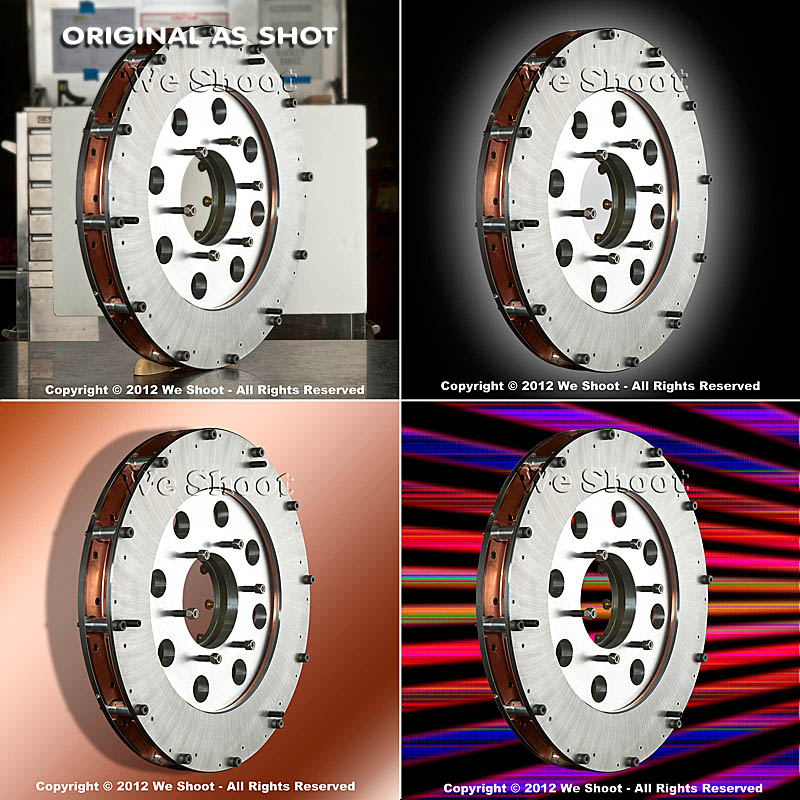
In the days of film, a professional commercial photographer had to be very careful of the backgrounds that would be used in his/her images.  Retouching was expensive.  Shooting an item for use against another background from the one it was taken with could be a labor-intensive multi-step process.  A spot on a high-key (pure white) background  could be touched out on the negative, and a nightmare undertaking on a transparency.   Today, of course, images are taken digitally and manipulated by editing programs, like Photoshop.  One of our most recent shoots involved large, heavy industrial products.   In film-days past, we would have probably used a seamless white background to shoot the product and spent a lot of time with product placement.  The items to be photographed were round, between two and three feet in diameter, and each weighed 500 or more pounds.  Five views were to be taken of each.  That means that either the item would have to be moved on the background, or very carefully lifted by a hoist onto the background.  We would have to be careful of marks left by the items where they rested on the paper, and some method of keeping such round items from rolling off the surface would have to be employed and kept out of sight.

So, pre-planning for the shoot is still important, even in this digital world.  We opted to not use any type of manufactured background per se, but to only use white reflectors in strategic places to reflect light or add a highlight where we desired.  Not using a background simplified the lighting somewhat in that a roll of paper or fabric didn’t block out the light from behind each item.  We were going to photograph the items in the factory environment with the idea that we would isolate the image in Photoshop, and put it on another, more desirable background.

Lighting was done with our powerful studio strobes, and the modeling lights on the strobes gave us an idea of how the lighting would look in the finished image.  We shot with soft-boxes to give a square look to our lighting in the highlights, as umbrellas just wouldn’t cut it here as these products were light-reflective.  We planned to keep the camera stationary, move the lights as necessary, and rotate the product for the five different angles the customer required.  Since the objects were circular,  and we wanted to keep all the images the same size, we had to plan how to keep that proportionality.  Think of a coin stood on edge.  The widest the image would have to be is a little more than the diameter when one of the faces of the coin is toward you.  When the edge of the coin is nearer to you, the size of the image could change, but we wanted to make them all the same size for the client’s ease of putting together several views of their product.  Also, we had to be far enough away to assure depth of field when we were shooting the views that showed part of the object furthest away.  Editing programs have great sharpening utilities, but a severely out-of-focus image cannot be brought back.  You can easily blur parts of a sharp image and make it look good if needed for the effect, but the reverse isn’t the case.  So all this had to be figured out in advance.

Now, let’s go on to the backgrounds for the images.  Since the area or table on which the items were shot was in a fixed location, the background for each image (as produced by the camera) would have been a toolbox and other parts of the assembly plant.  So we made it so that we and our client could “lift” the item off the background and put it on any other background or even a video.  This is done by means of a “clipping path.”  This is a very labor-intensive process.  It means that I use a Photoshop tool to painstakingly trace out every edge of the product at anywhere from a 100% to a 300% enlargement.  Once I have outlined every hole, edge, and cranny, I “select” the item alone and make a layer of it to put on other backgrounds.  I include this clipping path with the image, so the client is able to do the same.  Now, you may ask why I do so much work, as some of the editing programs have become pretty sophisticated and make an easier selection with other, faster tools.  Well, the answer is this:  I have used these editing tools, and sometimes there are errors in the program choosing what is part of the item and what is not.  It may not be noticeable on a small jpeg on a website, but it will stick out like a sore thumb on a 30X40 enlargement at a trade show.  That is what separates a pro from an amateur.  Below are an original view of one of the products, and a few different backgrounds that I feel work well.  Each background below was created in Photoshop, but other backgrounds could be used, as well.  Remember that whichever one a client chooses, I include the clipping path so they can put it against another background if that is their need.

As you can see, the product image looks at home with any of the backgrounds.  Keep this in mind as you plan your next shoot.

– Gary Silverstein

Tags: camera, commercial photographer, commercial photography, http://weshoot.com, Marketing, photographer, photography, Photoshop, professional, reflections, video
October 1st, 2012  |  Posted in How To, Learning, Tips  |  Comments Off on The Difference A Background Can Make . . .

Video: Why a clapperboard should be part of your kit bag . . .

Author: weshoot

Clapperboard


Did you ever watch an old Hollywood movie about making a movie?  At the beginning of each scene and take, someone holds up a slate with something like, “Scene 6, Take 164,” on it and audibly says the same thing that is on the slate.  At the top of the slate is the “Clapper,” and usually after the director yells “Action,” the person holding the slate claps it to denote the start of the scene.  Actually, the cameras are already rolling so they can record the slate, and the clap.  In the early days of movies, the slate was used to denote the scenes and takes so, when editing the film, the editor was able to piece together the scenes to make the story flow.  Scene 6 and Scene 3 may have been in one city, and other scenes in another.  As sound came in, the clapper was added to allow synchronization of sound to film.  Since the cameras were noisy beasts, the sound was recorded on a separate device, and the clapping sound was synchronized to the visual of the clapper sticks hitting one another.  They were then paired up, and the clapperboard visuals and sound were edited out in the final version.

Today you may ask why you would want to purchase and use this contraption since the audio and video are synchronized by the camera and in lockstep, unless intentionally unlinked in the video editing software.  The answer is that the slate is still needed for real video editing, and the clapper is very handy for synching multiple cameras and the sound with different angles of the same scene.  Almost everybody is bothered when the mouth movement doesn’t synch with the sound.

The truth is that anyone today can shoot a video!  All you need is $100 or more and a heartbeat.  Simple, cheap video cameras (or camcorders) are readily available.  But, professional video cameras can cost well above $60,000.  Why would anyone spend a lot of money for a camera when the images on our TVs looks pretty good from low-priced cameras?  A couple of  reasons are that the image degrades from the cheaper cameras when less than ideal lighting is encountered.  Video noise becomes a factor.  Also, sound input and output is better the more you spend on the camera.

Should you shoot your own video for your business?  Unless you are a budding amateur Spielberg, probably not!  While pushing the record button is easy, buying quality software like Adobe Premiere Pro and After Effects is expensive and learning how to use it can be daunting.

Using lighting can add quality to your video, and there is a whole science to it.

Do you have lights?  Do you have pro software to edit your video?  Are you proficient in video editing?  Do you have a camcorder of sufficient quality to overcome video and audio noise?  These are questions you should ask yourself before trying to promote your business in a video.

In making a video, my partner and I meet with our client to map out the story before even going near a camera.  Videos take planning.  Several days of shooting stills and video can go into a short promotional video.  Way more time is spent editing it.

Now, back to the clapperboard.  The clapperboard we employ (see image above) allows for a tremendous time savings when we’re editing video.

Below, take a look at one of the latest videos we did for a music composer.  You will notice that even though we recorded him from two different angles with two cameras, his mouth is in synch in the side view and the front view.  The guitar-playing scene was also shot with two cameras.  This two-camera setup is included at no extra charge.  It adds a dynamic not found in most amateur endeavors, and this professional look much more successfully illustrates the professionalism of your business.  Don’t put out a substandard video.  It could do more harm than good.

-Gary Silverstein

Tags: audio, clapper, clapperboard, http://weshoot.com, sound, two-camera, video, video production, videography, visual, we shoot, weshoot.com
July 17th, 2012  |  Posted in How To, Learning, Tips  |  Comments Off on Video: Why a clapperboard should be part of your kit bag . . .

Speak to Your Public . . . first in a series on Public Speaking

Author: weshoot

The silence was deafening.  You could hear a pin drop.  The crowd was still, each face looking up to me in anticipation of what I would say next.  Through the roaring din in my head, I heard a woman stutter with every word that escaped from her mouth.  Oh, my God, it was me!

That, my friends, is the scenario I have always envisioned if I ever got up to speak to a group of people.  With clichés included.

I pointed swiftly with my finger to the wall behind them, wanting to avert their gaze from my trembling, shuddering personae.

Oh good, that was smart.  Now I can collect myself.  Wait!  They’re looking back at me again.  What will I do?  I know.  I’ll drop my notes off the podium.  Then someone will have to pick them up and I’ll establish a relationship with someone in the audience so I can have a friend.  A friend, a friend, my kingdom for a friend!!!

Yup, my army of public speaking resisters, you guessed it.  None of that occurred during my first foray into public speaking, albeit only 2 minutes, 37 seconds.  Prior to being introduced to the audience on that fateful day, I had already spent days memorizing my speech.  And I had spent years writing marketing material for my company.  I knew what I was talking about.  I had no reason to lack confidence in this presentation.  But, no, like so many of you, I had multitudinous reasons to never, ever speak to a crowd of people.  But it all boiled down to one time-honored tradition in the ranks of probably 99% of the human nation:  I was “scared to death.”  And then I looked out – or down because I was on a stage – at a good 300 pairs of eyes staring up at me, and with little exception, these were friendly eyes, many with smiles, beckoning me to smile back and start my speech.  So I did.

Sure, there was a little stuttering.  There was a wee bit of hesitation.  But as I looked out on the masses, starting my speech by making light of the accolades said of my prowess as a commercial photographer by the Master of Ceremonies, I lost a good 50% of my fear.  These people were actually laughing at my self-deprecating humor.  And, with that, I realized one thing.  They wanted me to feel at ease with the crowd.  They wanted me to succeed in my presentation.  And I did.

So what do I want you to get from my experience?  I want you to cancel your monthly subscription to Guest Speaker Revulsion.  Put down your new book, “In Praise of Public-Speaking Resistance.”  And, yes, as you sit there gasping for air at such a thought, there is one last thing I want you to discontinue.  That’s right.  Your next weekly Aversion Therapy Anonymous meeting.  Yep, the ATA.  It has to be put into your past.  It’s time to move on, my comrades in business, because it’s now time to take the next step on your own.  Time for you, too, to step up on the dais and cry your eyes out.  Oh, wait, I regress.  It’s time to sing your heart out, to speak loud and strong.  It’s time to bring focus to yourself.  The confidence to do so may not come before it’s done, but the second time around just got easier.


[Look for my upcoming further blogs on the subject of Public Speaking for your business.]


– Dione Benson

Tags: commercial photographer, public speaking, speak, speaker, speech, talk
June 22nd, 2012  |  Posted in Learning  |  Comments Off on Speak to Your Public . . . first in a series on Public Speaking

Can your blog get hacked . . . ?

Author: weshoot

The blog you are reading is a WordPress blog.  If you read the last post on our blog in the recent past, you would not have realized that it had been hacked, because it was invisible.  Don’t worry, it caused you no damage.  It only caused us damage.

First, some background:  I had installed an earlier version of WordPress back in 2010 on our photography website as it is good for SEO to have a blog inside the domain, and for informative purposes to our readers.  Then, a banner came up from WordPress that an updated version was available and that I should update.  Anyone with experience in computers knows that updating can go seriously awry and you could lose all your posts or information, and it is best to back them up.  Of course, this is time spent, and no one wants to do all this preventative work, but I grudgingly did that with the help of my hosting company, and did the upgrade to version 3.1.3 or something like that .  I clicked on “update” and held my breath, and it worked.

About 6 months after that, I got another notice that a newer version of WordPress was now available with more security (I forget which number).  I thought, “Oh, boy, here we go again,” and went through the motions again.  This time, it didn’t work.  The update notified me that the server our website was on did not have a high enough PHP protocol, and that the update could not take place.  So, I left it where it was at.  I called my host and they said that the server I was on did indeed not have a higher PHP and that I would have to move to another server, and there was a procedure to do that, and I would have to put it in writing that I wanted to move to another server.  I didn’t want to hassle it, reasoning that I would see if anyone hacked the blog, as it would obviously show up in the blog reading . . . or would it?  I have been getting warnings from my Google webmaster tools account that I needed to update my WordPress for security reasons.  I just shrugged it off.  It was too much work.

I went to my Google webmaster tools site last week, and updated the XML sitemap to our website, and while there, I thought I would check the optimization for keywords.  I was very upset when I found words of popular drugs for ED in my keywords, along with a pet supply store.  I didn’t put them there!

How could anyone put them there?  I have a reasonably strong password, and I don’t give it out.  So I went to check out where they were in the blog.  Lo and behold, when the blog posts were in edit mode in HTML, there they were, plain as day.  But they were invisible to anyone reading the blog on the web.  Someone or something had inserted HTML links interspersed with my text, some even intersecting words, but not showing up in the blog.  I called tech support at my hosting company.  The person I talked to could see the intrusion, and told me it was due to a low PHP protocol and low security in the earlier version of WordPress.  I asked him why anyone would do that, seeing as how there was nothing to click on or any change in the visible information in the blog.  His opinion was that the links were inserted for backlinks to other websites for their SEO.  One of them was a pet supply house.  So, somebody had hired someone to do their SEO or web work and they hack WordPress blogs to increase the SEO of their clients.  Pretty underhanded!  It can have the result of lowering the weshoot.com page rankings.

So, my path was clear.  I formally asked in writing that all my domains be moved to a more secure server with as high a PHP as possible.  It took a couple of days for the move to solidify.  I backed up my domains in a full backup.  I updated to the newest version of WordPress.  Once everything was complete, I spent a whole day removing all the inserted HTML code from each old post (sometimes they had more text in their links than I had written in our posts), and will be very vigilant from now on.

If you have a WordPress blog, take a look at old posts in HTML from time to time.  You may get a surprise.  Update to the newest version of WordPress ASAP.  Weshoot.com is lucky.  We have a cooperative hosting company and they had a more secure place for our website with a higher version of PHP.  Make sure that your hosting company does, too.

-Gary Silverstein

Tags: backlink, blog, hack, html, link, photography, weshoot.com, WordPress
June 7th, 2012  |  Posted in Tips  |  Comments Off on Can your blog get hacked . . . ?

A Website: What is most important?

Author: weshoot

I received a call from a web designer the other day.  He had looked at our website at http://weshoot.com and decided it was too “plain” and that it needed his touch to make it work.  I responded that I am quite happy with our website, and that it does already work.  It is easy to navigate, with no delays in loading.  It doesn’t have much flash, so much of it is viewable on almost all mobile devices.  Yeah, maybe it’s not as fancy as some other photographers’ websites, but you can view all of our sample images at your leisure without waiting for the slideshow to bring around the image you want to see.  And above all, it is visible and we get calls and emails from all over the country inquiring about our photography services.  Visibility matters.  The best website ever made will not get many visitors if it is on page 65 of a Google search.

What makes it visible?  It is called SEO or search engine optimization.  You have all heard it before.  If you have a business website on the web, you have undoubtedly received a multitude of emails and phone calls, all touting services that can get you to the top of the first page of Google and other search engines.  It doesn’t matter to these people if you are already there.  What it basically comes out to is that most people type in a three-word phrase to find what they are looking for.  Something like “seattle product photography.”  As you would see, we come up somewhere on page one.

It takes a lot of work to get there.  I have a professional help make this a reality.  I help with my knowledge of some website development and making sure to post to social sites to help boost our SEO.  My SEO pro and I communicate often when changes to the website are needed and when they have been completed.  Even having a blog helps SEO.

So, the bottom line is:  If you need to budget for your website, go with a little less fanciness and spend instead on real SEO.  Make sure you get a pro to do your SEO.  If someone guarantees you that you will be at the top of page one, you’d better be in a business with no competition, because no great SEO pro will make that claim.

If you need a great SEO professional, drop me a line via our contact page on our website at http://weshoot.com.

– Gary Silverstein

Tags: commercial photography, http://weshoot.com, photography, professional photography, search engine optimization, SEO, website, weshoot.com
May 17th, 2012  |  Posted in Marketing, Tips  |  Comments Off on A Website: What is most important?

Video And Animation . . .

Author: weshoot

I think that video and animation is something that stills photographers have to become more aware of in order to be competitive.  One of the areas is simple animation of still photographs.  Fortunately, Photoshop CS5 has an application within it to take your still photo and make a short animated video that can keep on running on your web page to attract attention.  Older versions may have this capability also, but since I no longer have any of them available, I can only speak to what I have.  (See the image below to get an idea of what can be done.)  I have used the header image from our We Shoot Facebook page at http://on.fb.me/kH0Ozp to make a flashing “Eat at Joe’s” type of billboard for this purpose.  There are three transitions: First, just as a collage; second, “Call Now” is added; and, third, our phone number is flashed over our name.

I won’t go into how to make such an animation except to say that you go into the menu at the top of Photoshop and pick Window>Animation.  You can look up how to use this in the help menu, or go to Vimeo or Youtube to get step-by-step instructions on how to carry this out.  If you already have a knowledge of timelines in slideshows or video editing programs, you are already on your way.

BTW, the file size can be made relatively small, and take almost no time to load.  The animation will not work on some web pages, such as on Flickr, but will work elsewhere, and unless you have it blocked on your own website, it will probably work there.  As you can see, it works on this blog.

Have fun.

-Gary Silverstein

We Shoot

Tags: animation, fun, http://weshoot.com, photography, Seattle commercial and advertising photography, stills, video
March 18th, 2012  |  Posted in How To, Marketing, Tips  |  Comments Off on Video And Animation . . .

Megapixel madness . . .

Author: weshoot

First, let me say that I have nothing against technology.  I, as a professional photographer, use it every day.  The problem with the newest and greatest technology is determining what you really need, and secure that for your business.

New cameras have come out with incredible capabilities.  These include the Nikon D800 (in two forms) and the Canon 5D Mk III.  The former has 36.6 megapixels, and the latter has around 22.3.  Both shoot HD video.

Let’s look at what is needed.  I have been a photographer for a long time.  I currently shoot for various companies on assignments that include food, products, services, architecture, and lifestyle images.  I cut my teeth on event and consumer photography.  One thing I can tell you is that it is folly to show up with only one camera to a professional shoot, especially if reshooting it is difficult or downright impossible.  Let’s take a wedding photographer, for example.  Let’s say he has $3K-$3.5K to spend on a camera or cameras.  Should he buy one new Nikon D800 or Canon 5D Mk III to shoot weddings, or should he buy two Nikon D300s or Canon 7Ds?

I would say he should buy 2 of either of the latter 2 cameras.  First we usually buy the brand that will accept our older lenses.  That usually dictates the brand.  For weddings these days, how many people will be buying or making anything larger than an 8X10?

You don’t need over 12 megapixels for anything under 30X40 (and you might even be able to push it to 40X60).  Most images are printed smaller, and even wind up on the web, where a sub- one-megabyte image has sufficient size.  The only photographers who need such a large megapixel camera are those who produce images in excess of 30X40, or severely crop an image from the original size.  An 8X10 from a D800 won’t necessarily be better-looking than one from a D300!

Let’s also look at logistics.  A 12.2-megapixel D300 Nikon produces a tiff file around 35-megabytes (8-bit).  A D800 is said to produce a tiff image at around 76-megabytes (8-bit).  In Photoshop, professional photographers regularly make layers to enhance their images.  Each layer adds multiples to the size of that file, and unless you have a pretty robust 64-bit computer system, it may create delays in workflow, or even give you dreaded “out of memory” messages.

The second argument for buying two of the same camera is that you have a backup for the first camera.  The lenses are interchangeable.  A wedding couple and their families don’t want to hear that your camera failed during their wedding and you didn’t get the pictures.  When we did weddings during the days of film, we used to show up with no less that 3 medium-format camera bodies, 3 lenses, and multiple film inserts or backs.  We also had two shooters, and this allowed broader coverage.  If you are hired to shoot, and you do not deliver, you may be in breach of contract, will possibly get sued, and will definitely generate bad will.  This is very bad in this modern age, what with Facebook and Yelp.

My advice is if you are considering going pro, buy affordable cameras in pairs, or even use an older camera to back up your newer one.  Never turn up for a pro shoot with just one camera.  It can be a recipe for disaster.

– Gary Silverstein

We Shoot

Tags: Canon 5D Mk III, commercial photography, enlargement, megapixel, Nikon D300, Nikon D800, weshoot.com
March 6th, 2012  |  Posted in Tips  |  Comments Off on Megapixel madness . . .

Putting Lipstick on a Pig . . .

Author: weshoot

Some years ago, I was emailed by a man who wanted me to photograph a business property. He was a commercial real estate broker with a property to sell. He sent an image he had taken of a rundown business property in our area and wanted to know if we could photograph it. I called him, and we exchanged information.  I said I had viewed the image he sent and was curious why he would spend money on getting an image of such a property, to which he replied, “I need a pro to take the image, and then put some lipstick on this pig.” I asked him what he meant. He said he wanted the property to look great and that our photographic ability plus considerable Photoshop editing skills could make winning images. He would be showing the images to a buyer out of state, and he might be able to make a sale on the strength of my images. He wanted me to be complicit in fraud! Once I heard this, there was no way I was having anything to do with such activities, but out of curiosity, I asked him what his budget was for this, and he said he had very limited funds and could only pay about one-fourth of my then day rate. Not only did he have the chutzpa to ask me to commit fraud, even though I wouldn’t have shot and altered the image for profit, he still had the gall to think I would be thrilled to do it at no profit! I hope everyone he called was willing to say no.

Now, I have been asked to enhance properties before, like the time the water truck broke down that was used to wet down a parking lot and I had to make a parking lot look wet for an image. I was also asked before to put two adjacent aerial images together of an airport my partner had taken, and make one photo out of them, and then extend the airport background to look like the drop-off behind the airport had been filled in, and a retaining wall added. This was sort of a photographer’s rendering of what the airport could look like if the airport hired my client to remodel the airport. Another time, a company hired me to take an older aerial image of a building they had built and update it to close to what the building looked like now with landscaping as they couldn’t get another aerial shot. I, of course, went to the building and did extensive work to make a realistic image of the building that I imagined from the air. This image was made into a large print, framed, and hung in the boardroom of the construction company.

In these images in the above paragraph, there was no attempt to defraud anyone. If anyone asks you to do something like this, make sure of what their intentions are. Ask questions. And if someone asks you to “Put lipstick on this pig,” run the other way as fast as you can.

– Gary Silverstein
We Shoot

Tags: architectural, architecture, Seattle commercial and advertising photography, weshoot.com
February 16th, 2012  |  Posted in Learning, Tips  |  Comments Off on Putting Lipstick on a Pig . . .

<< Previous Next >>

  • Categories

    • How To (21)
    • Information (548)
    • Learning (30)
    • Lighting (179)
    • Marketing (291)
    • Photographs, Images (545)
    • Tips (38)
    • Uncategorized (2)
    • video (13)
  • Archives

    • September 2025
    • June 2025
    • May 2025
    • April 2025
    • January 2025
    • December 2024
    • November 2024
    • September 2024
    • August 2024
    • July 2024
    • June 2024
    • May 2024
    • April 2024
    • March 2024
    • February 2024
    • December 2023
    • November 2023
    • October 2023
    • September 2023
    • August 2023
    • July 2023
    • May 2023
    • February 2023
    • January 2023
    • October 2022
    • September 2022
    • August 2022
    • July 2022
    • March 2022
    • February 2022
    • January 2022
    • December 2021
    • July 2021
    • June 2021
    • May 2021
    • April 2021
    • March 2021
    • February 2021
    • January 2021
    • December 2020
    • November 2020
    • October 2020
    • September 2020
    • August 2020
    • July 2020
    • June 2020
    • May 2020
    • April 2020
    • March 2020
    • February 2020
    • January 2020
    • December 2019
    • November 2019
    • October 2019
    • September 2019
    • August 2019
    • July 2019
    • June 2019
    • May 2019
    • April 2019
    • March 2019
    • February 2019
    • January 2019
    • December 2018
    • November 2018
    • October 2018
    • September 2018
    • August 2018
    • July 2018
    • June 2018
    • May 2018
    • April 2018
    • March 2018
    • February 2018
    • January 2018
    • December 2017
    • November 2017
    • October 2017
    • September 2017
    • August 2017
    • July 2017
    • June 2017
    • May 2017
    • April 2017
    • March 2017
    • February 2017
    • January 2017
    • December 2016
    • November 2016
    • October 2016
    • September 2016
    • August 2016
    • July 2016
    • June 2016
    • May 2016
    • April 2016
    • March 2016
    • February 2016
    • January 2016
    • December 2015
    • November 2015
    • October 2015
    • September 2015
    • August 2015
    • July 2015
    • June 2015
    • May 2015
    • July 2014
    • June 2014
    • May 2014
    • September 2013
    • June 2013
    • March 2013
    • February 2013
    • January 2013
    • December 2012
    • October 2012
    • July 2012
    • June 2012
    • May 2012
    • March 2012
    • February 2012
    • December 2011
    • September 2011
    • August 2011
    • July 2011
    • March 2011
    • December 2010
    • October 2010
    • September 2010
    • July 2010
    • June 2010
  • Meta

    • Log in
    • Entries RSS
    • Comments RSS
    • WordPress.org

Copyright © 2026 - weshoot.com | Entries (RSS) | Comments (RSS)

WordPress theme designed by web design